

The best scanner isn’t always the best document manager. A clear scan can still be hard to use if it gets lost among downloads and photos, or if you can’t search its text, organize the PDF, or sign it. Choosing the best document management app android users can rely on means looking beyond capture to the full path from paper to a file you can find and protect.
Start with the documents you handle most often, then compare the features that support those tasks. Free scan and OCR limits, subscription features, and privacy controls can all affect whether an app fits your routine. This guide compares Android options for capturing, organizing, searching, signing, and safeguarding documents, and explains how to assess free and paid features. It also looks at Scantrix, which brings document scanning, OCR, PDF organization, PIN-protected privacy, and e-signatures into one mobile workflow.
Key Takeaways
- List your everyday document tasks first, then prioritize capture, organization, search, signing, and privacy features that support them.
- Use the checklist to compare the best document management app android options by workflow fit, not just scan quality.
- OCR can extract text from scans, but check whether an app also helps you retrieve documents through search or indexing.
- Scantrix combines Android capture, PDF organization, OCR, and e-signatures. Compare its free and premium features with your needs.
What Makes an Android Document Management App More Than a Scanner?
A scanner turns paper into a digital file. A document management app helps you capture, organize, find, and use that file afterward. Scanning creates the document; management supports its journey from capture to retrieval and sharing. This broader view aligns with a document management system, which handles documents beyond simple digitization.
On Android, assess the workflow you actually need. A receipt may need a quick scan and a clear folder. A signed form may need PDF review and sharing. A contract may need text extraction so you can reuse key details instead of typing them again. File types matter too: a scanner-focused app may manage PDFs well without editing Word or spreadsheet files. Broad office-format editing is a separate requirement, not a must-have for every document workflow.
Which document tasks should one Android app handle?
Start with four actions: digitize paper, review PDFs, retrieve information, and share completed files. Then consider where files are stored, how you’ll locate them later, and what privacy controls matter for sensitive documents. OCR extracts text from a scan, but extraction alone doesn’t guarantee reliable search across a document library. Organization and retrieval tools also affect how quickly you can find the right file.
The best document management app android users choose should suit these everyday tasks without adding tools they won’t use. If your work centers on paper-to-PDF capture, scanning, OCR, organization, and signing may matter more than editing every office format. For a wider view of mobile tools, see Android apps for a paperless workflow.
How to Compare the Best Document Management Apps for Android
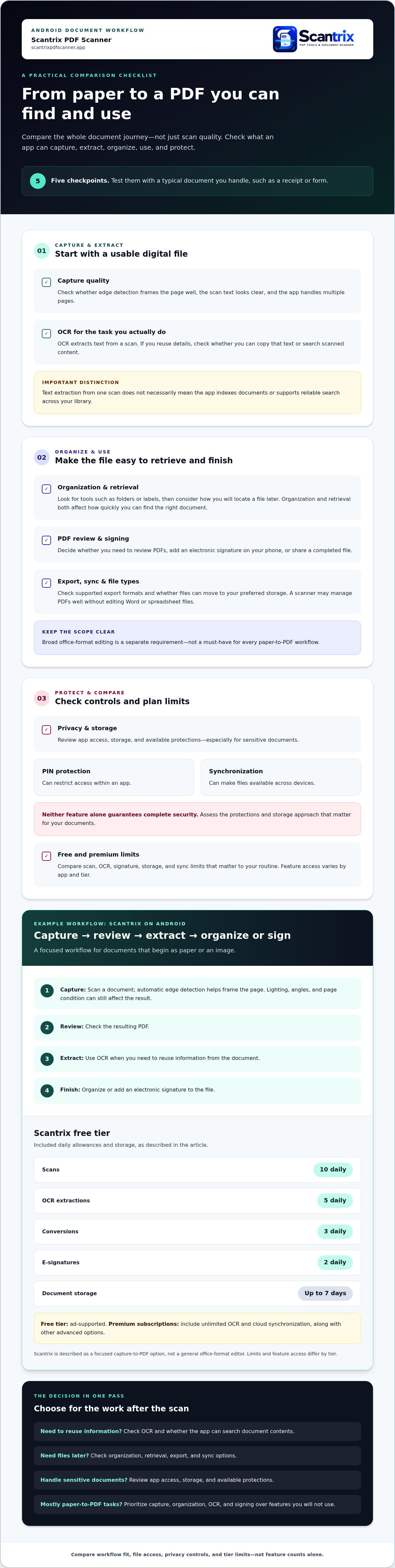
Compare the full workflow, not a feature count. Use a typical document you handle, such as a receipt or form, to assess these points:
- Capture: Check whether edge detection frames the page well, whether text looks clear in the resulting scan, and how the app handles multiple pages.
- OCR: Look for text extraction if you need to copy details or search scanned content.
- Organization: Assess the tools available for keeping files findable, such as folders or labels.
- Signing: Decide whether you need to add an electronic signature on your phone.
- Privacy: Review app access, storage, and available document protections, especially for sensitive files.
- Export or sync: Check supported file formats and whether files can move to your preferred storage.
How should you weigh OCR, organization, and privacy?
Match OCR to the task. If you regularly reuse information, the ability to copy text from scanned documents can reduce manual entry. But extracted text isn't the same as reliable library-wide retrieval. Check whether the app can index documents and search their contents, rather than only producing text from an individual scan.
PIN protection and backup solve different problems. A PIN can restrict access within an app; synchronization can make files available across devices. Neither feature alone guarantees complete security. The U.S. National Archives and Records Administration’s Managing Records in Mobile Environments outlines mobile records risks worth considering. For another layer of PDF protection, see guidance on locking PDF files on Android.
Free and premium tiers vary. Before choosing the best document management app android users can rely on, compare the scan, OCR, signature, storage, and sync limits that matter for your routine. Don’t assume paid features are the same across apps. If a capture-to-PDF workflow is your priority, explore Scantrix PDF scanning as one option.
Where Scantrix Fits in an Android Document Workflow
Scantrix is an Android app for workflows that begin with paper or an image. It captures documents, converts and organizes PDFs, extracts text with OCR, and supports electronic signatures. Automatic edge detection helps frame a page during capture, though lighting, angles, and page condition can still affect the result. PIN protection adds an access control within the app.
What does capture-to-PDF look like in practice?
Capture a paper form, review the resulting PDF, extract text if you need to reuse information, then organize or sign the file. This sequence connects digitization to useful next steps without requiring broad editing across office formats. Learn more about Scantrix PDF Scanner for Android. For capture tips, look for the auto edge detection guide.
The free tier includes 10 daily scans, 5 OCR extractions, 3 conversions, and 2 e-signatures, with ad support and document storage for up to 7 days. Premium subscriptions include unlimited OCR and cloud synchronization, along with other advanced options. Limits and feature access differ by tier. Scantrix is a focused fit for capture-to-PDF tasks, not a general office-format editor. That distinction can help narrow the best document management app android choice to the work you actually need.
Choose a Workflow That Works from Capture to Retrieval
A useful Android document app should do more than create PDFs. Compare how well each option helps you capture, organize, find, and use files, then weigh its privacy controls and free or premium limits against your needs. That’s a practical way to choose the best document management app android users can fit into daily work.
For a workflow that starts with paper, Scantrix combines document capture, PDF organization, OCR, and electronic signatures. Automatic edge detection supports page capture, while PIN-protected privacy adds an access control. Choose tools that solve your real tasks, not the ones with the longest feature list.
Ready to see how Scantrix could fit your document routine? Contact Scantrix about your document workflow.
Frequently Asked Questions
What is the best document management app for Android?
The best document management app android users choose depends on their needs for capture, OCR, file organization, signing, privacy, and synchronization. Scanner-first apps focus on turning paper into usable PDFs, while office suites handle broader document formats and editing. Scantrix is an option for Android users who want a capture-to-PDF workflow, but there’s no universal winner for every routine.
Can I manage and organize PDFs on my Android phone?
Yes. Android apps can help you capture documents, convert them into PDFs, and organize the resulting files. Compare how each app supports retrieval and export, along with the privacy controls it provides. Scantrix supports PDF organization and PIN-protected privacy. Choose storage, backup, and security tools that fit the way you manage your files.
Does a document management app need OCR?
OCR is useful if you need to reuse or search text in image-based scans. It converts text in an image into machine-readable content, which can help with tasks such as copying details from a form. Recognition isn’t guaranteed to be perfect, especially if a scan is unclear. Scantrix offers OCR, and unlimited OCR is a premium subscription feature.
Are document management apps for Android free?
Some apps are free, while others offer free tiers with limits or charge for advanced features. Those limits and plans can change, so compare the terms and features that matter to your workflow. Scantrix is a free Android app, with premium subscriptions that include options such as unlimited OCR and cloud synchronization.


