
Discover the top-rated Android scanning tools that deliver desktop-quality PDFs, secure OCR, and seamless electronic signatures in seconds.
Beyond Photos: What Defines the Best PDF Scanner for Android in 2026?
Your phone's camera takes pictures. A professional PDF scanner creates legally viable digital assets. In 2026, the distinction is critical. The best PDF scanner for Android moves beyond simple image capture, offering a suite of tools designed for professional document management. It’s not about taking a photo; it’s about creating a perfect digital copy.
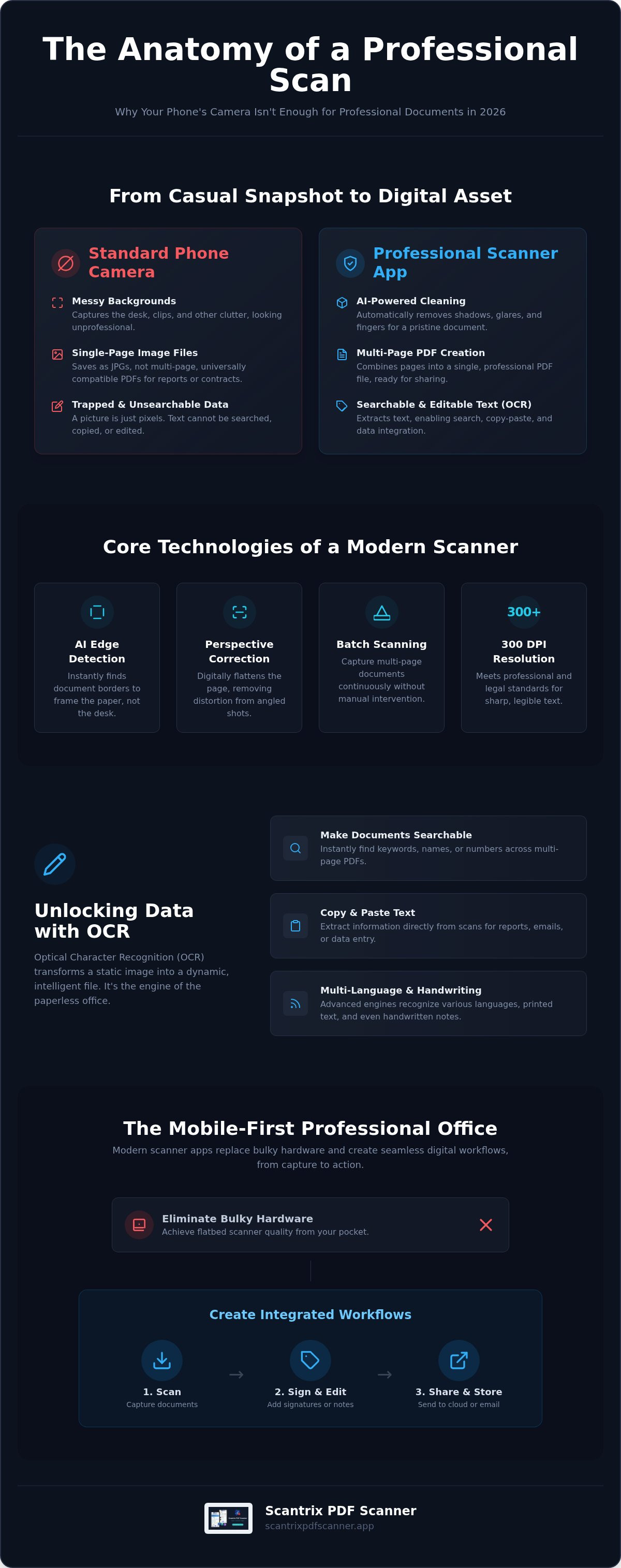
This process relies on technology that corrects, cleans, and standardizes your documents for professional use. It transforms a casual snapshot into a high-fidelity digital file.
- Perspective Correction vs. Photography: A photo captures a scene from an angle. A true scan digitally flattens the document, removing trapezoidal distortion to create a perfect, top-down view.
- Professional Standards: Business and legal documents require a minimum of 300 DPI (dots per inch) resolution. This ensures text is sharp and legible for printing, archiving, and official submission.
- AI-Powered Cleaning: Modern scanners use artificial intelligence to automatically remove shadows from overhead lighting, glares from glossy paper, and even the occasional finger captured in the frame. The result is a clean, distraction-free document.
- Intelligent Management: The best apps don't just capture images; they help you manage them. Features like automatic naming, custom folders, and batch processing turn your phone into an efficient digital filing cabinet.
Why Your Phone's Default Camera Isn't Enough
Using your standard camera app for documents creates more problems than it solves. It lacks the specialized technology needed for professional digitization. You get a picture of a document, not a digitized document itself.
- Messy Backgrounds: Without automatic edge detection, your scans include the desk, clips, and other background clutter, looking unprofessional.
- Limited to Single Pages: Standard camera apps save images as JPGs or other photo formats. They cannot natively create the multi-page, universally compatible PDFs required for contracts, reports, and applications.
- Trapped Data: A photo is just pixels. It contains no searchable or editable text. Without Optical Character Recognition (OCR), you cannot copy text, search for keywords, or integrate the data into other workflows.
The Rise of the Mobile-First Professional Office
Modern productivity demands tools that work anywhere. Mobile scanning apps have replaced bulky desktop hardware, providing powerful digitization tools directly in your pocket. This shift is powered by integrated workflows that connect capture to action. A professional PDF scan is a legally viable digital asset, treated with the same validity as a physical original in many contexts.
- Hardware Replacement: A high-quality scanner app provides results that are indistinguishable from a traditional flatbed scanner, eliminating the need for expensive, single-purpose office equipment.
- Integrated Workflows: The ability to scan directly to cloud storage (Scan-to-Cloud) or immediately add a signature (Scan-to-Sign) is no longer a luxury. It is a fundamental requirement for modern business efficiency.
Essential Features: OCR, AI Edge Detection, and Smart Cropping
The best Android PDF scanners are defined by their intelligent features. These tools automate the tedious parts of digitization, ensuring every scan is perfect with minimal effort. They turn your phone into a smart device that understands the content it's capturing.
- Automatic Edge Detection: Scantrix instantly identifies the borders of your document against any background. The app frames the paper, not the desk, for a clean, professional crop every time.
- OCR (Optical Character Recognition): This is the technology that turns a static image of a document into a fully searchable and editable file. Extract text, search for specific terms, and copy-paste information in seconds.
- Batch Scanning: Digitize entire multi-page reports, contracts, or book chapters without pressing the shutter button for each page. Simply hold your phone steady as the app captures page after page automatically.
- Image Enhancement Filters: One-tap filters optimize your scan for maximum clarity. Use grayscale for crisp text, whiteboard mode to capture presentations, and color optimization to preserve the detail of original documents.
Unlocking Data with High-Accuracy OCR
OCR is the engine of a paperless office. It makes your digital documents as useful as they are clear. High-accuracy OCR ensures that the extracted text is reliable and ready for immediate use in reports, emails, or data entry systems.
- Practical Application: Scan a stack of receipts and convert them directly into a text file for your expense report. No manual typing required.
- Multi-Language Support: Business is global. A modern OCR engine must recognize and accurately extract text from a wide variety of languages and character sets.
- Handwriting and Print: Advanced OCR, like that in Scantrix, can even interpret and extract handwritten notes alongside standard printed text, capturing all the information on a page.
Precision Cropping and Perspective Correction
A distorted, poorly cropped scan looks unprofessional and can be difficult to read. The best apps use smart technology to fix these issues automatically, delivering a perfect scan even from an imperfect angle.
- Eliminate Distortion: Perspective correction analyzes the corners of your document and digitally squares them, removing the "trapezoid" effect that occurs when you scan from an angle.
- Remove Clutter: Smart cropping isolates the document from its surroundings, ensuring only the page itself is included in the final PDF.
- Enhance Readability: Professional black-and-white filters increase the contrast between text and background, making documents easier to read and reducing file size for faster sharing.
Top Android Scanner Comparison: Scantrix vs. Built-in Solutions
While free, built-in tools like the Google Drive scanner offer basic functionality, they lack the power, privacy, and professional features of a dedicated app. For anyone who values speed and quality, a specialized tool is essential.
- Speed and Editing: Dedicated apps like Scantrix are built for a single purpose: fast, high-quality scanning. They offer advanced editing tools, batch processing, and a streamlined interface that basic utilities cannot match.
- The 'No Watermark' Advantage: Sending a client a contract or invoice with a "Scanned with..." watermark undermines your professional credibility. Scantrix provides clean, unbranded output.
- Privacy and Storage: Many free tools automatically sync your scans to the cloud, which can be a privacy risk for sensitive documents. Scantrix offers local-first storage and a PIN-protected vault for complete control over your data.
- Workflow Efficiency: How many taps does it take to scan a document, add your signature, and share it? With Scantrix, the entire scan-to-sign workflow is integrated into a few simple steps.
Why Professional Apps Outperform System Tools
System tools are designed for occasional, simple tasks. Professional apps are built for workflows. They offer a suite of integrated features that handle complex document management with ease.
- Document Organization: Professional apps allow for advanced multi-page document management, including reordering, merging, and splitting PDFs. Basic tools often just upload single, unorganized files.
- Integrated E-Signatures: The ability to apply a legally binding electronic signature directly after scanning is a game-changer for contracts and agreements. This feature is absent in most system tools.
- Specialized Modes: Dedicated apps often include modes specifically designed for scanning business cards, IDs, or whiteboards, automatically formatting them for optimal use.
Evaluating Cost vs. Value in 2026
When choosing an app, it's important to look beyond the price tag and evaluate the total value. A "free" app may come with hidden costs like data privacy risks or frustrating limitations.
- Freemium Models: A good freemium app offers all essential scanning features for free, without watermarks. Premium features like unlimited OCR or advanced security should be offered as an optional upgrade.
- Streamlined Pricing: Scantrix offers a clear, straightforward pricing model, avoiding the bloated and confusing subscription tiers of legacy software providers. You only pay for the professional tools you need.
- The Cost of 'Free': Be cautious of free apps with no clear business model. They may be monetizing through intrusive ads or, in some cases, by selling user data.
How to Optimize Your Mobile Scanning Workflow
Getting a perfect scan is about more than just pointing and shooting. Following a simple, repeatable workflow ensures every document you digitize is clean, organized, and secure.
- Position and Light: Place your document on a flat, contrasting surface. Ensure the area is well-lit, preferably with indirect light, to avoid shadows and glares.
- Capture and Enhance: Use your app's automatic capture to get a steady shot. Apply an enhancement filter, like black-and-white or grayscale, to maximize text legibility.
- Extract Data with OCR: Run OCR on the document to make its text searchable and editable. This is a crucial step for archiving and future reference.
- Apply E-Signatures: If the document requires a signature, apply it directly within the app. This completes the workflow without needing to export, print, or use another tool.
- Secure and Organize: Save the final PDF in a designated folder with a clear naming convention. For sensitive files, move them into a PIN-protected vault for an extra layer of security.
Scanning for Taxes and Legal Compliance
When digitizing documents for official purposes, precision is non-negotiable. Following best practices ensures your digital files are compliant and easy to manage.
- Organize Receipts: When scanning receipts for taxes, use batch mode to group them by month or expense category. Name the final PDFs accordingly (e.g., "Receipts_Oct2026.pdf").
- Meet Legal Standards: Ensure your scanner app is set to produce scans at 300 DPI. This is the widely accepted standard for documents submitted to banks, courts, and government agencies.
- Use Smart Naming: Adopt a consistent naming convention (e.g., "ClientName_Contract_Date.pdf") to create a searchable, paperless office where any file can be found in seconds.
Scantrix PDF Scanner: The Professional Standard for Android
Scantrix is engineered for the modern professional. It's a lightweight, powerful, and secure tool that transforms your Android device into a complete mobile office. It delivers high-performance results without the bloat of legacy software.
- Lightweight Performance: Scantrix is designed to be fast and responsive, even on mid-range Android devices. It launches quickly and processes scans instantly.
- Security-First Design: Your privacy is paramount. Keep sensitive medical records, legal contracts, and financial documents safe in a local, PIN-protected vault.
- The E-Signature Advantage: Scan, sign, and send. Scantrix integrates electronic signatures directly into the scanning workflow, saving you critical time.
- Seamless Organization: Use custom folders, smart naming, and powerful search to build and manage your paperless life with ease.
Privacy You Can Trust
For sensitive documents, privacy is not optional. Scantrix is built on a foundation of security, giving you full control over your most important information.
- PIN-Protected Vault: This feature is non-negotiable for medical, legal, or financial files. It provides an essential layer of security against unauthorized access on your device.
- Local-First Storage: Scantrix prioritizes on-device storage, meaning your documents are not automatically uploaded to a cloud server without your explicit consent.
- Avoid Data Risks: By keeping your documents secure on your device, you avoid the risks associated with cloud-only services that can be targets for data breaches.
Get Started with Scantrix Today
Ready to go paperless? Setting up your professional scanning environment takes only a minute. Download the app, explore the powerful features, and take control of your document workflow.
Download Scantrix PDF Scanner on Google Play
Frequently Asked Questions (FAQ)
What is the best free PDF scanner app for Android without watermarks?
Scantrix is a top choice, offering high-resolution scanning, edge detection, and PDF creation in its free version without imposing watermarks, ensuring your documents always look professional.
How do I extract text from a scanned document on Android?
You can extract text using an app with Optical Character Recognition (OCR). In Scantrix, simply scan a document and select the OCR option. The app will process the image and provide you with editable, searchable text.
Is it safe to scan sensitive legal documents with a mobile app?
Yes, provided you use a secure app. Choose an app like Scantrix that offers a PIN-protected vault and local-first storage. This keeps your documents encrypted and stored on your device, not on a vulnerable cloud server.
Can I sign a PDF document directly on my Android phone?
Absolutely. Apps like Scantrix have integrated e-signature tools. After scanning a document, you can create and apply your signature directly within the app before saving or sharing the final PDF.
How do I scan multiple pages into a single PDF file?
Use the batch scanning or multi-page mode feature. In Scantrix, you can activate this mode to capture several pages in a row. The app will then compile all the scans into one organized, multi-page PDF document.
What is the difference between OCR and a standard scan?
A standard scan creates an image of a document (like a photograph). An OCR scan analyzes that image, recognizes the characters, and converts them into machine-readable text. This makes the document's content searchable, editable, and easy to copy.
Do I need a high-end camera to get professional quality scans?
No. While a decent camera helps, the software is more important. A powerful scanner app uses AI-driven perspective correction, edge detection, and image enhancement filters to produce a high-quality, 300 DPI scan even with a standard smartphone camera.
How can I password protect my scanned PDFs on Android?
Many dedicated scanner apps, including Scantrix, allow you to secure your documents. You can either save individual PDFs with password protection or store them in the app's secure, PIN-protected vault for an added layer of security on your device.


