

Your smartphone is not just a camera. It's a high-performance document architect. While 62% of mobile scanner users operate on the Android ecosystem, most still settle for blurry images and distorted crops. It's time to stop treating document capture like a casual snapshot. Learning how to scan to pdf android requires a systematic approach that prioritizes technical precision. Professional results demand more than a simple click.
We understand the frustration of manual cropping and unreadable text. File size issues often stall your workflow. You need a reliable method to transform physical clutter into organized digital assets. This article promises to turn your device into a silent, high-speed assistant. We provide a professional, no-nonsense workflow that guarantees crisp output every time.
We'll explore the essential steps for perfect edge detection and searchable text extraction. You'll learn to secure sensitive documents with PIN protection and integrate e-signatures seamlessly. Expect a direct guide to faster sharing and smarter storage. Your transition to a paperless office starts here.
Key Takeaways
- Transform physical paper into professional digital assets. Master the technical workflow to scan to pdf android with high-resolution clarity.
- Optimize capture conditions. Use contrasting surfaces and smart edge detection to eliminate manual cropping frustration.
- Unlock document intelligence. Use OCR to convert static images into searchable, editable text for instant data extraction.
- Protect sensitive information. Implement PIN-protected privacy and categorized folders to secure your digital archive.
- Streamline your productivity. Leverage Android-optimized tools to scan, sign, and share documents in one frictionless motion.
What is Mobile PDF Scanning on Android?
Mobile scanning is digital transformation. It converts physical paper into high-resolution digital assets. Your phone becomes a professional tool. This workflow replaces bulky hardware with agile mobile solutions. Android devices leverage sophisticated camera hardware. They combine this with intelligent software processing. The result is a refined document. It's a crisp, searchable, and shareable file created in seconds. When you scan to pdf android, you aren't just taking a picture; you're creating a data-rich file ready for professional distribution.
Modern mobile scanning prioritizes clarity and speed. It eliminates the need for desktop scanners. You capture the document. The software processes the image. You save the result. This linear progression ensures maximum productivity. It's an essential skill for the modern professional. You can manage contracts, receipts, and identification documents from anywhere. The goal is a seamless transition from physical clutter to digital organization.
Camera Photo vs. Professional PDF Scan
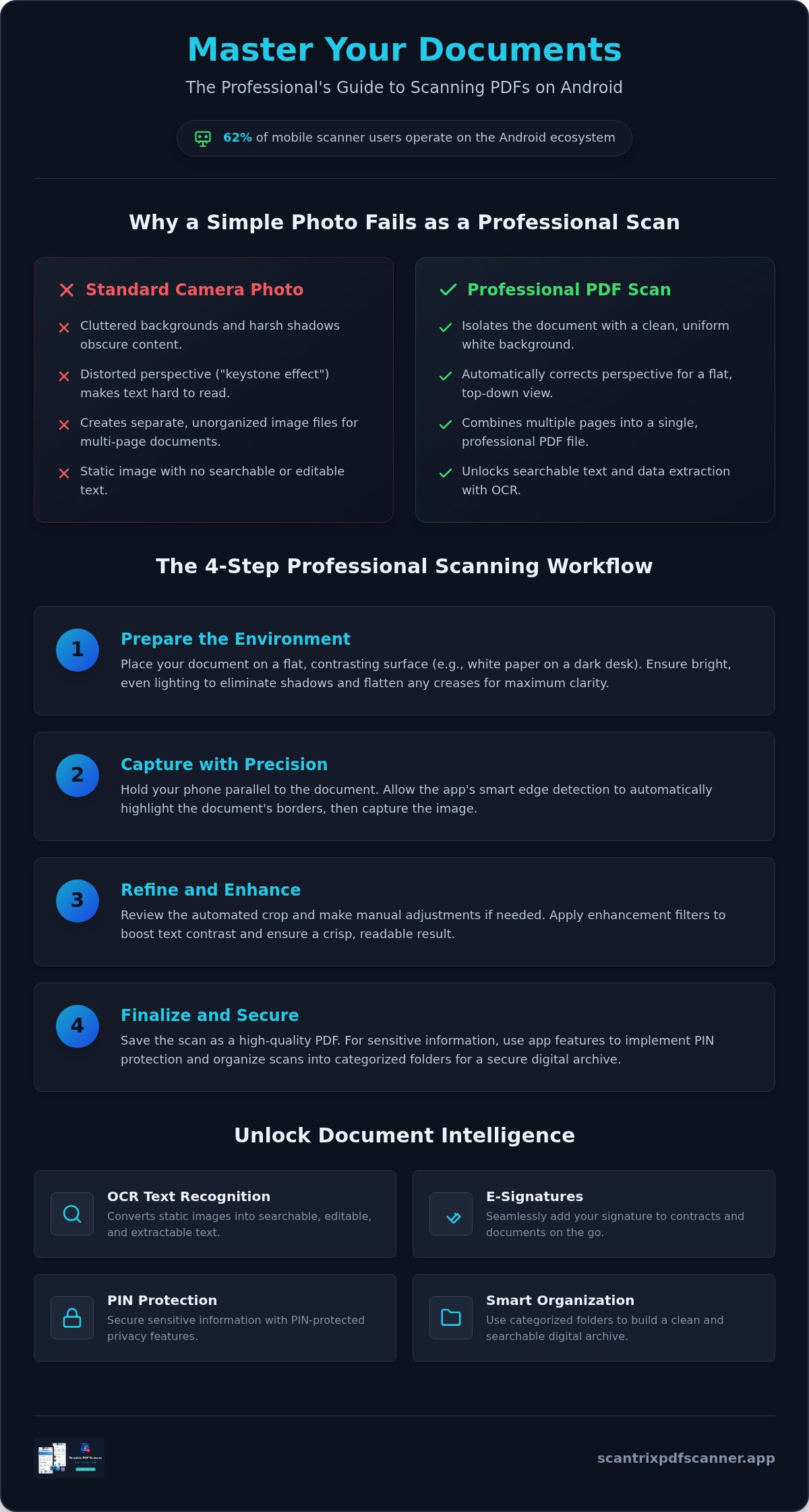
A standard photo captures everything. It includes shadows, background clutter, and uneven lighting. These images look unprofessional. They lack utility. Professional PDF scans isolate the document. They strip away the noise. Photos are static; scans are dynamic. A photo of a contract is just an image of text. A professional scan is a structured document. It uses perspective correction to flatten the image. This removes the "keystone" effect where the document looks skewed. It creates a flat, top-down view. This is essential for readability.
Multi-page support is the backbone of business communication. You can scan an entire five-page contract into one PDF. Standard photos leave you with five separate files. This creates friction during sharing. PDF scans also maintain standard A4 or Letter dimensions automatically. They fit into professional workflows perfectly. Your documents look uniform. They feel professional. They are ready for any corporate environment.
The Role of Intelligent Software
Software is the engine of mobile scanning. Smart algorithms detect document boundaries instantly. They calculate perspective. They correct distortion. Early tools like CamScanner pioneered this transition from simple photography to document management. Today, the technology is more advanced. Automated filters remove glares. They enhance text contrast. They turn grey backgrounds white and make black text pop. This level of processing ensures your scan to pdf android workflow remains frictionless.
Intelligent software acts as a digital architect. It doesn't just see pixels; it sees edges and contrast. The Scantrix PDF Scanner utilizes smart edge detection for perfect alignment every time. It finds the corners of your paper against a desk and crops the background out automatically. This saves time. This on-device processing protects your privacy. It happens instantly. The software does the heavy lifting. You get the result. It's a high-performance solution for high-performance users.
Step-by-Step: How to Scan to PDF on Android
Efficiency starts with the right environment. Open your professional scanning app. Position the document on a flat, contrasting surface. A dark desk works best for white paper. This contrast allows the software to distinguish edges instantly. Align your camera. Wait for the smart edge detection to highlight the borders. The system identifies the document boundaries before you even click. Capture the image. Review the automated crop. If the alignment is perfect, proceed to the enhancement stage. Save the final file as a PDF. Export it to your secure storage. This scan to pdf android workflow ensures speed without sacrificing quality. It's a direct path from paper to pixel.
Preparation for High-Quality Captures
Technical precision begins before the capture. Bright, even lighting is mandatory. Avoid harsh single-point lamps that create deep shadows. Position yourself so your phone doesn't block the light source. Natural daylight is often the most effective tool for clarity. Flatten the paper completely. Creases cause text distortion and unreadable sections. If the paper was folded, press it flat or use small weights at the corners. Hold the phone parallel to the document. A 90-degree angle ensures the most accurate perspective. This minimizes the work required by the perspective correction algorithms. High-quality input leads to high-performance output. For a reliable experience, download the Scantrix PDF Scanner to start your first capture.
Fine-Tuning Your Scan
Automated tools are powerful but sometimes require human oversight. Use manual crop adjustments if the auto-detection missed a corner. Drag the handles to the exact edge of the paper. Precision here prevents background clutter from entering your final PDF. Apply filters to maximize readability. The "magic" filter typically increases contrast and removes grey background noise. It makes text pop. Grayscale is ideal for text-heavy contracts. It reduces file size while maintaining professional clarity. You can also add multiple pages to a single document. Scan the first page. Tap the "add" icon. Repeat the process for every sheet. This builds a comprehensive multi-page PDF in one session. Your digital archive remains organized, professional, and easy to navigate.
Advanced Features: OCR and E-Signatures
Scan. Transform. Execute. Modern scanning goes beyond image capture. It involves document intelligence. Your Android device becomes a data processor. Advanced features turn static pixels into actionable text. This systematic approach saves time. It reduces errors. When you scan to pdf android, you leverage tools that bypass the need for desktop software. OCR and e-signatures are the pillars of this professional workflow. They bridge the gap between physical paper and digital productivity. You don't just store documents; you make them work for you.
Unlocking Text with OCR Extraction
OCR is a technical breakthrough. It identifies characters within your scan. Run the extraction tool. The system analyzes the document. It creates a searchable text layer. You can now extract data from receipts or contracts instantly. Manual typing is obsolete. Copy text to your clipboard. Paste it into your CRM or email. This technology handles printed and even clear handwritten characters with precision. Search your PDFs for specific dates or keywords. Information is now at your fingertips. Efficiency is the result.
Signing Documents on the Go
Contracts don't wait for office hours. E-signatures provide instant execution. Create a digital signature once. Reuse it across all your files. Open your scanned document. Place the signature precisely on the line. The integrated e-signature tool ensures a professional finish. It meets business standards for paperwork. You sign in the field. You send in seconds. This eliminates the "print-sign-scan" cycle. It's a direct path to completion. Your workflow remains mobile. Your results remain professional. You maintain a high-performance output without being tethered to a desk.
The Edit-to-Scan Workflow
Refinement is part of the process. Most competitors require a complex subscription for basic editing. The Scantrix PDF Scanner offers a zero-friction workflow. Edit before you export. Adjust the contrast. Crop the edges. Reorder the pages for a logical flow. Annotate important clauses. This "Edit-to-Scan" method ensures high-quality output every time. You control the final result. The interface is minimalist. The tools are high-performance. You transform physical clutter into organized digital assets without leaving the app. It's a silent assistant for your daily productivity. When you scan to pdf android with professional tools, you ensure every file is ready for corporate distribution.
Organizing and Securing Your Digital Documents
Capture is the first step. Organization is the final goal. A disorganized digital drive is as inefficient as a cluttered physical desk. You need a systematic structure. Create custom folders immediately. Categorize documents by function. Receipts. Identification. Legal contracts. Systematic renaming is mandatory for professional workflows. Use a consistent format like YYYY-MM-DD followed by the project name. This allows for chronological sorting and instant retrieval. When you scan to pdf android, you aren't just creating a file; you're building a searchable archive. Structure creates speed.
Cloud integration is a critical component of modern management. Research indicates that 50% of scanning apps now offer seamless cloud functionality. Sync your files. Access your data across all Android devices. This ensures redundancy. If your hardware fails, your documents remain safe. Offload completed projects to external storage. Keep your local device storage clean and responsive. High-performance users don't hunt for files. They navigate a structured digital architecture designed for rapid access.
The Importance of PIN Protection
Data privacy is a primary concern for mobile users. Verified research shows that 41% of individuals worry about how their scanned data is handled. Your scanned IDs, tax returns, and medical records are high-value targets. Don't leave them exposed in your general photo gallery. Scantrix provides PIN-protected privacy as a core feature. Enable biometric or PIN locks within the app interface. This creates a secure vault for your most sensitive assets. Encrypt your files before sharing them via email or messaging platforms. While competitors often hide security behind expensive subscriptions, professional tools prioritize your protection. You control the access. You own the data. Ready to secure your workflow? Download Scantrix for PIN-protected scanning and protect your digital identity.
Efficient File Management
Speed requires intelligent processing. Batch process multiple scans to save time. Group related pages into a single, cohesive PDF. Use digital tags to find documents across different folders. A "2026 Taxes" tag can link receipts stored in various project subfolders. This creates a multi-dimensional filing system. It bypasses the limitations of traditional folder hierarchies. Use the integrated editing tools mentioned previously to refine your documents before final categorization. This ensures only high-quality, readable files enter your archive. Maintain a clean workspace. Delete blurred or duplicate captures instantly. A lean digital environment is a fast digital environment. Your scan to pdf android routine should conclude with a refined, organized, and secured result every time.
Scantrix: The Ultimate Professional Android Scanner
Precision meets productivity. Scantrix is the definitive tool for the modern professional. It is optimized specifically for Android hardware. Most generic apps fail to utilize the full potential of your device's camera. Scantrix does not. It transforms your smartphone into a high-performance digital architect. The interface is minimalist. The results are high-impact. When you need to scan to pdf android, you require a tool that respects your time. Scantrix delivers technical sophistication without unnecessary friction. It is a silent assistant for your daily workflow.
Experience a zero-friction environment. Scan. Edit. Sign. Secure. You complete these tasks within a single application. There is no need to jump between platforms. This systematic approach ensures logical organization. It mirrors the efficiency of high-level software development. The app moves instantly from user need to technical resolution. You achieve professional-grade output every time. This reliability is the hallmark of a premium productivity tool.
Why Professionals Choose Scantrix
- Superior Edge Detection: Smart algorithms identify boundaries instantly. This reduces manual editing time. You get a perfect crop on the first attempt.
- Accurate OCR: Extract data with confidence. Our character recognition minimizes data entry errors. It handles complex layouts with ease.
- Robust Security: Sensitive data remains on your device. We prioritize on-device processing. This enhances user privacy and ensures offline functionality.
- Optimized Performance: Scantrix is built for the 62% of users on the Android ecosystem. It leverages specific OS capabilities for faster processing.
Get Started with Scantrix
Immediate action leads to immediate results. Download Scantrix from the Google Play Store. It is a free app with no subscription fees as of May 22, 2026. This allows you to integrate professional scanning into your workflow without financial friction. Start your first capture today. Position your document. Let the smart edge detection work. Save your first PDF. You will see the difference in clarity and speed. Your smartphone is now a powerful document management system.
The transition from physical clutter to digital organization is effortless. You don't just scan to pdf android; you master the art of mobile scanning. Scantrix provides the framework. You provide the documents. Together, they create a streamlined, paperless office. Join the 52% of enterprises adopting digital workflows. Use a tool designed for the expert who values performance above all else. Your productivity deserves a professional-grade assistant.
Accelerate Your Digital Transformation
Physical paper is a bottleneck. Digital organization is the solution. You now possess the professional workflow to scan to pdf android with technical precision. Automated edge detection eliminates manual cropping frustration. High-accuracy OCR turns static images into actionable data. These tools transform your device into a silent productivity assistant that respects your time.
Security is no longer a luxury. It's a professional requirement. Use PIN protection to shield sensitive IDs and contracts from unauthorized access. Your digital archive is now structured, searchable, and secure. This systematic approach ensures you stay ahead in a fast-paced corporate environment. Efficiency is the result of the right tools meeting the right habits.
Scantrix offers the ultimate performance for Android power users. It combines Smart Edge Detection, Secure PIN Protection, and High-Accuracy OCR within a single, minimalist interface. Turn your phone into a professional scanner with Scantrix and optimize your digital output today. You're ready to lead a more organized and efficient professional life.
Frequently Asked Questions
Is it free to scan to PDF on Android?
Yes, it is free. Basic scanning is available through built-in OS tools or free professional applications. Scantrix provides a full suite of features without subscription fees as of May 2026. This allows you to scan to pdf android without financial barriers. Professional results are now accessible to every mobile user.
How do I make a PDF from my phone camera photos?
Open your scanner app and select the import option. Choose the specific photo from your Android gallery. The software applies perspective correction and contrast filters instantly. Save the result as a PDF file. This process transforms a standard camera image into a professional, high-resolution document ready for distribution.
Can I scan multiple pages into one PDF on Android?
Yes. Professional apps offer a batch or multi-page mode for this purpose. Capture the first page. Tap the plus icon to add more. Continue scanning until your document is complete. The software merges all captures into a single, organized PDF file. It's an efficient way to manage long contracts or reports.
Is mobile scanning as good as a desktop scanner?
Mobile scanning matches desktop quality for most business needs. High-resolution cameras combined with intelligent algorithms remove shadows and glares. With 78% smartphone penetration, mobile tools are the new industry standard. They provide a level of speed and portability that traditional hardware scanners cannot match.
How can I sign a scanned PDF on my phone?
Use an integrated e-signature tool within your scanning app. Open your scanned file and select the signature option. Create your signature once or use a saved version. Place it precisely on the signature line. Save and export the final document. This creates a legally ready file in seconds without printing.
How do I password protect a PDF on Android?
Enable PIN-protected privacy within your professional scanning app. This creates a secure vault for sensitive documents like IDs or tax forms. Some apps also offer biometric locks for added security. This ensures your data remains on your device and inaccessible to unauthorized users. Secure storage is a priority for digital workflows.
What is the best app for scanning documents on Android?
Scantrix is the ultimate choice for Android power users. It is optimized specifically for the 62% of the market using Android hardware. It offers smart edge detection and OCR without the complexity of cloud-heavy competitors. It acts as a silent, high-performance assistant for your daily productivity needs.
How do I extract text from a scanned document?
Use OCR Text Extraction. This technology analyzes the pixels in your scan to identify printed characters. Recent AI improvements have increased OCR accuracy by 45% in mobile apps. Run the tool on your document. Copy the identified text to your clipboard. You can now paste the data into emails or spreadsheets instantly.


