

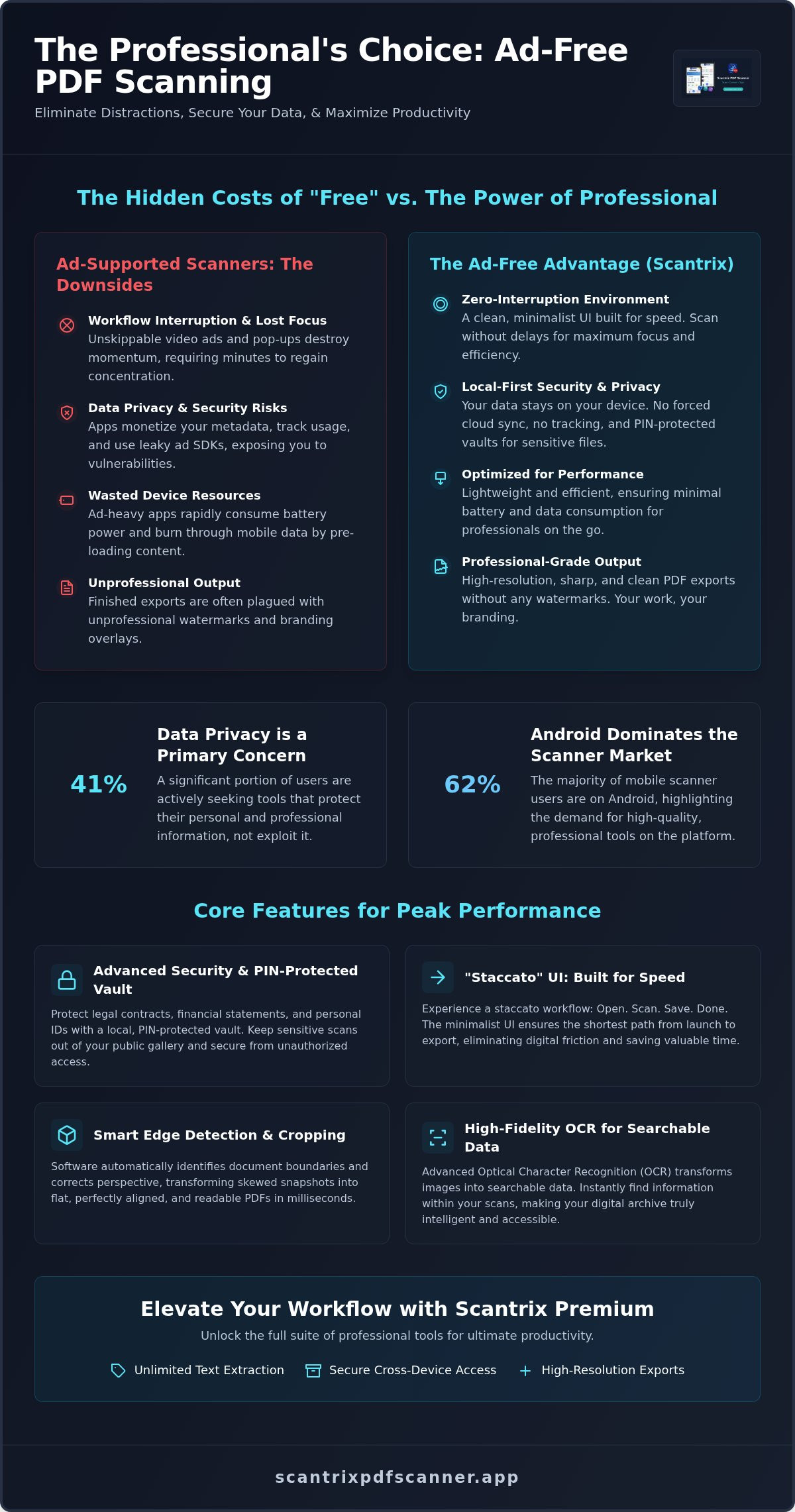
A pop-up ad during a critical document scan isn't just a nuisance. It's a total failure of professional software. In a market where 41% of users now cite data privacy as their primary concern, your tools shouldn't be gateways for trackers. You need an ad free pdf scanner android that respects your time. No interruptions. No delays. Just high-performance digitisation.
You want a tool that acts as a silent, efficient assistant. You're likely tired of bloated interfaces, forced cloud syncing, and unprofessional watermarks on your finished exports. Professional-grade output requires a different approach. This guide shows you how to eliminate digital friction and secure your documents with local PIN protection. We'll explore the shift toward minimalist scanners like Scantrix, focusing on smart edge detection and accurate OCR that keeps your workflow moving at the speed of business.
Key Takeaways
- Eliminate cognitive friction. Professional scanning requires a zero-interruption environment for maximum focus.
- Adopt the leading ad free pdf scanner android for 2026. Streamline your workflow with a minimalist UI built for speed.
- Secure sensitive documents with a PIN-protected vault. Protect legal and financial scans from unauthorised access and public gallery exposure.
- Transform images into searchable data. Use advanced OCR and smart edge detection for high-fidelity digital conversions.
- Optimize your professional output. Leverage Scantrix Premium for unlimited text extraction and secure cross-device access.
The Hidden Cost of Ad-Supported PDF Scanners
Ads destroy momentum. You open an app to scan a contract. A 30-second video starts. Your focus vanishes. This is the reality of most "free" utilities. They prioritize ad impressions over your results. A professional ad free pdf scanner android eliminates this friction. It treats your time as a finite resource. It provides a direct path from physical paper to digital file. No interruptions. No waiting.
Intrusive pop-ups do more than annoy. They create risk. Accidental clicks on malicious banners can lead to phishing sites or unwanted downloads. In a high-stakes environment, these errors are costly. True productivity requires a silent assistant. It needs a tool that disappears until it's needed. Most "free" apps fail this test. They demand your attention. They sell your focus. Professional environments require tools that prioritize output over ad revenue.
Workflow Interruption and Productivity Loss
Seconds matter in business. Unskippable video ads are more than a delay; they're a productivity drain. Every interruption requires a cognitive reset. Research suggests it takes minutes to regain deep focus after a distraction. Cluttered interfaces force you to hunt for buttons. This leads to errors. A streamlined ad free pdf scanner android avoids this bloat. It offers a staccato workflow. Open. Scan. Save. Done. With Android users accounting for 62% of the mobile scanner market share, the demand for efficient, professional tools has never been higher.
Technical costs are significant. Ad-heavy apps consume battery power rapidly. They burn through mobile data by pre-loading video content in the background. For a professional in the field, these inefficiencies are unacceptable. You can't afford a dead battery during a client meeting. You can't waste data on ads you didn't ask to see. Clean tools lead to clean results. Efficiency is the only metric that matters.
Data Privacy Risks in Ad-Supported Ecosystems
"Free" is never free. Most ad-supported scanners monetize your metadata. They track your location, device ID, and usage patterns. They share this data with global ad networks. Third-party ad SDKs often require "leaky" permissions. These access points can expose your device to unnecessary vulnerabilities. Security isn't an optional feature. It's the foundation of professional work. Your tools should protect your data, not broadcast it.
Sensitive documents require isolation. Legal contracts, financial statements, and personal IDs shouldn't exist in an environment designed for tracking. You need a secure, local-first solution. High-quality tools often use Optical Character Recognition (OCR) to process text locally. This keeps your data out of the cloud and away from ad networks. Data privacy concerns affect 41% of users today according to recent market analysis. Don't let your scanner be the weak link in your security chain. Choose tools that prioritize your privacy over their profit.
Scantrix: A Minimalist Approach to Android Scanning
Scantrix is a high-performance Android utility. It's built for rapid document digitization. Most apps hide the scan button under complex menus. Scantrix puts it front and center. It utilizes a "Staccato" UI. This ensures short paths from camera launch to PDF export. No diversions. No splash screens. It's the professional ad free pdf scanner android for users who demand speed. Every tap produces a result. Every second counts toward your bottom line.
Reliability is a silent feature. Scantrix doesn't demand your email address before you scan. It doesn't ask for social media permissions. This minimalist approach isn't just about speed. It's about data integrity. By limiting unnecessary access, it follows FTC best practices for app security. Choosing an ad free pdf scanner android shouldn't mean sacrificing features. You get professional-grade output. This means high-resolution scans without forced watermarks. Your documents look sharp. They remain yours. No branding overlays. No hidden trackers. Just pure digital results.
Automatic Edge Detection and Smart Cropping
Precision is non-negotiable. Scantrix identifies document boundaries in milliseconds. It finds page edges against any background. Perspective correction is automatic. It transforms skewed snapshots into flat, readable PDFs. Smart edge detection is a productivity multiplier that removes the friction of manual cropping. It lets you scan stacks of paper in seconds. The software handles alignment. You handle the work. This ensures consistent, professional results every time you capture a document.
The Edit-to-Scan Workflow
Moving from capture to refinement is instant. You capture. You refine. You export. There is no lag between steps. Batch scanning handles multi-page reports with ease. Reorganize pages quickly. Adjust filters for the entire document at once. This streamlined approach allows you to manage complex legal or financial documents on the go without a desktop.
- Direct export to professional email clients.
- Secure local storage for sensitive data.
- Instant cloud synchronization for remote teams.
- High-fidelity PDF and image formats.
Advanced Security: PIN-Protected Privacy and Local Storage
Cloud storage is often a liability. Most scanners force your documents onto external servers immediately. This creates a massive digital footprint. It increases the surface area for data breaches. Scantrix prioritizes local-first security. It keeps your sensitive legal documents on your device. No external server pings. No forced syncing. This is the hallmark of a professional ad free pdf scanner android. You control the data. You own the privacy. It's a direct response to the 41% of users who now prioritize data privacy above all other features.
Local encryption is superior. It ensures that even if your phone is accessed, your files remain unreadable. Scantrix uses a PIN-protected document vault. This separates your professional scans from your personal photo gallery. Most apps dump scans into the public "Pictures" folder. This is a security failure. Scantrix creates an isolated environment. It's a "Mobile Secure Zone" for your most critical assets. Understanding how OCR technology works locally reveals why this matters. Processing happens on-device. Your data never leaves your hand. This isolation prevents other apps from scraping your document text for metadata.
Securing Sensitive Financial and Legal Files
Tax receipts and ID copies require extreme caution. You shouldn't store them in a standard gallery app. Use the PIN-lock feature to prevent unauthorized access during phone sharing. If you hand your phone to a colleague or family member, your financial records remain hidden. It's simple. It's effective. This approach addresses security issues that impact 36% of users according to market research. Establishing a secure zone ensures your digital office remains private. High-stakes tasks require high-security tools. You can't afford a data leak during a routine scan.
E-Signatures: Closing Deals Without the Paperwork
Efficiency meets legality. The Scantrix e-signature tool allows you to close deals instantly. Add your signature in two taps. The three-step professional contract workflow is simple: scan, sign, and send. It maintains document integrity throughout the process. No printing required. No scanning back. This ad free pdf scanner android turns your phone into a mobile closing office. You save time. You look professional. You keep the momentum of the deal alive. Modern business demands this level of speed. Scantrix delivers it without the clutter of ads or the risk of cloud leaks. It's a seamless transition from physical agreement to digital execution. Your workflow remains uninterrupted. Your results remain secure.
Unlocking Text: OCR and High-Resolution Conversions
Physical documents are static. OCR changes that. It transforms flat images into searchable, actionable data. This is a fundamental requirement for modern, paperless workflows. Scantrix uses high-performance local processing to turn paper into editable digital formats instantly. It's an ad free pdf scanner android that prioritizes high-fidelity text extraction. Reliable data entry happens on the go. You don't need a desktop to digitize a multi-page report. Multi-language support ensures accuracy across global document types. It recognizes characters in diverse scripts with professional-grade precision. AI-driven OCR accuracy has improved by 45% recently, and Scantrix leverages these advancements to provide near-perfect results on your mobile device.
Searchable PDFs are the standard for professional archiving. They allow you to find specific clauses in contracts or line items in receipts within seconds. Without OCR, a scan is just a picture. With it, a scan is a database. Scantrix processes this information without external server pings. This maintains the privacy standards discussed earlier while delivering desktop-class results. It's a silent, powerful transformation. Your physical archives become a digital library. You save time. You eliminate manual typing errors. You keep your business moving forward.
How to Extract Text Using Scantrix OCR
The process is rapid. It follows a logical, three-step path that fits into any busy schedule.
- Step 1: Capture a clear, well-lit image of the text using the Scantrix camera interface.
- Step 2: Use the OCR tool to process the document locally on your Android device.
- Step 3: Copy, share, or save the extracted text as a new, editable file.
Optimizing Scans for Maximum OCR Accuracy
Quality in equals quality out. Lighting and contrast play a critical role in character recognition. Shadows create digital noise that confuses the software. Poor contrast leads to interpretation errors. This is where Smart Edge Detection serves as a productivity multiplier. It ensures the software identifies the document boundaries in milliseconds. It removes background clutter that might interfere with the text engine. OCR accuracy depends on pixel clarity and alignment. Scantrix handles the technical heavy lifting. You get clean, searchable text every time. This precision is vital for legal and financial data. One wrong digit can ruin a spreadsheet. High-resolution conversions prevent these failures.
Ready to digitize your archives? Download the Scantrix PDF Scanner App and start extracting text with professional precision today.
Elevating Your Workflow with Scantrix Premium
True efficiency demands a zero-distraction environment. Scantrix Premium is the definitive ad free pdf scanner android experience. It's designed for power users who handle high volumes of paperwork daily. You get unlimited OCR. You get seamless cloud synchronization. This ensures instant cross-device access to your most critical files. It removes the friction of manual transfers. Your digital filing system becomes a high-performance asset. It's systematic. It's logical. It's professional. You aren't just scanning documents; you're building a searchable knowledge base.
Tiered pricing ensures you pay for what you use. Unlike bloated enterprise suites that push unnecessary features, Scantrix focuses on essential scanning utilities. You don't need a massive software ecosystem to digitize a simple contract. You need a tool that works every time. Premium users benefit from advanced organization features. Tag documents by client. Sort by project. Search text across your entire archive instantly. This level of control is necessary for maintaining a modern, paperless workflow in 2026. Market research shows 33% of enterprises have recently shifted to paperless document workflows. Scantrix Premium provides the digital architecture for this transition.
Why Go Premium? The Productivity ROI
Ads are a hidden tax on your time. Removing them provides an immediate return on investment. You save seconds on every scan. Over a year, this adds up to hours of reclaimed focus. Specialized file converters enhance your versatility. Transform JPG to PDF. Convert Word to PDF. Execute these tasks within a single, streamlined interface. Priority updates ensure you always have the latest security layers. Enhanced encryption protects your PIN-protected vault. You're not just buying an app; you're securing your digital office. Reliability is the ultimate premium feature. A tool that never fails is a tool that pays for itself.
Getting Started with Scantrix on Android
Deployment is instant. Download the app from Google Play to begin. The setup is minimalist. There's no slow build-up or complex registration process. Choose the plan that fits your scanning volume. Whether you're an independent consultant or part of a growing legal firm, there's a configuration for your needs. Start with the core features. Scale as your document load increases. The path from physical paper to professional digital output has never been shorter. It's time to refine your process. It's time to eliminate the noise of ad-supported tools forever.
Transform your Android device into a professional scanner with Scantrix and experience the speed of a truly ad-free workflow today.
Master Your Digital Workflow
Efficiency is a competitive advantage. Intrusive ads disrupt focus and compromise data security. Transitioning to a high-performance ad free pdf scanner android isn't just about convenience; it's about professional standards. By choosing a tool that prioritizes local processing over cloud-first tracking, you protect your most sensitive legal and financial assets. You reclaim lost minutes. You eliminate digital friction. Every second saved is a second reinvested in your results.
Reliability defines the Scantrix experience. Features like Automatic Edge Detection and Professional OCR Extraction ensure your documents are sharp, searchable, and ready for immediate use. Secure your work within a PIN-Protected Vault to keep private scans off your public gallery. This is the modern standard for mobile productivity. Stop letting bloated software slow your progress. It's time to adopt a tool that values your time. Experience ad-free scanning with Scantrix PDF Scanner and transform your Android device into a high-speed digital office. Your paperless future starts with a single, focused scan.
Frequently Asked Questions
Is Scantrix PDF Scanner really ad-free?
Yes, Scantrix is a dedicated ad free pdf scanner android utility. It eliminates pop-ups, banners, and unskippable video ads from your workflow. This ensures your focus remains on document digitization rather than navigating distractions. Professional output requires a clean, zero-interruption interface. Scantrix delivers this by prioritizing the user's time over ad revenue. Every scan is fast. Every interaction is direct.
How does the PIN-protected privacy feature work?
The PIN-protected privacy feature creates an isolated document vault on your device. You set a unique code to lock the app or specific folders. This prevents unauthorized users from viewing sensitive legal or financial scans. It also keeps your documents separate from the public Android photo gallery. Your data stays private even if you share your device with colleagues. Security remains local and absolute.
Can I scan multi-page documents into a single PDF?
Yes, Scantrix supports batch scanning for multi-page reports and contracts. You capture each page in sequence using the staccato UI. The app then compiles these images into a single, high-resolution PDF file. You can reorder, delete, or add pages before finalizing the export. This makes handling complex business agreements fast and systematic. Efficiency is built into every step of the process.
Does the OCR feature support handwriting recognition?
OCR Text Extraction is optimized for printed documents and high-fidelity text recognition. While it can process clear, legible handwriting, its primary strength lies in digitizing typed reports, receipts, and contracts. It converts these images into searchable data instantly. This allows you to copy and share text without manual typing. For best results, ensure high contrast and steady lighting during capture.
Will Scantrix add a watermark to my scanned documents?
No, Scantrix does not add watermarks to your exported files. Your documents remain clean and professional. Forced branding overlays are unprofessional and unnecessary. This ad free pdf scanner android ensures your scans are ready for immediate legal or corporate use. You maintain full ownership and control over the visual integrity of every document you create. Your work stays yours.
Is my data stored in the cloud or locally on my phone?
Your data is stored locally on your Android device by default. This local-first approach minimizes your digital footprint and enhances security. Scantrix does not force cloud uploads or external server pings. This protects sensitive information from potential cloud breaches. You can manually sync to your preferred cloud provider only when you choose to do so. You own the storage path.
How do I add my signature to a scanned document?
Use the integrated E-Signature Tool to sign documents in two taps. After scanning a contract, select the signature icon to place your saved signature on the page. You can resize and position the mark precisely. This creates a seamless scan-to-sign workflow. It eliminates the need for printing and re-scanning. Close deals instantly from your mobile office. Momentum stays high. Friction stays low.
What makes Scantrix better than Adobe Scan for Android?
Scantrix offers a faster, more minimalist experience than Adobe Scan. It avoids the complex, multi-tab interfaces and forced cloud logins found in larger ecosystems. Scantrix prioritizes local PIN-protected privacy and immediate action. It doesn't require a heavy subscription for basic professional features. You get a high-performance utility that values your time and data integrity above corporate bloat. Results are immediate. Performance is peak.


