

Why settle for blurry borders and fragmented files when your smartphone is a high-performance office? You've likely felt the frustration of a scanner app crashing halfway through a long report. It's tedious to manually crop every edge. It's worse to realize you can't reorder pages after the scan. Finding a reliable multi page pdf scanner android shouldn't be a technical chore. It should be a fast, precise workflow.
We agree that your time is valuable. You need tools that work as hard as you do. This guide teaches you to master the art of digitizing multi-page reports into a single, professional PDF using your Android device. We promise a clear path to clean, automated results without the typical friction of mobile apps. No more messy borders. No more lost data.
We'll explore smart edge detection to eliminate manual cropping. We'll cover secure PIN-protected storage for your sensitive documents. You'll learn to reorder pages effortlessly and export clean, high-resolution files in seconds. This is the definitive 2026 roadmap for mobile productivity. Transform your paperwork. Simplify your life. Let's begin.
Key Takeaways
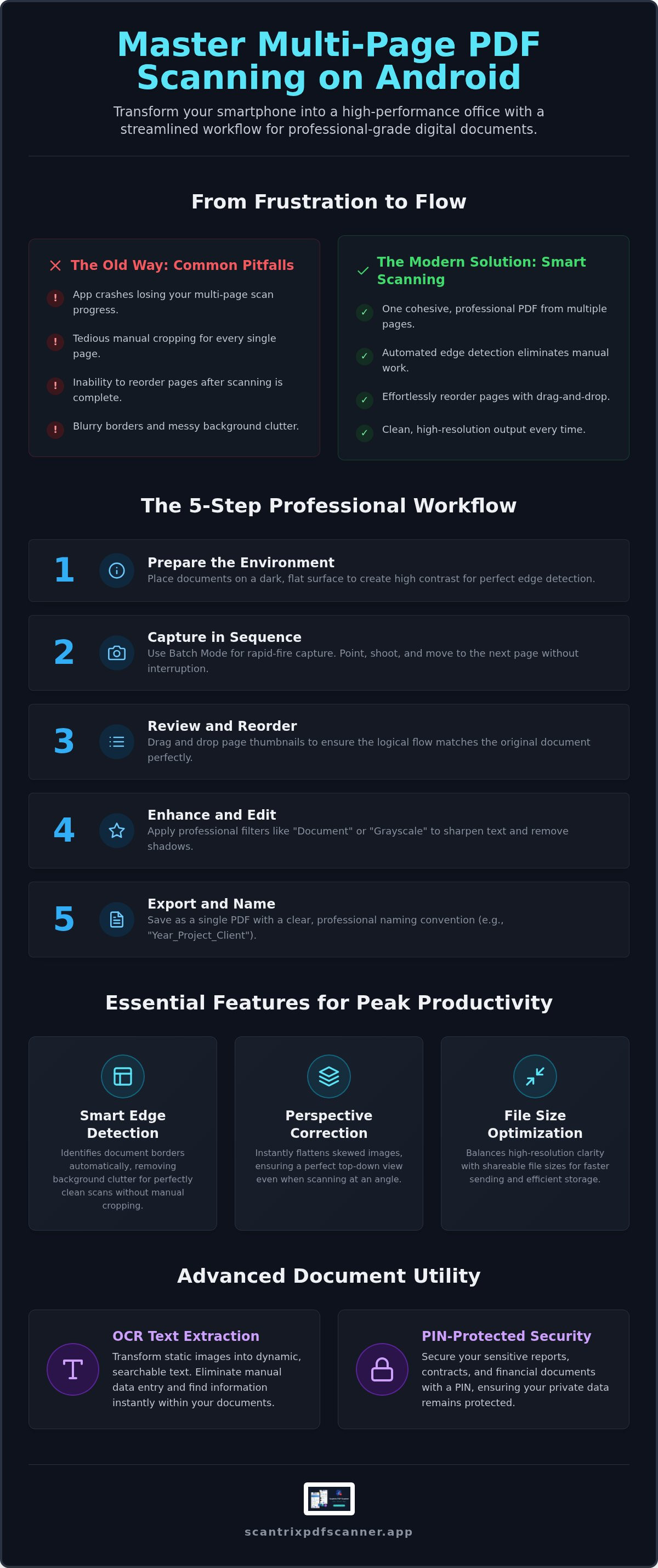
- Master a streamlined 5-step workflow for rapid-fire document capture. Use batch mode to convert physical stacks into digital assets instantly.
- Optimize professional output with a dedicated multi page pdf scanner android. Maintain document integrity and simplify your sharing process.
- Automate the editing process. Leverage smart edge detection to remove messy borders and ensure perfectly aligned scans without manual intervention.
- Enhance document utility and protection. Transform images into searchable text with OCR and secure sensitive files using PIN-protected privacy.
Understanding Multi-Page PDF Scanning on Android
Modern productivity demands speed. Multi-page scanning is the process of capturing several physical sheets into one cohesive digital file. It eliminates the chaos of individual image uploads. You get a single, organized document. Using a multi page pdf scanner android ensures your reports stay intact. It simplifies sharing. It maintains document integrity. One file. One upload. Complete professional clarity.
Traditional hardware is bulky. The classic Image scanner requires a desk and a power outlet. Your Android device offers a different path. Modern mobile cameras now rival traditional flatbed scanners in resolution and clarity. Scantrix PDF Scanner leverages this hardware. It transforms your phone into a high-performance assistant. You get desktop-grade results in the palm of your hand. It's mobile. It's fast. It's precise.
Professional results require precision. Smart Edge Detection is the secret. It identifies document borders automatically. No manual cropping is needed. It removes background clutter. It produces clean, sharp edges every time. This automation saves minutes on every scan. You focus on the content. The app handles the aesthetics. It's a systematic approach to digitizing your workflow.
Key Features for High-Volume Scanning
Efficiency is the goal. High-volume tasks require specific tools to prevent fatigue and errors. Your multi page pdf scanner android should prioritize a "problem-meets-immediate-solution" structure. Look for these essential capabilities:
- Batch mode: Capture pages in rapid succession. Point, shoot, repeat. The app handles the sequence without pausing for processing.
- Automatic perspective correction: Fix skewed angles instantly. Even if you scan at an angle, the software flattens the image for a top-down view.
- File size optimization: Balance high resolution with shareable file sizes. Get crisp text without bloated attachments. Your emails will send faster. Your storage will last longer.
These features turn a smartphone into a professional utility. You don't just take photos. You build digital archives. Every scan is a refined, organized result. This is the new standard for digital documentation.
How to Scan Multiple Pages into One PDF: A 5-Step Process
Transforming a physical stack into a digital asset requires a systematic approach. Don't just snap photos. Follow this 5-step process to master your multi page pdf scanner android for professional-grade results. Efficiency starts with preparation. High-performance output follows.
- Prepare the environment: Contrast is essential. Place documents on a dark, flat surface. Avoid glossy finishes. This allows the app to distinguish edges instantly.
- Capture in sequence: Open the Scantrix batch mode. Position the camera. Tap the shutter. Move to the next page. Repeat. It's rapid-fire productivity.
- Review and reorder: Don't settle for mistakes. Drag and drop thumbnails to fix the sequence. Ensure the logical flow matches the original report perfectly.
- Enhance and edit: Apply professional filters. Use "Document" or "Grayscale" modes. These sharpen text. They eliminate distracting shadows.
- Export and name: Save as a single PDF. Use clear naming conventions like "Year_Project_Client." One file. One result.
Optimizing the Capture Phase
Precision prevents rework. Hold the phone parallel to the document to minimize perspective distortion. Let Smart Edge Detection handle the cropping for a staccato workflow. For maximum OCR accuracy, use bright, indirect natural light to eliminate glare and harsh shadows. This ensures every word is captured with technical sophistication. You can get the Scantrix app to experience this automated precision firsthand.
Finalizing the Multi-Page Document
Verification is the final step. Check every page number. Missing pages in legal or financial reports create liability. If you discover a missing sheet after saving, don't restart. Use the "Append" feature to add pages to an existing PDF later. This flexibility keeps your workflow linear and goal-directed. Your final output should be a clean, secure, and professional document ready for immediate distribution.
Professional Workflows: Security and Text Extraction
Capturing the document is just the start. High-performance workflows require more than just a picture. They demand utility. They demand security. A professional multi page pdf scanner android turns static images into dynamic assets. It secures your data. It streamlines your output. It transforms your smartphone into a sophisticated digital architect.
OCR for Multi-Page Reports
Manual data entry wastes time. OCR Text Extraction solves this problem instantly. It scans entire bundles. It identifies characters. It creates searchable, selectable text from every page. This transformation allows you to copy data from reports directly into spreadsheets or emails. Accuracy is the priority. High-resolution capture is non-negotiable for reliable extraction. Blurry text leads to processing errors. Sharp, high-contrast scans yield perfect data. Clean input produces professional results.
Securing Sensitive Business Scans
Physical papers are vulnerable. Digital files can be too. Don't leave sensitive contracts or financial reports in your public photo gallery. Scantrix provides a dedicated solution for professional privacy. Enable PIN-protected privacy to lock your document vault immediately. This adds a layer of technical sophistication to your mobile office. It ensures that sensitive data remains for your eyes only. Mobile encryption is the first line of defense for digital paper trails. Secure your assets. Protect your privacy. Maintain total control.
Finalize your documents with a complete professional toolkit. Use the E-Signature Tool to sign multi-page contracts without printing a single sheet. It's fast. It's legal. It's efficient. Pair this with cloud integration for immediate desktop access. Your multi page pdf scanner android captures the data. Your cloud storage organizes it. This systematic organization reinforces a logical workflow. It simplifies complex tasks into effortless steps. You achieve professional results without unnecessary friction or complexity.
Optimize Your Mobile Productivity
Modern document management requires more than just a camera. You've mastered the systematic workflow for rapid-fire capture. You've learned to prepare high-contrast environments and reorder pages for perfect logical flow. Now, you possess the knowledge to transform physical stacks into professional digital assets. Efficiency is no longer a goal. It's your new standard.
Precision and security define the professional experience. Automatic edge detection eliminates the frustration of manual cropping. PIN-protected privacy ensures your sensitive business data remains confidential. Integrated OCR turns static images into searchable text for immediate utility. These tools move you from disorganized photos to a refined digital archive. It's time to leverage your multi page pdf scanner android to its full potential.
Don't settle for tools that crash or create messy files. Your time is too valuable for technical friction. Download Scantrix PDF Scanner for professional multi-page scanning and experience a high-performance assistant that values your productivity. Start digitizing your reports with total confidence. Your streamlined office is just one tap away.
Frequently Asked Questions
How many pages can I scan into one PDF on Android?
Most professional apps support 100 pages or more in a single document. Scantrix handles large reports through seamless multi-page export. Your device's available memory and storage are the only real constraints. You can capture entire bundles without stopping for processing. It's built for high-volume tasks.
Will scanning multiple pages make the PDF file too large to email?
No, advanced software uses file size optimization to keep documents shareable. Scantrix balances high resolution with efficient compression. It sharpens text while reducing image bloat. This ensures your professional output fits within standard email attachment limits. Share instantly. Don't worry about bounced messages.
Can I reorder pages after I have finished scanning?
Yes, you can adjust the sequence before you export the file. Use the drag-and-drop interface to fix the logical flow of your document. This feature eliminates the need to rescan if a page is out of order. It's a systematic way to ensure your report is perfect. View thumbnails. Move pages. Finalize.
Is it possible to extract text from a multi-page PDF scan?
Yes, OCR Text Extraction transforms images into selectable text across the entire file. Your multi page pdf scanner android creates searchable documents for quick data entry. This allows you to find specific keywords within a fifty-page report in seconds. It turns static paper into a dynamic digital asset. Capture data. Copy text. Save time.


