

A phone camera is not a document scanner. Treating it like one leads to blurry text and messy backgrounds. To convert paper to pdf android effectively, you need a technical workflow. Precision matters. Speed is essential. Most mobile captures fail because they lack the necessary processing power to handle lighting or perspective shifts. You need a better system. You deserve professional results without the friction of desktop hardware.
You've likely dealt with unreadable files or static images you can't edit. It's a waste of time. We'll show you how to master a professional-grade process for high-quality results. This article covers smart edge detection, OCR text extraction, and secure digital storage. AI-driven OCR accuracy has improved by 45 percent, making manual data entry obsolete. We'll guide you through the transition from physical paper to signed digital contracts. Learn to create crisp, cropped documents that are fully searchable and secure. Transform your device into a silent, high-performance assistant. Let's begin the workflow.
Key Takeaways
- Move beyond photography. Understand the multi-stage digital conversion process required for professional-grade output.
- Master precision capture. Follow the technical steps to convert paper to pdf android using smart edge detection.
- Unlock intelligent data. Utilize built-in OCR to transform raw images into searchable, high-performance text instantly.
- Ensure document security. Protect sensitive business intelligence with PIN-protected privacy and professional e-signature tools.
The Mechanics of Mobile Conversion: Why a Photo is Not a PDF
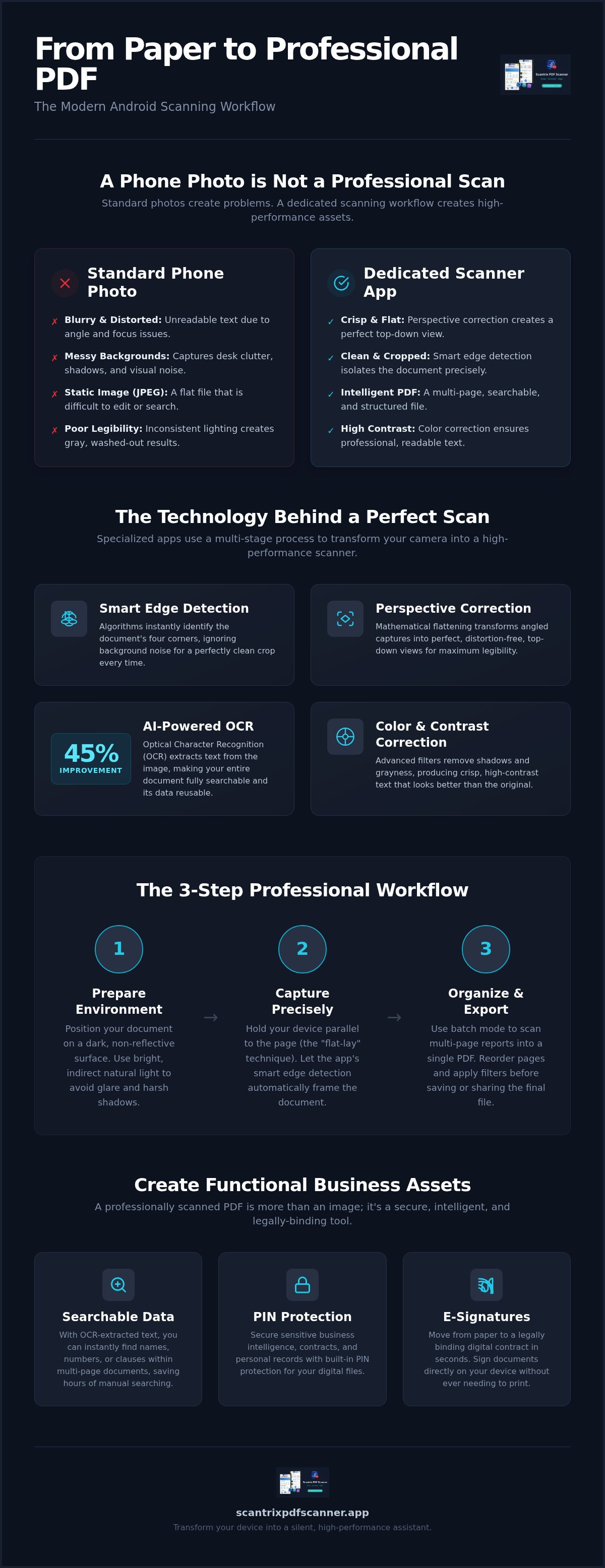
A photograph captures a moment. A scan captures data. When you convert paper to pdf android, you aren't just taking a picture. You are initiating a complex digital transformation. A standard JPEG is a static, compressed image file. It is difficult to search. It is impossible to scale without losing clarity. Professional workflows require more than a raw image capture.
The Portable Document Format (PDF) is a dynamic container. It supports multi-page structures, embedded metadata, and text layers. Mobile scanning apps use the phone's sensor as a gateway. They move beyond simple pixels to create structured files. This process ensures your documents remain readable, professional, and ready for long-term storage. It turns a piece of hardware into a high-performance assistant.
The Role of Smart Edge Detection
Precision starts with the boundary. Smart edge detection algorithms analyze the frame in real time. They identify the high-contrast line between your document and the background surface. This is not just a crop. It is an intelligent isolation of data. The system ignores visual noise like desk grain, shadows, or stray pens. It identifies the four corners of the page instantly. You get a clean, focused result without manual adjustments. It saves time. It ensures consistency across multi-page scans.
Perspective and Color Correction
Most mobile captures happen at an angle. This creates distortion. Professional software uses mathematical flattening to fix this. It calculates the tilt of the phone. It then stretches the image into a perfect top-down view. This perspective correction is vital for legibility. After flattening, the system applies color filters. These filters enhance text contrast and remove background grayness. The result is a crisp, black-and-white or high-fidelity color document. It looks like it came from a flatbed scanner. It is professional. It is precise.
Practical Workflow: How to Convert Paper to PDF on Android
Your smartphone is a digital architect. It builds structured assets from physical documents. To convert paper to pdf android effectively, preparation is mandatory. Precision starts before you open the app. Clear your workspace. Align your materials. A professional result depends on the environment you create for the sensor.
Efficiency requires a systematic approach. Follow a linear path from capture to export. Learn how to scan to PDF on Android with our streamlined guide to master the initial setup. Once the environment is ready, the software handles the technical heavy lifting.
Capturing the Perfect Digital Image
The "flat-lay" technique involves positioning the device directly parallel to the document surface to eliminate geometric distortion. Lighting is the next priority. Use natural, non-glare lighting to maximize OCR accuracy and prevent sensor washout. Avoid direct overhead bulbs that create harsh shadows. Place white paper on a dark, matte surface. This high-contrast background assists the smart edge detection algorithm in defining boundaries instantly. It ensures the crop is tight and accurate.
Managing Multi-Page Document Batches
Complex reports require a cohesive file structure. Don't scan pages as individual files. Use batch mode to digitize long documents into a single, organized PDF. Capture the first page. Move to the next. The system stacks them automatically. You can review the thumbnails in real time. Drag pages to reorder them. Delete blurry captures immediately. This logical progression ensures the final document is professional and ready for distribution. For an ad-free experience, use a professional-grade scanner app to finalize your high-performance workflow.
Professional Output: Security, OCR, and E-Signatures
The conversion is complete. Now, the document must perform. To convert paper to pdf android is to create a functional business asset. Scantrix PDF Scanner provides a professional-grade alternative to ad-heavy, generic scanners. It ensures your data remains yours. No distractions. No friction. This final stage of the workflow adds intelligence and security to your digital files.
A paperless legal workflow requires more than just a picture. It requires a signature. Integrated electronic signatures allow you to sign contracts instantly. There is no need to print. There is no need to scan twice. It is a seamless, high-performance solution for the modern expert. You move from physical paper to a legally binding digital document in seconds.
Unlocking Text with OCR
Static images are dead ends. Optical Character Recognition (OCR) transforms pixels into editable data. This process extracts text for use in emails, spreadsheets, or reports. It turns a flat image into a dynamic resource. Searchable PDFs allow for rapid data retrieval. You find specific information in seconds. Archiving becomes effortless. AI-driven OCR accuracy has improved by 45 percent according to recent industry analysis. This ensures your digital records are reliable and precise. It is data you can trust.
Securing the Digital Result
Privacy is a technical requirement. Many apps push unencrypted cloud uploads by default. This creates unnecessary risk for sensitive business intelligence. Scantrix PDF Scanner prioritizes local storage for maximum control. Use PIN-protected privacy to lock sensitive files. Your documents stay on your device. This local-first approach prevents unauthorized access during the transition from physical to digital states. It is professional security without the complexity of external account setups. Your files are safe. Your workflow is protected. You are in total control of your digital architecture.
Master Your Digital Document Transition
Physical paper is a bottleneck. Digital efficiency is the solution. You've learned that professional scanning requires precision edge detection and mathematical perspective correction. It's not a photography task. It's a technical conversion. By following a structured workflow, you can convert paper to pdf android with desktop-level quality. Speed matters. Accuracy wins. Results define your productivity.
You now have the blueprint for high-performance document management. Use built-in OCR text extraction to unlock searchable data instantly. Secure your sensitive files with PIN-protected privacy. Sign critical contracts on the go with the integrated e-signature tool. Your Android device is no longer just a phone. It is a sophisticated digital architect. It handles the heavy lifting so you don't have to. Experience a silent, high-performance assistant today.
Download Scantrix PDF Scanner for Android to access an ad-free, secure scanning environment. Start your professional transition now. Your workflow deserves precision.
Frequently Asked Questions
How do I convert paper to PDF on Android without a physical scanner?
Use a high-performance scanner app like Scantrix. It utilizes your phone's camera sensor to capture the physical document. Smart edge detection identifies boundaries automatically. Perspective correction flattens the image instantly. This technical workflow allows you to convert paper to pdf android with professional-grade clarity. It replaces bulky desktop hardware with a streamlined, mobile-first solution. Your phone becomes a silent, high-performance assistant for all document tasks.
Can I extract text from a paper document using my Android phone?
Yes. Built-in OCR technology makes text extraction possible. Scantrix identifies characters within the captured image and converts them into editable digital text. This turns static captures into dynamic assets. You can copy, paste, or search the document content immediately. It eliminates manual data entry and improves archiving efficiency. This process ensures your digital records are reliable, precise, and fully searchable for rapid retrieval.
Is it possible to sign a scanned paper document on my smartphone?
Absolutely. Modern scanner apps include integrated e-signature tools. You capture the document, apply your digital signature, and finalize the file. This creates a paperless legal workflow. You don't need to print or use desktop software. It is a secure, rapid solution for signing contracts or agreements from any location. It maintains professionalism while maximizing speed and efficiency in your daily business operations.
What is the best way to scan multiple pages into one PDF on Android?
Use batch scanning mode for optimal results. This feature allows you to capture several pages in a single, continuous session. The app stacks these captures into a cohesive, multi-page PDF structure. You can reorder or delete specific pages before exporting the final file. It is the most efficient method to convert paper to pdf android for long reports, multi-page contracts, or complex technical manuals.


