

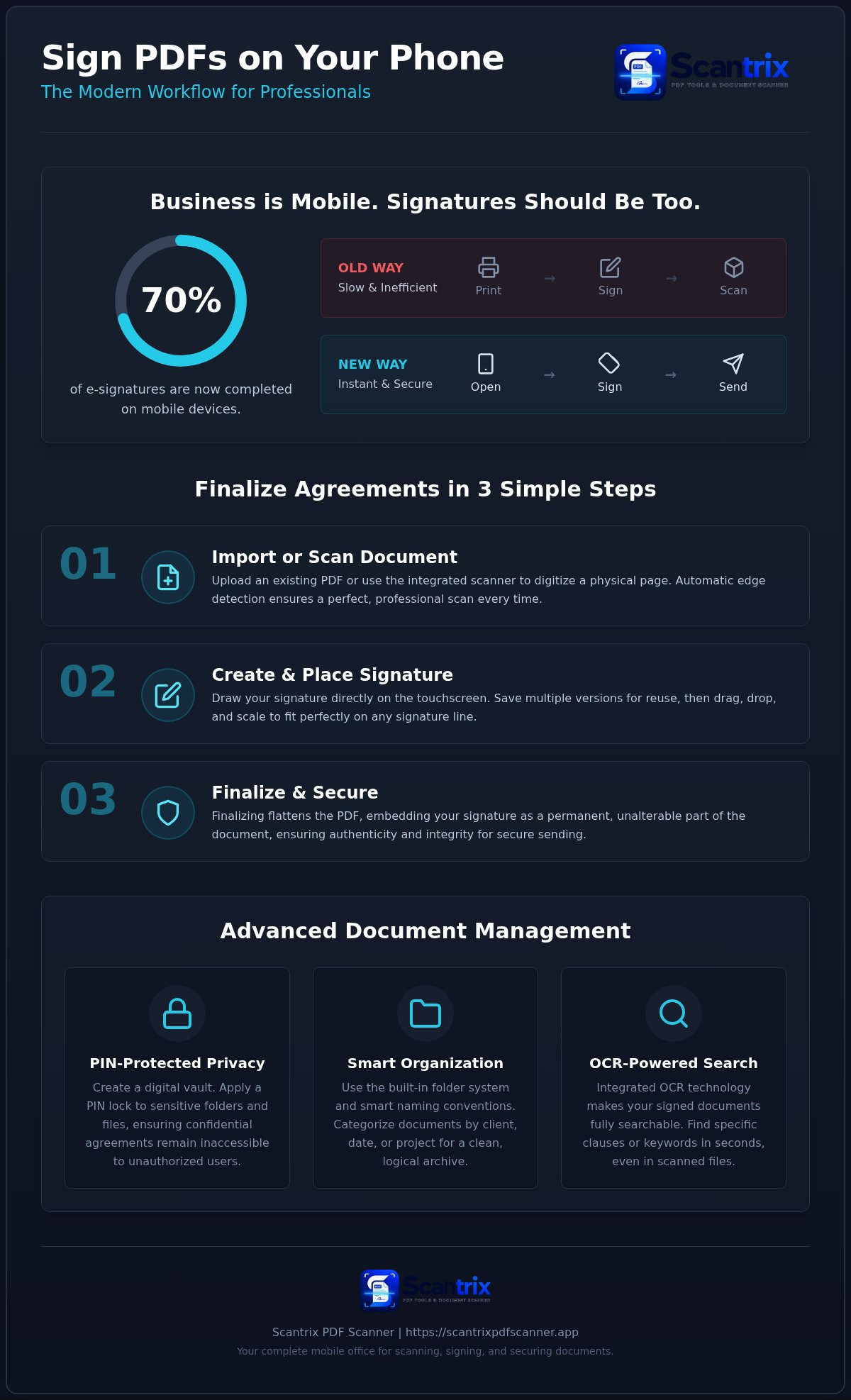
Statistics show that 70% of electronic signatures are now completed on mobile devices. Business doesn't wait for a desk. You shouldn't have to hunt for a printer or a scanner in 2026. It's a waste of time. The ability to sign pdf documents on phone is now a requirement for modern professionals. You need speed. You need security. Sign. Secure. Send.
We agree that document signing should be instant and effortless. This guide teaches you the most efficient way to finalize contracts using your Android device. You'll learn to generate professional-grade signatures and secure them with PIN protection in under two minutes. We'll walk through the exact steps to move from a blank line to a sent email without ever touching a piece of paper.
Key Takeaways
- Eliminate the inefficient print-sign-scan cycle. Accelerate your professional workflow. Save resources.
- Master the fastest method to sign pdf documents on phone. Ensure legal validity and professional-grade output every time.
- Leverage Scantrix PDF Scanner for an integrated scan-to-sign process on Android. One tool. Zero friction. Immediate results.
- Deploy PIN-protected privacy to secure sensitive agreements. Prevent data leaks. Store your signed documents in a logical, organized system.
Why Mobile E-Signatures are Essential for Modern Workflows
The traditional "print-sign-scan" loop is a productivity bottleneck. It requires hardware you don't always have. It forces unnecessary delays. An Electronic signature serves as a legally recognized digital mark on your electronic documents. It transforms your Android device into a portable closing room. When you sign pdf documents on phone, you eliminate friction. You save resources. You finalize agreements in seconds rather than days.
Professional agility defines the 2026 market. Responding to contracts in real-time provides a distinct competitive edge. You aren't tethered to a desk. You aren't hunting for a printer. The ability to sign pdf documents on phone ensures you never miss a deadline due to logistics. Under 2026 digital standards, e-signature validity is defined by the signer's intent, the document's unalterable state, and a secure record of the transaction.
The Legal Validity of Signing Documents on Your Phone
Legal frameworks globally recognize mobile e-signatures as binding. Most business contracts, NDAs, and onboarding forms accept digital marks without hesitation. However, it's vital to distinguish between a simple electronic signature and a high-security digital signature. Simple signatures are standard for routine approvals. High-security versions use cryptographic keys to prove identity and document integrity.
For high-stakes legal contracts, such as property deeds or testamentary trusts, check your specific national regulations. Some jurisdictions still mandate wet-ink signatures for these specific categories. For everything else, Scantrix provides the professional tools needed to maintain compliance and speed. It's about efficiency. It's about results. Your Android device is now your most powerful administrative tool.
Step-by-Step: How to Sign PDF Documents on Phone Using Scantrix
Launch the app. Import your file. The workflow is immediate. To sign pdf documents on phone, you're able to either upload an existing PDF from your storage or use the integrated scanner to digitize a physical page. Scantrix applies automatic edge detection to ensure your scan is perfectly aligned. Select your document. Open the professional edit menu. Locate the e-signature tool to begin. The ability to sign pdf documents on phone transforms your mobile device into a complete office.
Tap the signature icon. Draw your mark directly on the touchscreen. Scantrix allows you to create and preview multiple versions before committing. Once satisfied, save the asset. Drag the signature to the designated field. Use the corner handles for precision scaling. Finalize the document to trigger the embedding process. This flattens the PDF. It ensures your mark is unalterable. It's critical to validate the authenticity and integrity of the finalized contract. Your document is now ready for secure transmission.
Capturing the Perfect Signature on a Touchscreen
Use a stylus for the highest level of control. A fingertip works well for bold, clear marks. Scantrix enables you to save your signature for recurring tasks. This feature removes the need to redraw for every new document. Simply select your saved mark from the library. Position it exactly over the signature line. Scale the dimensions to match the surrounding text for a professional finish. If you encounter specific document formats that require unique handling, contact our support team for guidance. The result is professional. It mirrors physical pen-on-paper output.
Beyond the Signature: Securing and Organizing Your Signed Documents
Signing is only half the battle. Storage security is the other. A finalized agreement contains sensitive data. It requires protection. When you sign pdf documents on phone, you create a digital asset that must be managed with precision. Leaving these files in a generic downloads folder is a professional risk. Scantrix provides a high-performance solution through PIN-protected privacy. This ensures your contracts remain confidential and inaccessible to unauthorized users.
Organization drives efficiency. Use the built-in folder system. Apply smart naming conventions. Signed documents shouldn't be lost in a cluttered file system. Categorize them by client, date, or project status. The OCR text extraction tool adds a layer of intelligence to this process. It makes your signed documents fully searchable. Locate specific clauses in seconds. OCR transforms static scans into dynamic, searchable data. This is essential for long-term contract management. You can index your entire library. Locate key terms without manual review. This systematic approach reinforces a logical workflow. It ensures every action leads to a refined, organized result. Your Android device becomes a secure digital archive.
Implementing PIN-Protected Privacy for Sensitive Files
Enable the PIN lock feature within the Scantrix settings. Apply it to specific folders containing high-stakes agreements. This creates a digital vault on your device. It separates business data from your personal gallery. This separation prevents accidental exposure. It maintains professional boundaries. Security is a standard, not an option. Learn more about secure document storage to keep your workflow protected. One app. Total control. Zero leaks. Control your data and maintain total oversight of your digital assets to sign pdf documents on phone with complete confidence.
Master Your Digital Workflow
Mobile signing is no longer a luxury. It's a professional standard. You've learned how to eliminate the inefficient print, sign, scan loop forever. You now have the steps to sign pdf documents on phone with absolute precision. Scantrix provides the high-performance tools to make this transition seamless. Use automatic edge detection for perfect scans. Leverage OCR text extraction to keep your signed files searchable. Most importantly, safeguard your sensitive contracts with PIN-protected privacy. This ensures your business remains confidential. One app. Total control. Zero friction. Ready to transform your productivity and close deals faster? Need a professional way to sign on the go? Contact us for Scantrix support. Your Android device is now your most powerful administrative asset. Take control of your documents today.
Frequently Asked Questions
Is signing a PDF on my phone as legal as a pen signature?
Yes, electronic signatures carry the same legal weight as traditional pen signatures in most jurisdictions. Laws like the ESIGN Act in the US and eIDAS in the EU establish this framework. When you sign pdf documents on phone, the digital mark represents your intent to be bound by the agreement. Professional tools ensure the document remains unalterable after the signature is applied.
Can I sign Word documents or only PDFs on my phone?
You can sign Word documents, but converting them to PDF is the professional standard. PDFs preserve formatting across all devices. They prevent unauthorized edits after the signature is applied. Scantrix focuses on a PDF-centric workflow to ensure document integrity. Always finalize your Word files as PDFs before sending to maintain a polished, secure appearance. This ensures the recipient sees exactly what you signed.
Do I need a stylus to sign documents on an Android screen?
A stylus isn't required for a professional result. You can use your fingertip to create a clear mark directly on the touchscreen. However, a stylus offers higher precision for complex signatures. Scantrix allows you to save your best signature once. You then reuse it for future tasks. This eliminates the need for perfect drawing every time you sign pdf documents on phone.
How do I send a signed PDF once I am finished?
Use the integrated share menu within the app to transmit your file. Once you finalize the signature, select the export or share option. You can send the document via email, messaging apps, or cloud storage links instantly. Scantrix flattens the file first. This embeds the signature permanently into the document layers. It's ready for immediate delivery. Fast. Secure. Professional.


