

Your notebook is a data graveyard. You capture brilliant ideas on paper, but they stay trapped there. Manual transcription wastes time. Searching through physical pages is a legacy problem. You need a modern solution. We agree that physical notes should be searchable, shareable, and secure. This guide reveals how to master ocr for handwritten notes android to transform messy scribbles into professional digital text instantly.
Precision is the priority. With Microsoft Lens retiring in early 2026, the shift to advanced AI-driven tools is mandatory. You will learn to achieve high accuracy using professional-grade Android utilities. We examine the best software for cursive and print, detail the transition from paper to encrypted PDF, and show you how to archive sensitive information with PIN-protected privacy. Turn your handwriting into a searchable asset. Start now. Results matter.
Key Takeaways
- Understand the complexity of handwriting recognition. Learn why non-standardized scripts require high-performance processing for accurate results.
- Perfect your capture technique. Master ocr for handwritten notes android by utilizing smart edge detection and optimized lighting for flawless extraction.
- Streamline your professional workflow. Transition from physical paper to organized, searchable PDF archives that simplify document sharing.
- Protect sensitive data instantly. Use offline-first PIN encryption to secure your digitized notes from unauthorized access.
Understanding OCR for Handwritten Notes on Android
Optical Character Recognition (OCR) is the bridge between physical ink and digital data. For mobile users, ocr for handwritten notes android involves more than simple pattern matching. It requires interpreting non-standardized scripts that lack uniform spacing or alignment. Unlike machine-printed text, handwriting varies by slant, pressure, and individual style. This makes the process computationally expensive. Recognition engines must calculate infinite geometric variations in real-time. It demands high performance.
The landscape changed in 2026. Developers shifted toward AI-enhanced neural networks. These systems don't just scan letters. They analyze context. They predict words based on stroke sequences. This evolution allows for superior cursive interpretation. It handles messy scribbles with professional precision. You get cleaner data. You save time. Reliability is the new standard.
A foundational understanding of Optical Character Recognition (OCR) helps you choose the right tool. High-quality apps now prioritize deep learning models over basic template matching. This ensures your digital archives remain accurate as your handwriting evolves. Results are immediate.
Image Text vs. Searchable PDF Layers
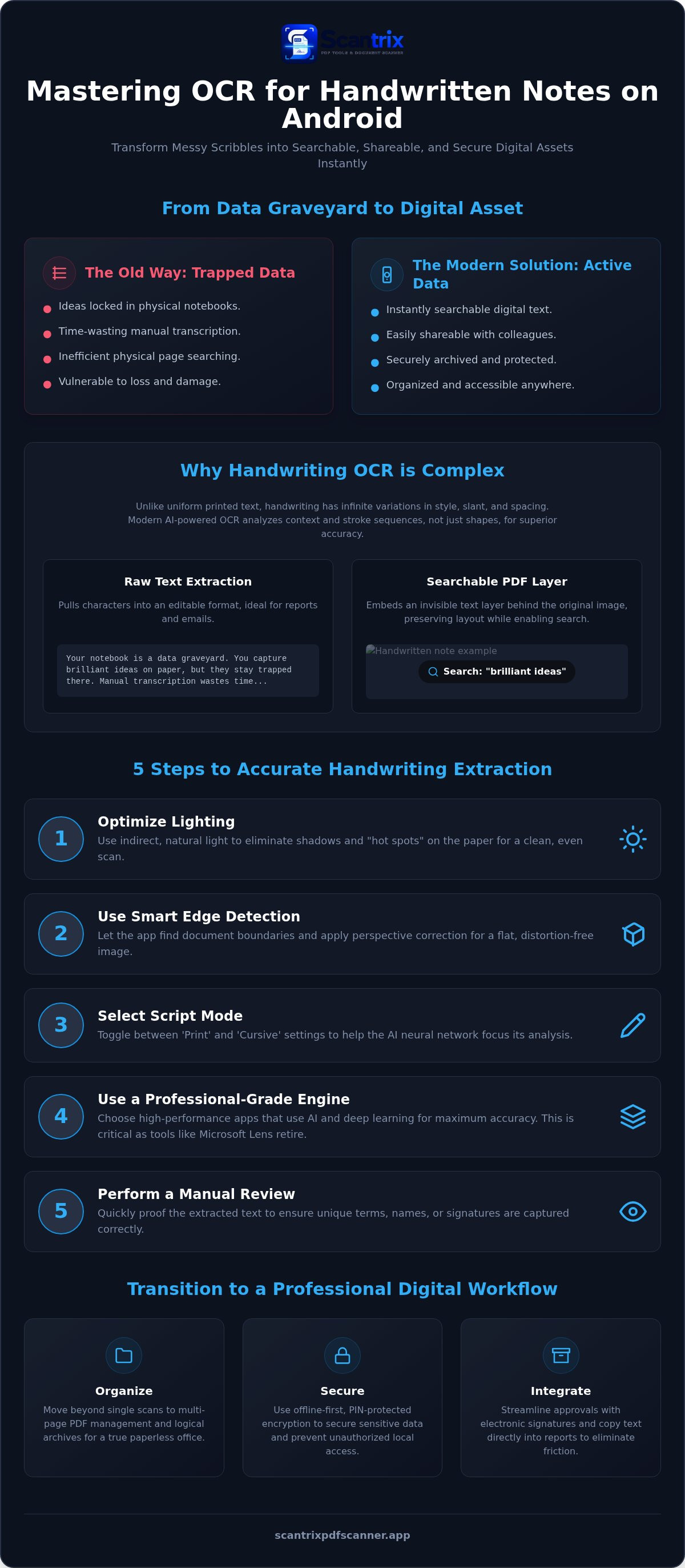
Digitization offers two distinct outputs. Raw text extraction pulls characters into an editable format. It's perfect for quick emails or reports. Searchable PDF layers provide a different advantage. They embed an invisible text layer directly behind the original image. This preserves your visual layout while enabling deep search functionality.
Mastering searching text in scanned documents on Android maximizes your utility. Professional workflows require both formats for redundancy. You keep the original visual proof. You gain instant searchability. It’s a systematic approach to document management. No more lost notes. Total digital control.
5 Steps to Accurate Handwriting Extraction
High-performance ocr for handwritten notes android relies on input quality. Software cannot interpret what it cannot see. Results require precision. Follow these steps to ensure maximum extraction accuracy.
First, optimize lighting. Eliminate shadows. Use indirect, natural light to prevent "hot spots" on the paper. Second, activate smart edge detection. This feature identifies document boundaries and applies perspective correction instantly. It ensures a flat, distortion-free scan area. Third, select the appropriate script mode. Toggle between print and cursive settings to narrow the neural network's focus. Fourth, convert scanned PDF to editable text using a professional-grade engine. Finally, perform a manual review. Proofing ensures technical terms or unique signatures are captured correctly. Accuracy is the priority.
Best Practices for Capturing Clear Notes
Contrast is essential. Black ink on bright white paper provides the cleanest signal. Yellow legal pads or grey backgrounds introduce visual noise that confuses modern OCR technology. Always use high-resolution capture. It preserves the delicate strokes and pressure points required for neural network analysis. Automatic cropping is also vital. It removes background clutter and focuses the processor on the text alone. This systematic approach eliminates errors. It saves time.
Efficiency drives productivity. For organizations scaling their digitization efforts, contact our team for tailored workflow solutions. Professional results start with professional tools.
Transitioning to a Professional Digital Workflow
Simple extraction is just the start. Professional productivity requires systematic organization. Move beyond single scans to multi-page PDF management. Organize your archives logically. High-performance ocr for handwritten notes android creates the foundation for a paperless office. It transforms static ink into active data. Results are immediate. Efficiency is the goal.
Security is non-negotiable. Physical notebooks are vulnerable. Digitized notes must be protected. Use offline-first PIN protection to secure sensitive information. Prevent unauthorized access locally. This ensures your intellectual property stays private. Integration completes the cycle. Use electronic signatures for handwritten contracts or authorized memos. This streamlines the approval process. Learn how to copy text from a scanned document on Android to accelerate report writing. It eliminates manual transcription. It removes friction.
Modern workflows rely on technical sophistication. Academic research on handwritten character recognition confirms that neural networks are essential for interpreting non-standardized scripts. These models provide the accuracy required for professional use. You get reliable data every time. Your workflow stays fast. Your output stays professional.
Why Scantrix PDF Scanner is the Efficient Choice for Android Users
Design dictates performance. Scantrix PDF Scanner prioritizes speed. The utilitarian interface removes unnecessary steps. It's a tool for high-efficiency document management. You work in an ad-free environment. This promotes deep focus. Productivity is the priority. There is no decorative fluff. Only results. For advanced enterprise scanning needs, contact the Scantrix PDF Scanner team. We provide scalable solutions for secure, professional digitization. Upgrade your workflow today.
Master Your Digital Archive
Stop wasting time on manual transcription. You now understand the technical mechanics of ocr for handwritten notes android. High-performance digitization starts with optimized capture. Use smart edge detection for perfect crops. Leverage AI-driven neural networks for precise extraction. Your workflow must be seamless and secure. Transition to searchable PDF archives today. Use PIN-protected privacy to guard sensitive files instantly. These steps transform messy physical notes into professional digital assets. The results are undeniable. Your productivity improves. Your data stays safe. Finalize your digital transition now. Efficiency is a choice. Results matter.
Scale your productivity with the Scantrix PDF Scanner App. Experience the power of professional OCR text extraction. Build your digital future today. You're ready to lead.
Frequently Asked Questions
Can OCR read messy or cursive handwriting accurately?
Yes, AI-enhanced neural networks interpret complex scripts with high precision. In 2026, professional tools achieve over 91% accuracy for handwritten print. Cursive recognition is now standard. Success depends on capture quality. Use smart edge detection to provide the engine with a flat, distortion-free image. This maximizes character recognition. Results are reliable.
Is it possible to convert handwritten notes to a searchable PDF on Android?
Yes, you can create searchable PDF layers directly on your mobile device. Using ocr for handwritten notes android allows you to embed an invisible text layer behind the original scan. This preserves the visual authenticity of your ink while enabling keyword searches. It's an essential feature for professional document management and long-term archiving.
What is the best way to extract text from a photo of a whiteboard?
Use smart edge detection and perspective correction to extract whiteboard text efficiently. Whiteboards often suffer from glare and extreme angles. Professional scanning apps automatically crop the background and flatten the image. This provides a clean signal for the OCR text extraction engine. High-resolution capture is mandatory to preserve stroke detail. The process is fast.
Are my digitized handwritten notes secure from third-party access?
Security depends on the local encryption features of your chosen tool. Scantrix prioritizes data integrity with offline-first PIN-protected privacy. Your digitized files remain on your device, not on external servers. This prevents third-party access to sensitive intellectual property. Always verify that your ocr for handwritten notes android utility offers local encryption. Protect your data.


