

Manual data entry is a relic. Your phone is a powerhouse. You need to convert scanned pdf to editable text android with zero friction. Blurry scans usually mean bad data. Manual corrections take too long. Privacy risks are real. You deserve a better workflow. Efficiency is the priority. Results are the goal.
This 2026 guide delivers the most accurate extraction methods available today. Learn to use advanced OCR for instant results. Capture handwritten notes. Process documents locally. Maintain total privacy. We compare top performers like Adobe Scan and Scantrix PDF Scanner while addressing the retirement of legacy apps like Microsoft Lens in early 2026. Stop retyping. Start automating. Your digital transformation begins here with tools designed for speed, security, and absolute precision.
Key Takeaways
- Understand how advanced OCR technology transforms static images into searchable, high-utility digital text.
- Master a streamlined workflow to convert scanned pdf to editable text android using high-performance mobile tools.
- Enhance document accuracy with smart edge detection and multi-page scanning for complex professional reports.
- Secure sensitive information through local file processing and PIN-protected storage to ensure total document privacy.
Understanding OCR: How an Image to Text Android App Works
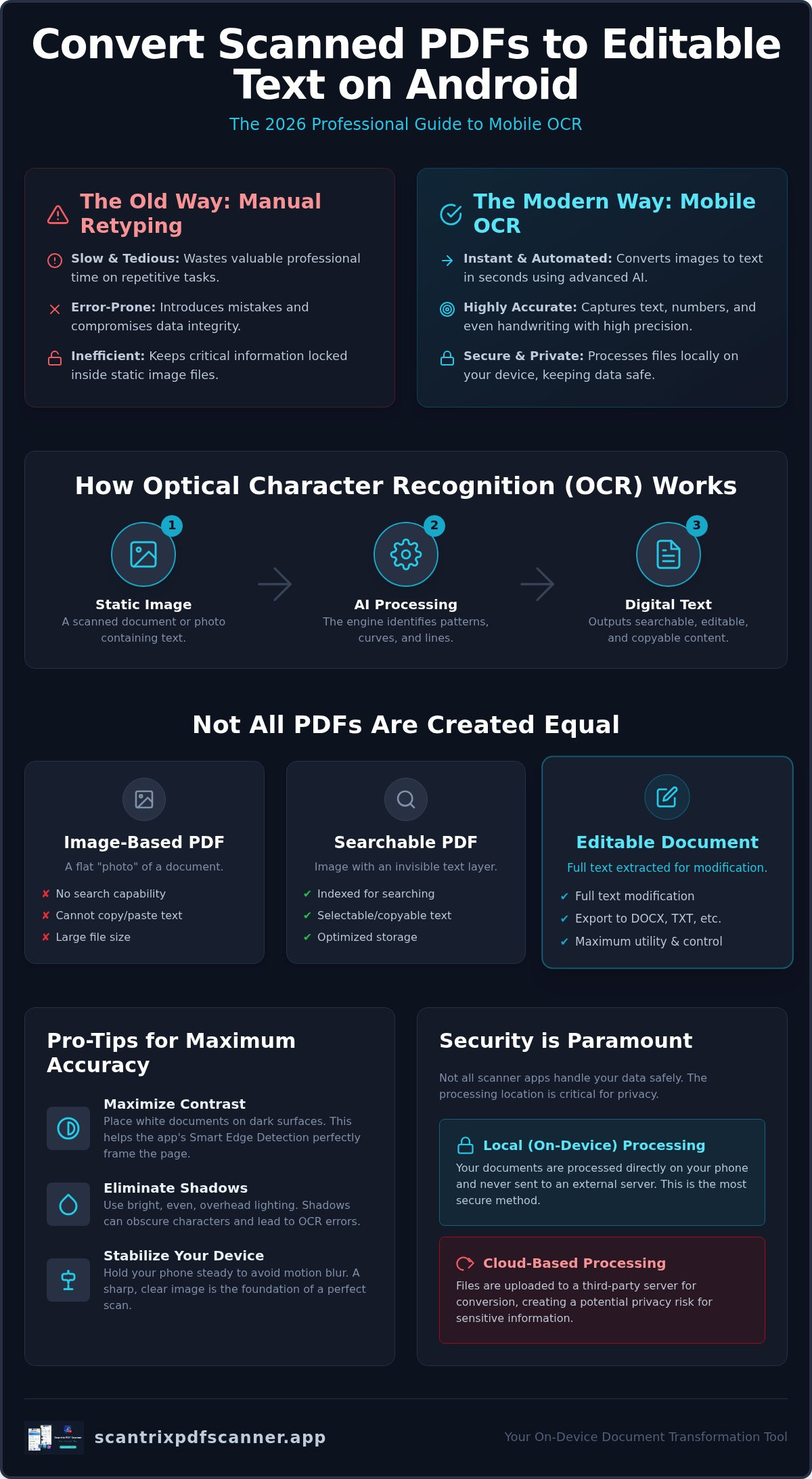
Efficiency starts with the right engine. Static images hold data hostage. You need to convert scanned pdf to editable text android to free that information. This process relies on Optical Character Recognition (OCR). It translates visual shapes into digital characters. It maps every curve and line. It identifies patterns. It converts pixels into usable text strings. Modern 2026 AI engines represent a massive leap forward. They recognize complex fonts. They interpret stylized headers. They even process handwritten notes with high accuracy.
A professional image to text android app eliminates the need for manual retyping. Retyping is slow. It's error-prone. It wastes professional time. Advanced mobile sensors now capture high-resolution details that feed the OCR engine. The result is a clean, digital document ready for editing. It's fast. It's reliable. It works where you work. This tool is the fastest way to convert scanned pdf to editable text android without a PC.
Image-Based vs. Searchable PDFs: What is the Difference?
Not all PDFs are equal. Image-based PDFs are flat files. They are essentially digital photos saved in a PDF container. You can't highlight words. You can't copy paragraphs. They lack underlying text data. Conversion changes the architecture of the file. It adds a transparent text layer over the image. This enables searching text in scanned documents android. It turns a static snapshot into a dynamic, interactive asset. You gain full control over your data.
- Image-Based: Locked pixels, no search capability, large file sizes.
- Searchable: Indexed text, selectable content, optimized storage.
- Editable: Full text extraction, ready for modification, professional output.
Transformation is immediate. Static pixels become editable content in seconds. Your Android device becomes a sophisticated digital architect to convert scanned pdf to editable text android with ease. You save hours of work. You ensure data integrity. You move faster.
Step-by-Step: Convert Scanned PDF to Editable Text Android
Precision matters. Speed is essential. To convert scanned pdf to editable text android, start by launching your professional scanner tool. Access the OCR module directly from the main interface. You can import an existing file from your device or capture a new document with the camera. Capture is usually the superior choice for high-fidelity results. Once the file is ready, initiate the extraction engine. The software processes the visual data, identifies character patterns, and generates a digital text layer in seconds.
Finalize the process by choosing your output format. Select TXT for raw data extraction. Use DOCX for comprehensive editing in word processors. Opt for a searchable PDF if you need to maintain the original layout while enabling text selection. For a reliable, high-performance workflow, the Scantrix PDF Scanner App handles these transformations with professional-grade accuracy.
Optimizing the Capture with Smart Edge Detection
Quality starts at the source. Poor scans lead to character misinterpretation. Use Smart Edge Detection to automate the framing process. This technology identifies document borders and crops out background noise instantly. It ensures the page is perfectly flat and aligned. Perspective distortion is a common failure point in mobile scanning; correcting the angle before running OCR is vital for success.
- Maximize Contrast: Place white documents on dark surfaces to help the sensor define edges.
- Eliminate Shadows: Use bright, overhead lighting to prevent dark spots from obscuring text.
- Stabilize the Device: Hold your phone steady to avoid motion blur during the capture phase.
A clean capture is the foundation of a successful digital transition. These optimizations ensure you convert scanned pdf to editable text android with minimal manual correction. Professional results require professional preparation.
Maximizing Accuracy and Security for Your Scanned Files
Extraction is just the beginning. Verification ensures quality. Always review your results for character misinterpretation. Symbols and complex punctuation often require manual checks. Multi-page scanning accelerates the process. It digitizes entire reports in one session. This saves time. It maintains document order. Professional workflows require speed. You can easily implement how to copy text from a scanned document on android techniques to pull specific citations into emails or presentations instantly.
Security is paramount. Many free tools upload files to the cloud for processing. This creates unnecessary risk. Choose apps that prioritize local processing. Your data stays on your device. This is the safest way to convert scanned pdf to editable text android without exposing trade secrets or personal information. Private documents belong in private spaces. Efficiency shouldn't compromise safety.
Securing Extracted Data with PIN-Protected Privacy
Sensitive files demand protection. Extracted financial or legal data is a target. Lock your scans behind a PIN or biometric layer. This prevents unauthorized access. It ensures compliance with professional standards. It builds trust. A paperless office must be a secure office. You manage the keys. You control the access.
- PIN Access: Set unique codes for sensitive document folders.
- Biometric Lock: Use fingerprint sensors for instant, secure entry to the app.
- Local Storage: Keep files off vulnerable external servers to prevent data leaks.
Protecting your output is as important as the extraction itself. When you convert scanned pdf to editable text android, security should never be an afterthought. High-performance tools integrate these features into the standard workflow. Results are clean. Data is safe. Momentum is maintained.
Master Your Digital Document Workflow
Efficiency is no longer optional. You now have the technical roadmap to convert scanned pdf to editable text android with absolute precision. High-quality extraction starts with a perfect capture. Use smart edge detection to eliminate distortion. Verify your results to ensure character accuracy. Security remains the ultimate priority. Process your files locally to keep sensitive data off external servers. It's time to replace manual retyping with automated intelligence.
Experience the most accurate results by using professional-grade tools. Download Scantrix PDF Scanner for professional OCR results. Leverage an advanced AI-driven OCR engine. Rely on automatic edge detection for flawless scans. Store critical files in a secure PIN-protected document vault. Your mobile device is now a high-performance productivity hub. Start transforming physical paperwork into dynamic digital assets now.
Frequently Asked Questions
Can I convert a scanned PDF to Word on Android for free?
Yes, basic tools exist. Adobe Scan and Text Fairy offer free extraction. Most professional apps provide a free tier for initial scans. You can convert scanned pdf to editable text android and export to TXT or DOCX without immediate payment. Scantrix offers these core features to streamline your digital transition. Speed meets value. Results are immediate.
How accurate is OCR on Android smartphones in 2026?
In 2026, mobile OCR accuracy is near-perfect. AI engines have eliminated most character misinterpretations. They process standard serif and sans-serif fonts with 99% precision. High-resolution mobile sensors provide the raw data needed for complex extraction. Even handwritten notes are now viable for digital conversion. Your smartphone is a high-performance productivity tool. Results are instant. Precision is the standard.
What is the best way to extract text from a blurry PDF scan?
Blurry scans are the primary cause of OCR failure. The best solution is a rescan using smart edge detection. This ensures the document is flat and in focus. Use bright, overhead lighting to maximize contrast. If rescanning isn't an option, apply image sharpening filters. Perspective correction also helps the engine map characters correctly. Quality capture equals quality text. Preparation is vital.
Is it safe to use online OCR converters for legal documents?
Security is the main concern with online tools. Uploading legal documents to the cloud is risky. These files often reside on external servers indefinitely. Local processing is the professional alternative. It keeps data on your Android device. Use a PIN-protected document vault to secure sensitive files. Private data should never leave your control. Safety is non-negotiable. Professionalism requires privacy.


