

The right passport scanning app for android depends on what you need the scan to do. If you need a clear digital copy, a camera scan saved as a PDF may be enough. If a process requires data from your passport’s electronic chip, you need an app that supports NFC reading. These are different tasks, so choose the capability that matches your goal.
For a useful digital copy, look for sharp text, complete page edges, and practical ways to protect and organize the file. This guide compares camera-based PDF scanning with NFC reading, then covers capture quality, privacy, and file handling. Scantrix PDF Scanner supports a digital-copy workflow with smart edge detection, OCR text extraction, PDF creation, and PIN-protected privacy. Start with the output you need, then compare apps.
Key Takeaways
- Match the app to the task: use camera capture for a visual copy, or NFC reading when a process requires chip data.
- Compare a passport scanning app for android by its output, capture quality, text extraction, file controls, and privacy features.
- Review the crop and extracted text before saving or sharing a passport PDF. OCR can read visible text, but it does not verify identity.
- Scantrix PDF Scanner’s edge detection, OCR, PDF tools, and PIN protection can support a more deliberate document workflow.
Passport scanning app for Android: PDF capture or NFC identity check?
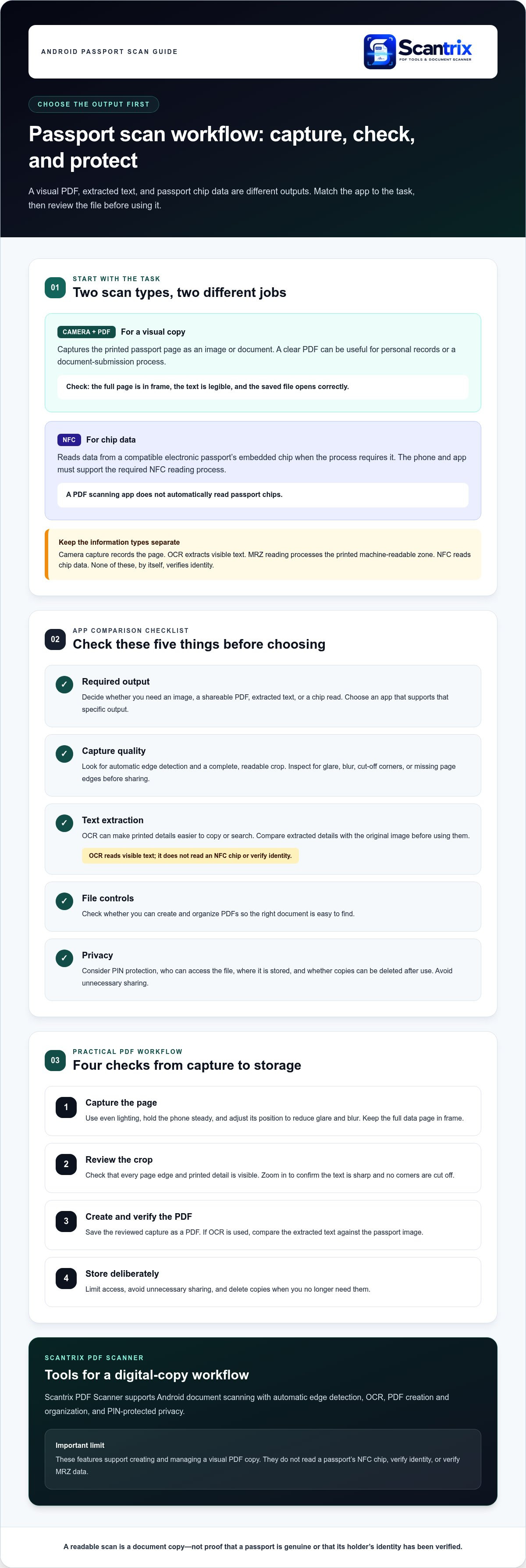
Begin by deciding what you need to produce. A shareable PDF is a visual copy of the passport page. An NFC scan reads data from a compatible passport’s electronic chip. These functions are not interchangeable, so a passport scanning app for android that creates PDFs does not automatically read passport chips.
A passport PDF scan captures the printed page as an image or document; an electronic passport chip read retrieves data from the embedded chip. A clear scan can be useful for personal records or a document-submission process. It does not prove that the passport is genuine or verify the holder’s identity.
Camera capture records the page. OCR, or optical character recognition, extracts visible text from that image, but it does not read a chip. The MRZ, or machine-readable zone, is the printed area of letters, numbers, and symbols found on many travel documents. An app with MRZ-reading functionality can process that printed zone, which is still different from NFC chip reading.
NFC is relevant when a process specifically requires data from a compatible electronic passport. A biometric passport contains an embedded chip, and the phone and app must support the required NFC reading process. Treat a page image, extracted text, and chip data as distinct types of information.
What does a passport scanning app actually need to do?
If you need a readable record or a requested visual copy, camera capture and PDF creation may be sufficient. Check that the entire page is in frame, the text is legible, and the saved file opens correctly. Scantrix PDF Scanner supports Android document scanning, automatic edge detection, OCR, PDF creation, and PIN-protected privacy for this type of workflow. NFC reading and identity verification are separate capabilities.
How to compare passport scanning apps for Android
Choose an app based on the job, not just the word “scanner.” Before installing a passport scanning app for android, consider what it needs to produce and how you will manage the file:
- Required output: Do you need an image, a shareable PDF, extracted text, or a chip read? Choose an app that supports the specific output.
- Capture quality: Look for automatic edge detection and a complete, readable page crop. Inspect the result for glare, blur, or missing corners before sharing it.
- Text extraction: OCR can make printed details easier to copy or search. See this guide to copying text from scanned documents.
- File controls: Check whether you can create and organize PDFs in a way that makes the right document easy to find.
- Privacy: Consider PIN protection, who can access the file, where you store it, and whether you can delete copies after use.
OCR extracts visible text from an image. It does not verify identity or read an NFC chip. For a travel-specific process, the official Mobile Passport Control (MPC) app is an example of a purpose-built government app, rather than a general document scanner.
Which features matter for a clear, manageable digital copy?
Prioritize a clean crop, legible details, PDF creation, and simple organization. Automatic edge detection can help frame the page, but inspect the capture for cut-off corners, glare, and blur. OCR can make visible text easier to work with, but compare any extracted details with the original image before using them.
OCR reads visible text; NFC reads data from a compatible passport chip. Scantrix PDF Scanner brings together Android document scanning, edge detection, OCR, PDF tools, and PIN-protected privacy. Explore the Scantrix PDF scanning app for a digital-copy workflow.
Using an Android PDF scanner for passport document workflows
A practical passport PDF workflow is straightforward: capture the page, inspect the crop, create the PDF, and choose where to store it. Use even lighting and keep the full data page in frame. Before saving, zoom in to make sure the printed details are sharp and every corner is visible.
- Capture: Hold the phone steady and adjust its position to reduce glare and blur.
- Review: Check that all page edges and printed information are visible.
- Create: Save the reviewed capture as a PDF.
- Store deliberately: Limit access, avoid unnecessary sharing, and delete copies when you no longer need them.
How can Scantrix PDF Scanner support a passport PDF workflow?
Scantrix PDF Scanner is an Android document scanner for capturing and organizing PDFs. Automatic edge detection helps define the page area, while OCR extracts visible text for document tasks. Review the image and any extracted text for accuracy. These features support creating a PDF copy; they do not read a passport’s NFC chip or verify MRZ data.
Passport scans contain sensitive personal information. Use PIN protection, restrict access to the file, and think carefully before sending or keeping a copy. For practical steps, read this PIN-protected PDF security guidance. If you need an Android tool to capture and organize document PDFs, explore the Scantrix PDF Scanner.
Choose the right scan workflow
Start with the task: camera scanning creates a visual copy, while NFC is for processes that require data from a compatible passport chip. For a PDF, prioritize readable capture, complete page edges, useful text extraction, and thoughtful file storage. OCR helps you work with printed text, but it does not verify identity.
Scantrix PDF Scanner is a free Android document-scanning app available through Google Play. It combines automatic edge detection, OCR, PDF organization, and PIN-protected privacy to support a more manageable digital-copy workflow. Choose a passport scanning app for android that suits the output you need, then inspect the scan and protect the file.
Explore Scantrix PDF Scanner and get in touch to take the next step toward a clear, organized document workflow.
Frequently Asked Questions
Can an Android app scan a passport into a PDF?
Yes. A passport scanning app for android can use your phone’s camera to capture a passport page and save it as a PDF. Use even lighting, keep the full page in frame, then review the crop and zoom in to check that the text is legible. Scantrix PDF Scanner supports Android document scanning, PDF creation, and organization.
Does a passport scanning app need NFC?
No, not for a visual copy. Camera scanning is enough when you need an image or PDF of the printed page. NFC is relevant when a process specifically requires data from a compatible passport’s electronic chip. NFC capability alone does not mean an app verifies identity, so match the app’s function to the task.
Can OCR read passport details on Android?
Yes. OCR can extract visible printed text from a passport image, making details easier to copy or search. Blur, glare, or cropping can affect the result, so compare extracted text with the original page before using it. OCR does not read an NFC chip or confirm that a passport or its holder is genuine.
How should I protect a passport scan on my Android phone?
Restrict access and avoid keeping or sharing unnecessary copies. Use PIN protection when available, store the PDF deliberately, and delete it when you no longer need it. Scantrix PDF Scanner includes PIN-protected privacy. A PIN is one access control, so handle the file carefully and consider where copies may remain after sharing.


