

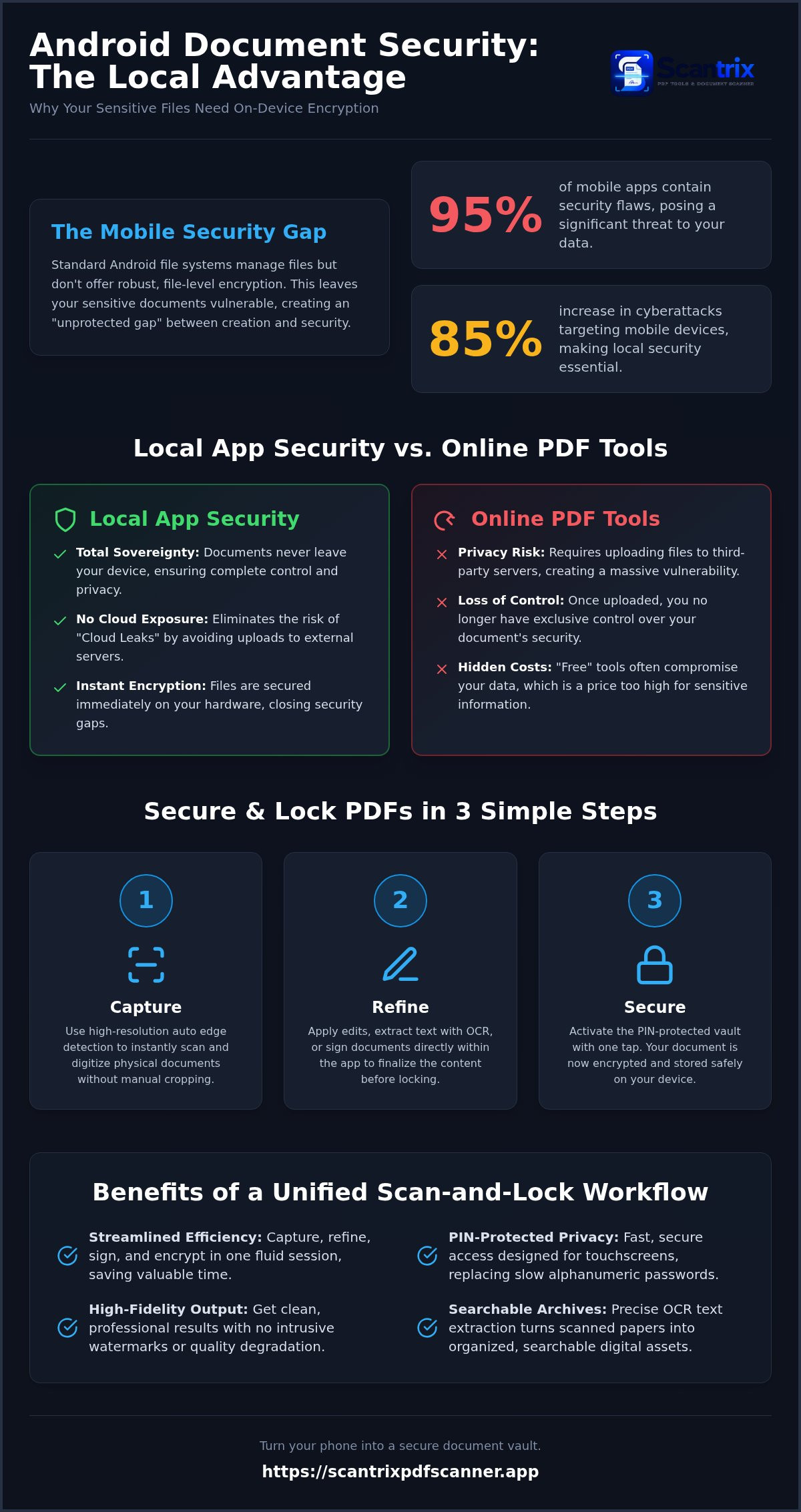
95% of mobile apps contain security flaws. This is a fact. For professionals handling sensitive data, it's a threat. You need a dedicated app to lock pdf files on android that keeps your documents off the cloud. You want local control. You need immediate results. Security shouldn't be a gamble. It should be a standard.
You're tired of clunky interfaces. Managing dozens of passwords is a waste of time. We agree. Mobile security shouldn't be a struggle. This guide shows you how to secure documents instantly using professional tools built for PIN-protected privacy. You'll master a high-performance workflow from scan to lock. No fluff. No friction. Just a fast, local way to encrypt your files and protect your privacy. It's time to turn your phone into a secure document vault and reclaim your digital peace of mind.
Key Takeaways
- Local encryption keeps sensitive documents on your device. Eliminate unauthorized access and risky cloud uploads.
- Use a professional app to lock pdf files on android to streamline your workflow. Integrate capture, signing, and encryption into one step.
- Achieve high-fidelity results with smart edge detection and OCR. Turn physical papers into secure, searchable digital assets.
- Prioritize speed with PIN-protected privacy. Access your document vault instantly without managing complex passwords.
Why You Need a Dedicated App to Lock PDF Files on Android
Standard Android file systems lack granular, file-level encryption. They manage files but don't protect them. Using a dedicated app to lock pdf files on android fills this gap. It replaces bulky desktop software with a sleek mobile solution. You get professional security without the wait. It’s efficient. It’s necessary. According to the Verizon 2025 Mobile Security Index, cyberattacks targeting mobile devices increased by 85%. The PDF file format supports advanced security; your phone needs the right tool to activate it.
Complex alphanumeric passwords frustrate users. They lead to lockouts and lost time. PIN-protected privacy offers a superior alternative. It’s designed for touchscreens. It’s fast. It’s secure. You gain instant access to your document vault while maintaining high-level encryption. This local approach ensures your sensitive documents never leave your device unauthorized. It provides a professional-grade barrier against unauthorized access without the friction of traditional logins.
Local App Security vs. Online PDF Tools
Free online converters come with a hidden cost: your privacy. These tools require file uploads to external servers. This creates a massive "Cloud Leak" risk. Once a file leaves your device, you lose control. Professional apps like Scantrix prioritize local processing. Everything stays on your hardware. No mandatory cloud sync. No third-party exposure. Local encryption is the only way to guarantee total document sovereignty on Android. It turns your smartphone into a silent, high-performance assistant for secure document management. You bypass the security flaws found in 95% of tested mobile apps. Choosing an app to lock pdf files on android means choosing safety over convenience.
How to Secure and Lock PDFs in 3 Simple Steps
Efficiency defines the modern professional workflow. Securing documents shouldn't take minutes. It should take seconds. By using a specialized app to lock pdf files on android, you eliminate the "unprotected gap" between capture and encryption. This seamless transition prevents data exposure. It ensures your files are safe from the moment they become digital assets. To improve your PDF document security, follow this streamlined three-step process.
- Step 1: Capture. Position your phone over the document. High-resolution automatic edge detection identifies borders instantly. The app crops and enhances the image without manual input.
- Step 2: Refine. Apply necessary edits. You can sign pdf documents on phone directly within the interface. This maintains document integrity before the final lock.
- Step 3: Secure. Activate the PIN-protected vault. Restrict unauthorized viewing with one tap. Your document is now encrypted and stored locally.
Configuring PIN-Protected Privacy for Sensitive Documents
Set up a 4-digit or 6-digit PIN for immediate access. This replaces traditional alphanumeric passwords that slow you down on touchscreens. Organize your locked files into secure folders. This structure simplifies professional audits and keeps your workspace clean. Before locking, you might need to extract data. Learn how to copy text from a scanned document on android to finalize your edits. This integrated approach ensures every file is perfect before it's sealed. For advanced security questions, contact our technical support team for expert guidance.
The Benefits of a Unified Scan-and-Lock Workflow
Managing multiple apps creates friction. It invites human error. A unified workflow eliminates these risks immediately. By using a scanner with built-in security, you consolidate your professional toolkit. You capture, refine, and encrypt in a single, fluid session. This integration solves the critical security gap found in traditional tools that ignore the capture phase. Scantrix provides the speed of a mobile tool with the technical authority of desktop software. It’s a complete document ecosystem. It’s efficient. It’s reliable.
Professional-grade output is a non-negotiable standard. Many free tools insert intrusive watermarks or degrade image quality. They compromise your professional brand. Scantrix delivers clean, high-fidelity results every time. You get precise OCR text extraction for searchable, organized archives. Your documents look professional because they are. They stay private because you chose an app to lock pdf files on android that prioritizes local encryption. No leaks. No third-party compromises. Just high-performance results for high-stakes data.
Transitioning to a Paperless and Secure Office
Digitizing legal and financial records is only the first step. Locking them is the essential second. A paperless office must be a secure office to be viable in 2026. Professional scanning apps act as a silent assistant in your daily productivity. They handle the complex mathematics of encryption while you focus on high-value tasks. You achieve total organization. Your sensitive records stay digitally encrypted and instantly accessible in a local vault. It’s the future of document management. It starts with your next scan. Download Scantrix PDF Scanner to secure your mobile documents today.
Secure Your Mobile Workflow Today
Mobile document security is no longer optional. It's a professional requirement. You now understand how local encryption protects data from cloud leaks. You've seen how a unified workflow removes friction between scanning and securing. Choosing the right app to lock pdf files on android is the final step in building a secure paperless office. It turns your device into a high-performance vault.
Scantrix delivers the specific tools for this transformation. You gain PIN-protected privacy for instant access. You produce professional scans with no watermarks. You utilize advanced OCR text extraction for precise organization. Stop compromising sensitive data with unsecure tools. Prioritize speed and reliability in your mobile security strategy. It's time to take control.
Secure your documents with Scantrix PDF Scanner on Android today. Experience total document sovereignty. Your digital peace of mind starts now.
Frequently Asked Questions
Is it safe to lock PDF files using a free Android app?
Safety depends on the app's data policy. Many free tools monetize through data harvesting or intrusive ads. Professional solutions prioritize local processing. They ensure your documents never reach a third-party server. This eliminates cloud-based leaks. Always verify an app's permissions before installation. Local encryption remains the gold standard for mobile document sovereignty.
Can I recover a locked PDF if I forget my PIN or password?
Recovery is typically impossible with professional-grade local encryption. This is a security feature, not a bug. If a developer could bypass your PIN, your data wouldn't be truly secure. You must manage your credentials carefully. Store your PIN in a reliable password manager. Without the correct code, your sensitive files stay permanently locked. Security demands absolute user accountability.
Does locking a PDF on Android make it unreadable on a computer?
Standard PDF encryption remains cross-platform. Locking a file on your phone won't break compatibility with your desktop. When you use an app to lock pdf files on android, it utilizes protocols recognized by global software. You will enter the same PIN or password on your computer to gain access. It’s a professional, integrated workflow for your digital office.
What is the difference between a password-protected PDF and a PIN-protected app?
Password protection encrypts the individual file. A PIN-protected app to lock pdf files on android secures your entire local vault. The app-level lock prevents unauthorized users from even viewing your file directory. It adds a critical layer of privacy before a document is ever opened. Combining both methods provides the highest level of mobile security for sensitive records.


