

Your phone gallery is a major security liability. Mixing tax returns with vacation photos invites a data breach. It's a common mistake. Most users leave sensitive information exposed to any app with media access. You need a professional confidential document scanner app to isolate your private data. Security requires a dedicated environment.
This 2026 guide delivers the exact steps to digitize and protect your files on Android 17. You will learn to build a PIN-protected digital vault. We cover how to scan physical papers, use OCR for text extraction, and manage a searchable, encrypted archive. It's time to replace gallery clutter with technical sophistication. Stop compromising. Start securing. Transform your phone into a high-performance secure storage tool today. This systematic approach ensures your data remains private and accessible.
Key Takeaways
- Stop storing IDs in photo galleries. Build an encrypted, PIN-access vault for total privacy.
- Capture professional documents instantly. Use smart edge detection for clean, high-resolution PDF borders.
- Protect sensitive files with a confidential document scanner app. Isolate data from unauthorized mobile access.
- Optimize your digital workflow. Use OCR and e-signatures to maintain a searchable, secure document archive.
Understanding Secure Document Storage on Android
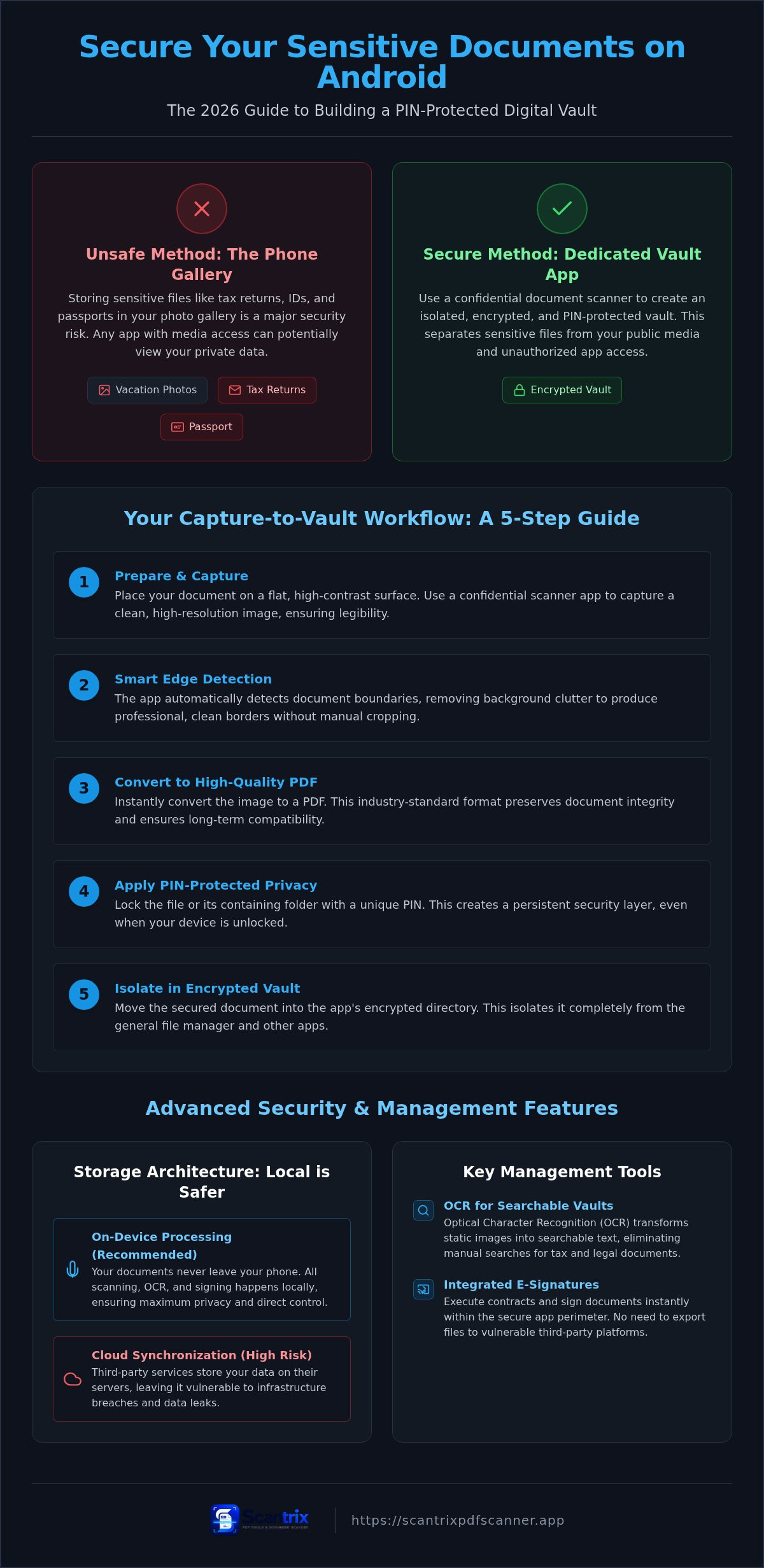
Secure document storage is a hardened, encrypted environment. It requires more than a standard file folder. A professional confidential document scanner app creates an isolated vault for your most sensitive data. Most users mistakenly store passports or tax records in their system photo gallery. This is a critical security gap. Standard galleries lack permission isolation. Any third-party application with media access can potentially view your private IDs. You must separate these files from your public media to prevent unauthorized scans. Security starts with isolation.
Android 17 security standards in 2026 demand multi-layer protection. Cloud synchronization is often marketed as a solution, but it introduces significant risks. Services like Evernote rely on server-side storage. This leaves your information vulnerable if their infrastructure is breached. Local, on-device privacy is the superior architecture. It keeps your files under your direct control within the device hardware. Strengthening your Mobile security involves minimizing your digital footprint. On-device processing ensures your documents never leave your possession during the digitization process.
Why PIN-Protected Privacy is Your First Line of Defense
Lock files. Prevent unauthorized access. Stay private. A dedicated app to lock PDF files on android prevents accidental exposure during screen sharing or device hand-offs. Biometric locks are convenient but often lack the granularity of a secondary PIN barrier. If you share your phone with colleagues or family, a PIN ensures your legal documents remain hidden. This creates a persistent security layer that remains active even when the device is unlocked. Scantrix PDF Scanner provides this essential isolation. It acts as a silent assistant for your digital organization. Use Scantrix PDF Scanner to build a secure perimeter around your critical information. This systematic approach guarantees professional-grade output and total data privacy.
How to Store Sensitive Documents on Your Phone: A 5-Step Guide
Secure your physical documents through a systematic five-step process. Place your papers on a flat, high-contrast surface. Neutral lighting prevents visual artifacts. Use a confidential document scanner app to initiate the capture. High-resolution sensors on Android 17 require steady hands. This ensures your final PDF is legible for professional use. Blurry scans are a security risk. Clarity is essential.
Execute the scan. Smart edge detection identifies document boundaries instantly. It removes background clutter automatically. This produces professional, clean PDF borders without manual cropping. Convert the image to a high-quality PDF immediately. This format preserves document integrity and ensures long-term compatibility. It's the industry standard for legal and financial records. Digital transformation requires precision.
Finalize the security layer. Apply PIN-protected privacy to the specific file or folder. Move the document into an encrypted directory. This isolates the sensitive data from your general file manager. Your phone now functions as a high-security vault. No unauthorized users can access the content without the correct code. It's a closed-loop system. Your privacy remains intact.
The Capture-to-Vault Workflow with Scantrix PDF Scanner
Launch Scantrix PDF Scanner and activate the camera tool. Position your device. This confidential document scanner app handles alignment and cropping automatically. This eliminates background noise. Move the final file into a PIN-locked directory for maximum safety. This workflow is significantly faster than using desktop scanners. If you require a custom configuration for your business, reach out for a professional consultation to secure your workflow. It is the most efficient method for Android data protection.
Advanced Features for Secure Document Management
A secure vault is only effective if it's functional. OCR transforms static images into actionable data. It creates searchable vaults for tax and legal documents. This eliminates manual searching. Many users rely on fragmented workflows. They scan with one tool and extract text with another. This movement between apps increases data exposure risks. A unified confidential document scanner app eliminates these gaps. It processes everything locally on your Android device. Process locally. Stay secure.
E-signatures are the final component of a secure mobile office. They allow you to execute contracts instantly. You don't need to export files to third-party signature platforms. This keeps your sensitive information within the encrypted perimeter. Local storage remains the safest choice in 2026. Cloud synchronization introduces unnecessary vulnerabilities. If a server is compromised, your private records are at risk. Perform regular security audits. Review your app permissions every thirty days. Verify that your PIN-protected privacy features are fully operational. Control your data. Protect your future.
Optimising Your Secure Digital Filing System
Efficiency requires organization. Use OCR text extraction to index sensitive records. This allows for instant keyword searches across your entire archive. Learn to sign PDF documents on your phone to close contracts securely. It prevents the need for physical printing or external software. Implement a strict naming convention. Use a standard date and document type format for every file. This systematic approach ensures fast retrieval within your PIN-locked vault. You save time. You maintain total control.
Secure Your Mobile Data Strategy
Transitioning from physical clutter to a secure digital vault is a modern necessity. You now have the roadmap to isolate sensitive IDs from public galleries and implement a robust capture-to-vault workflow. Using a professional confidential document scanner app provides the technical barrier your data requires in 2026. It's about precision and privacy. Stop settling for basic storage.
Leverage Smart edge detection for clean, professional captures every time. Utilize Professional OCR extraction to transform your records into a searchable, organized archive. Always rely on PIN-protected privacy to lock your files against unauthorized access. These features work together to create a hardened security perimeter on your Android device. Ready to optimize your system? Get a professional security consultation for your document workflow to ensure your mobile office is bulletproof. Take control of your privacy today. Your information deserves professional-grade protection.
Frequently Asked Questions
Is it safe to store my Social Security card on my Android phone?
Yes, provided you use a dedicated encrypted vault rather than the system gallery. Standard photo apps expose your data to any app with media permissions. Using a confidential document scanner app ensures your sensitive ID is isolated. This method prevents unauthorized access and keeps your personal data secure under 2026 privacy standards. It's the most reliable way to handle sensitive records.
What is the best way to encrypt a PDF on Android for free?
Use an app that offers local, PIN-protected privacy features to secure your files without cloud fees. Many free versions of professional utilities provide basic encryption for individual documents. You don't need expensive subscriptions for essential locking. Avoid web-based converters that require uploading your files. Local encryption keeps data on the hardware. This ensures documents remain private and inaccessible.
Can I access my PIN-protected documents if I am offline?
You can access your secured files anywhere because professional security tools prioritize local storage. Offline access is a critical feature of a high-quality confidential document scanner app. It ensures you aren't dependent on a stable internet connection for urgent tasks. Your data remains encrypted on your device. Simply enter your PIN to view or share your records instantly. Access stays fast and reliable.
How do I scan and secure tax receipts for the 2026 tax season?
Capture your receipts using smart edge detection to ensure clear, high-resolution images. Immediate conversion to PDF format preserves the financial data. Use professional OCR text extraction to make your receipts searchable by date or vendor. Finally, move these files into a locked directory. This systematic approach simplifies your 2026 tax preparation while maintaining a clean, secure digital archive. Stay organized and protected.


