

What if the fastest way to find a scanned receipt, contract, or record is to make its filename do the sorting for you? Vague names like Scan_0047.pdf tell you almost nothing, and scans from different dates or categories quickly blur together. The best way to name scanned documents for organization is to use a short, repeatable pattern that makes each file easy to identify.
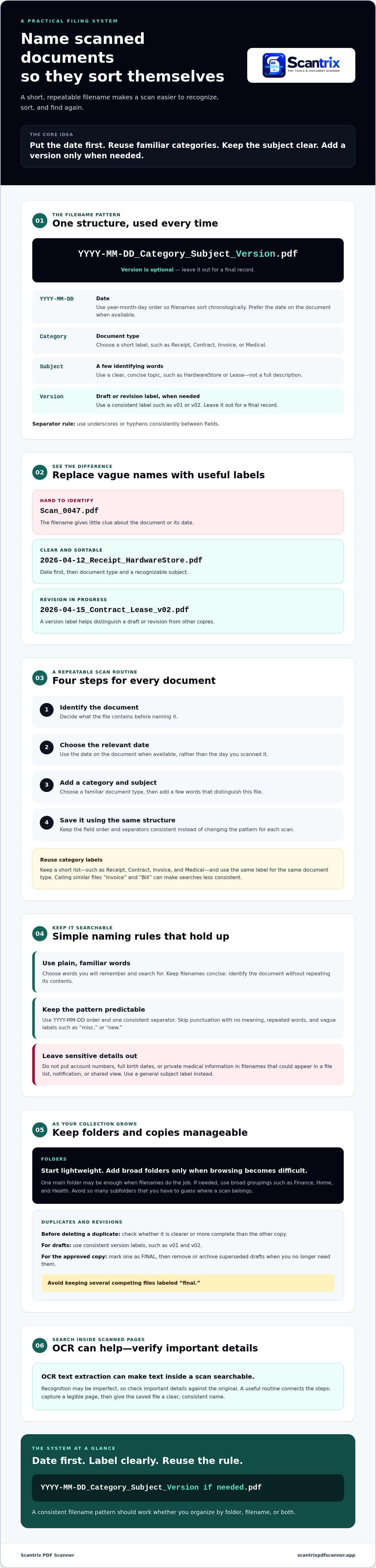
Start with YYYY-MM-DD, then add a category and a clear subject. Include a version only when needed. This format keeps files sortable by date and easier to find by type or topic. In this guide, you’ll learn how to choose useful labels, apply them consistently, and build the naming step into your scanning routine.
Key Takeaways
- The best way to name scanned documents for organization is to use a clear pattern you can repeat with every scan.
- Build a short list of category labels and reuse the same one for each document type.
- Set a simple rule for duplicate scans and revised copies so you can identify the version to keep.
- Use folders when they make browsing easier, but avoid extra layers when consistent filenames are enough.
Best Way to Name Scanned Documents: Start with a Simple Pattern
The best way to name scanned documents for organization is to use one consistent, descriptive format that tells you what a file contains, when it belongs, and which version to open. A useful pattern is YYYY-MM-DD_Category_Subject_Version.pdf. Treat the version field as optional: leave it out for a final record, and include it for drafts or revisions.
For example, rename Scan_0047.pdf to 2026-04-12_Receipt_HardwareStore.pdf. While a document is being revised, change Document1.pdf to 2026-04-15_Contract_Lease_v02.pdf. Starting with the date sorts files chronologically, while the category and subject make each one easier to recognize. For an overview of filename components and conventions, see this guide to understanding filenames.
Which details belong in a scanned document filename?
Include only details that help you identify or retrieve the file. Keep the pattern short and predictable:
- Date: Use YYYY-MM-DD, such as 2026-04-12. Year-month-day order keeps filenames in date sequence.
- Category: Choose a short label, such as Receipt, Contract, or Medical, and reuse it for similar documents.
- Subject: Add a few identifying words, such as HardwareStore or Lease, rather than a full description.
- Version: Add v01 or v02 to drafts and revisions. Leave it out for a final record.
Use underscores or hyphens consistently between fields. Avoid details that don’t help identify the file. A compact name is easier to scan, sort, and reuse for future documents.
How to Name Scanned Documents Consistently, Step by Step
A naming rule is useful only if you apply it consistently. Follow the same quick workflow for each scan:
- 1. Identify the document. Decide what the file contains before naming it.
- 2. Choose the relevant date. Use the date on the document when available, rather than the day you scanned it.
- 3. Add a category and subject. Choose a familiar document type, then add a few words that distinguish the file.
- 4. Save it using the same structure. Keep the field order and separators consistent instead of changing the pattern for each scan.
Keep a short list of category labels, such as Receipt, Contract, Invoice, and Medical. Reuse the same label for the same type of document. If you call one file “Invoice” and another “Bill,” a search for either term may not find both. The Network of the National Library of Medicine offers guidance on consistent naming conventions, including date formats and practical ways to make filenames uniform.
How can you keep filenames searchable and easy to sort?
Choose plain words you’ll remember and search for. Keep dates in YYYY-MM-DD order, and use underscores or hyphens as your standard separator. Skip punctuation that adds no meaning, repeated words, and vague labels such as “misc.” or “new.”
Keep filenames concise. The name should identify the document, not repeat its contents. Don’t include sensitive details such as account numbers, full birth dates, or private medical information in a filename that could appear in a file list or on a shared screen. Use a general subject label instead. For an Android scanning workflow, Scantrix PDF Scanner can capture and organize PDFs alongside a consistent naming habit.
Maintain an Organized Scanned Document System as Your Files Grow
Keep the system lightweight. If filenames make files easy to find, one main folder may be enough. Add a few broad folders, such as Finance, Home, and Health, when browsing a growing collection becomes difficult. Avoid so many subfolders that you have to guess where each scan belongs. Your naming pattern should work whether you organize by folder, filename, or both.
Set a clear rule for copies. Before deleting a duplicate scan, check whether it is clearer or more complete than the other copy. For documents being revised, label drafts consistently, such as v01 and v02. Mark one approved copy as FINAL, then remove or archive superseded drafts when you no longer need them. Avoid keeping several competing files labeled “final.”
How should you adapt the system for privacy and future searches?
Keep account numbers, full birth dates, and other sensitive identifiers out of filenames that could appear in notifications or shared views. Use a general subject label instead. If you need to search for words inside a scan, choose a scanner with OCR text extraction. OCR can make text searchable, but recognition may be imperfect, so check important details against the original.
Scanning and naming work best as connected steps: capture a legible page, then give the saved file a useful label. Scantrix PDF Scanner is an Android PDF scanning app with OCR text extraction. For more on the app, visit Scantrix PDF Scanner. A broader digital filing cabinet guide can also help you decide how folders and filenames should work together.
Make Your Naming System a Scanning Habit
A reliable filing system starts with a filename pattern you can use without stopping to rethink every scan. Put the date first, choose consistent category labels, and add a concise subject. Reserve version tags for drafts or revisions, and keep folders simple enough to browse.
The best way to name scanned documents for organization is the one you’ll keep using as your files grow. Make naming part of the scan-to-save routine, and review duplicate or outdated copies before they clutter your collection. If you scan on Android, Scantrix PDF Scanner is a free PDF scanning app that can extract text with OCR and organize PDFs.
Explore Scantrix PDF Scanner or contact the team to learn more and make a consistent naming pattern part of your scanning routine.
Frequently Asked Questions
What is the best format for naming scanned documents?
Use a consistent format that identifies the date, document category, and subject: YYYY-MM-DD_Category_Subject.pdf. For example, 2026-04-12_Receipt_HardwareStore.pdf is more descriptive than Scan_0047.pdf. Add a version label only for drafts or revisions. The best way to name scanned documents for organization is to keep the pattern short, predictable, and easy to reuse.
Should I put the date at the beginning or end of a scanned file name?
Put the date at the beginning, using year-month-day order, such as 2026-04-12. This format helps files sort chronologically by name, even across different categories. Use the same date position and format for every scan. Avoid ambiguous forms like 04-12-26, which can be interpreted differently depending on date conventions.
How do I name scanned documents so I can search for them?
Use plain, specific terms you’re likely to remember, such as the document type and a useful subject: Invoice_PhoneRepair or Receipt_HardwareStore. Keep category labels consistent, skip filler words, and don’t include sensitive identifiers that could appear in a file list. OCR can make text inside a scan searchable, but recognition may not be perfect, so verify important details.
Should I use folders or filenames to organize scanned documents?
Use filenames as the foundation, then add folders if they make browsing easier. A small set of broad folders, such as Finance or Home, can help manage a growing collection. If descriptive filenames make files easy to locate, one main folder may be enough. Avoid deep folder structures that make it hard to decide where a scan belongs.


