

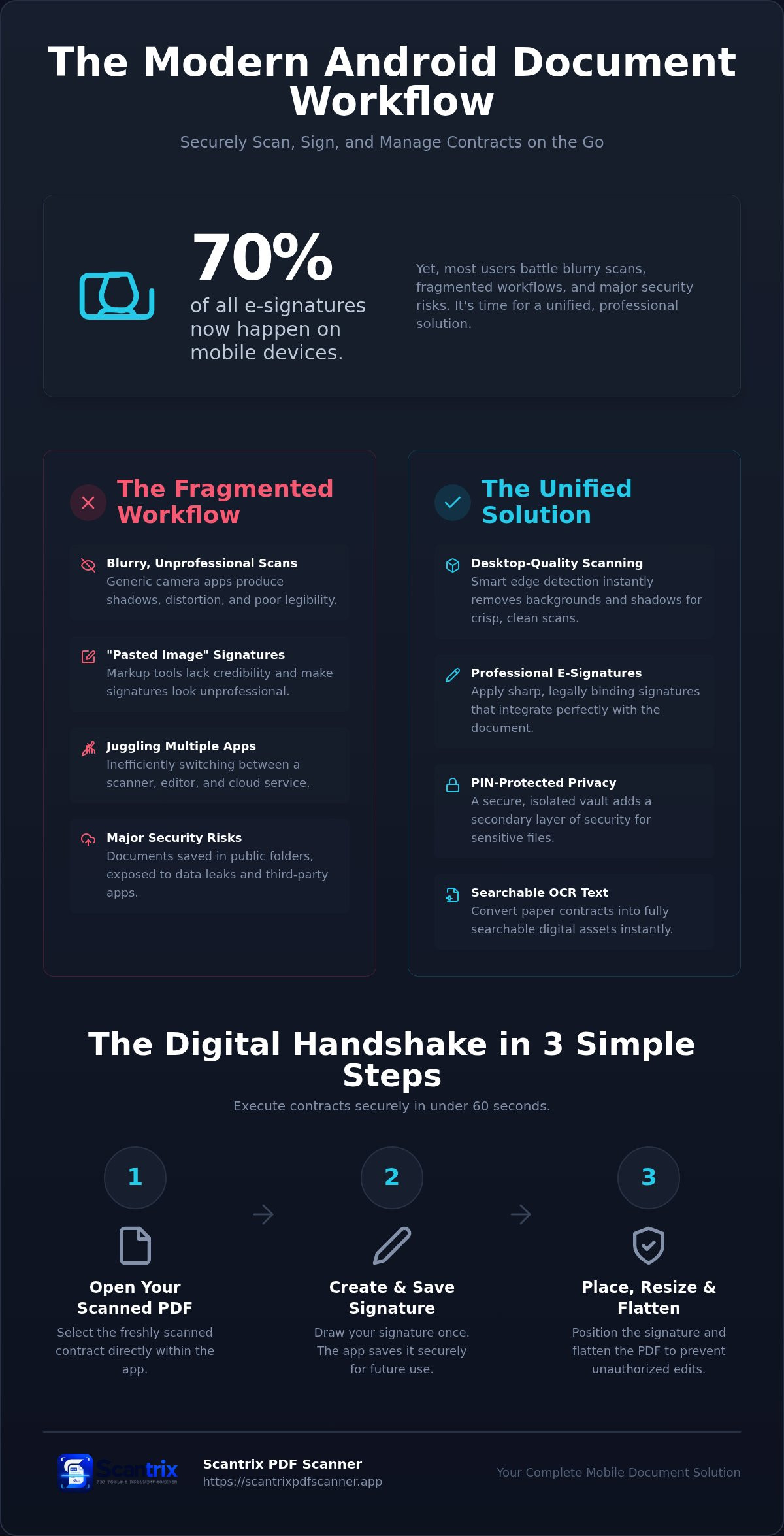
70% of all electronic signatures now happen on mobile devices. Yet, most users still battle blurry scans and fragmented workflows. You shouldn't have to juggle three separate apps to close a single deal. It's inefficient. It's frustrating. You need professional-grade results without technical friction. Security shouldn't be an afterthought.
This guide reveals how to securely scan and sign documents android users can rely on for sensitive contracts. You'll learn the exact steps to digitize paper, apply legally binding signatures, and encrypt your files instantly. We'll explore how to leverage smart edge detection, OCR text extraction, and PIN-protected storage. Stop settling for unprofessional outputs. Start using a single, high-performance workflow. Clear scans. Secure signatures. Total control.
Key Takeaways
- Capture desktop-quality scans. Use smart edge detection to eliminate shadows and distortion instantly.
- Master how to securely scan and sign documents android professionals rely on. Apply professional signatures in seconds.
- Secure sensitive legal data. Implement PIN-protected privacy for a secondary layer of mobile security.
- Convert paper into searchable assets. Leverage OCR text extraction to streamline your digital workflow.
Mastering the Secure Scan: Capturing Contracts on Android
Professional contracts demand professional scans. Generic camera apps fail here. They produce shadows. They create distortion. This undermines the legitimacy of your digital assets. High-quality capture is the absolute foundation. If the base image is blurry, the entire workflow fails. Your digital Electronic signature requires a crisp, legible background to maintain its professional appearance.
Security begins the moment you press the shutter. Many generic tools automatically sync sensitive data to public cloud folders. This creates a massive privacy risk for legal documents. You must ensure your tool prioritizes local, isolated storage during the capture phase. A secure environment prevents unauthorized access before the document is even signed. You need a closed-loop system to securely scan and sign documents android devices can manage without data leaks.
Professional Edge Detection and Capture Techniques
Achieving a desktop-quality result requires specialized logic. Use Scantrix PDF Scanner for automatic edge detection. This feature identifies document boundaries instantly. It removes background noise. It ensures a perfect crop every time. You don't have to manually adjust corners or fight with perspective. The app does the heavy lifting.
Legibility is critical for legal compliance. Integrated filters remove harsh shadows. They enhance text contrast. This produces a clean, white background that mimics a physical flatbed scanner. For complex agreements, you can organize multi-page contracts into a single, cohesive PDF file. It's fast. It's systematic. This approach ensures your output is professional, searchable, and ready for immediate execution. Transformation from physical paper to digital asset becomes a seamless, one-tap process.
The Digital Handshake: How to Sign PDF Documents on Android
Scanning is the beginning. Signing is the result. Generic markup tools often fail. They create a "pasted image" look. This appears unprofessional. It lacks credibility. You need a dedicated tool to maintain document integrity. A specialized signature engine ensures the ink looks sharp. It integrates perfectly with the PDF. High-quality output is non-negotiable for 2026 contracts. Professionalism builds trust.
Workflow speed is your competitive edge. You shouldn't juggle multiple apps. A unified system allows you to securely scan and sign documents android users need for rapid execution. You can finish the entire process in under sixty seconds. Speed requires security. Understanding Digital Signatures is vital for document safety. A professional utility manages metadata and tamper-evidence automatically. It acts as a silent assistant. It protects your data while you work.
Creating and Applying Legally Binding E-Signatures
Execution must be effortless. Use this systematic approach for every contract:
- Step 1: Open your scanned document. Select the integrated E-Signature tool.
- Step 2: Draw your signature once. The app saves it securely. This eliminates repetitive tasks.
- Step 3: Place, resize, and flatten the signature. Flattening prevents unauthorized editing. It locks the signature into the PDF structure.
This method ensures your agreements are professional and secure. Learn more about signing PDF documents on your phone for total legal validity. When you securely scan and sign documents android workflows become truly mobile. If you have questions about specific legal requirements, contact our team for guidance.
Protecting Sensitive Data: PIN-Protected Document Security
Digital capture is just the first step. Secure storage completes the professional workflow. Most free scanners dump PDFs into your phone's general gallery or public download folders. This is a critical vulnerability. It exposes sensitive contracts to any third-party app with basic media permissions. You need an isolated environment. You must securely scan and sign documents android utilities can keep hidden from the rest of the operating system. Privacy isn't optional.
Your phone's lock screen is a general barrier. It isn't sufficient for high-stakes paperwork. Financial records, tax forms, and legal agreements require a secondary layer of protection. This internal vault prevents accidental data exposure when you share your device with colleagues or family members. It also blocks unauthorized cloud syncs from leaking sensitive metadata to public servers. Isolation is the only path to true mobile document security. Control your data.
Managing a Secure, Paperless Workflow with Scantrix
Efficiency meets privacy in a single interface. Enable PIN-protected privacy within the app to lock specific folders. This creates a secure vault for your most critical digital assets. You can also utilize OCR text extraction to index your files. This technology makes your PDFs searchable within the app without exposing the text to external indexing tools. It’s fast. It’s smart. It’s protected. You save time while maintaining total confidentiality.
Consistency is vital for long-term security. Ensure your legally binding e-signatures remain behind this same security layer. Never store signature assets in unencrypted folders. A unified, protected workflow ensures that from the moment of capture to the final archive, your data remains private. It’s a complete system for the modern professional. No friction. No leaks. Just high-performance security. Build a workflow you can trust.
Elevate Your Professional Mobile Workflow
Physical paperwork is now obsolete. You've mastered the transition. Professional document management requires more than a camera app. It demands precision. It requires security. Privacy isn't optional. You now have the tools to securely scan and sign documents android workflows demand. Use automatic smart edge detection for every capture. Apply crisp, professional signatures in seconds. Lock your most sensitive files behind a PIN-protected privacy vault. This isn't just about digitizing paper. It's about building a high-performance, secure ecosystem.
Professional OCR text extraction ensures your data remains searchable and organized. Don't settle for fragmented tools. Take control today. Efficiency wins deals. Download Scantrix PDF Scanner for Android and transform your productivity. Your secure mobile office is ready.
Frequently Asked Questions
Is it secure to scan sensitive documents with an Android app?
Security depends on the application's architecture. Scantrix provides a closed-loop system that avoids auto-syncing to public clouds. It utilizes isolated storage and a PIN-protected vault to keep files private. This prevents third-party apps from accessing your sensitive contracts. You maintain total control over your data. It's the professional standard for mobile document privacy in 2026.
How do I add a legally binding signature to a PDF on Android?
Use an integrated e-signature tool that flattens the asset into the PDF. This prevents unauthorized editing or signature reuse. Scantrix allows you to draw your signature once and apply it precisely to any agreement. You can securely scan and sign documents android users need for valid, remote execution. It ensures your contracts look professional and remain tamper-evident.
Can I password protect individual PDF files on my phone?
Yes. You should use a utility with a dedicated PIN-protected privacy vault. Most generic file managers don't offer internal folder locking. Scantrix enables you to secure sensitive folders within the app. This creates a vital secondary layer of protection beyond your device lock screen. It's the most effective way to safeguard financial and legal records from accidental exposure.
What is the best way to scan multi-page contracts without a flatbed scanner?
Leverage smart edge detection to capture pages sequentially. This technology identifies boundaries and corrects perspective automatically. Scantrix organizes these individual scans into a single, cohesive PDF file instantly. Built-in filters remove shadows and enhance text contrast for desktop-quality results. It's the fastest way to digitize long agreements using only your smartphone. High-performance results are guaranteed every time.


