

Data breaches now cost an average of $4.99 million. One lost phone. One unencrypted file. That's all it takes. You know the risk. Your phone holds your life. Securing a document shouldn't feel like a chore. Ad-heavy tools waste time. Complex software adds friction. You need professional results without the desktop. This guide identifies the best password protected pdf app android to bridge the gap between raw scans and professional encryption.
Discover how to use Scantrix PDF Scanner to lock and manage sensitive documents directly on your device. We'll break down the scan-to-lock workflow, PIN-protected categories, and the tools required to keep data offline. Professional privacy starts with a tap. Let's secure your files.
Key Takeaways
- Secure sensitive records against physical theft. Professional encryption ensures document compliance and data integrity.
- Centralize security workflows. Use a password protected pdf app android to eliminate risks associated with multi-app file handling.
- Automate professional output. Smart edge detection and OCR transform physical paper into high-fidelity, searchable digital assets.
- Accelerate document protection. Apply PIN-protected privacy at the point of capture for immediate, on-device security.
Why You Need a Password Protected PDF App on Android
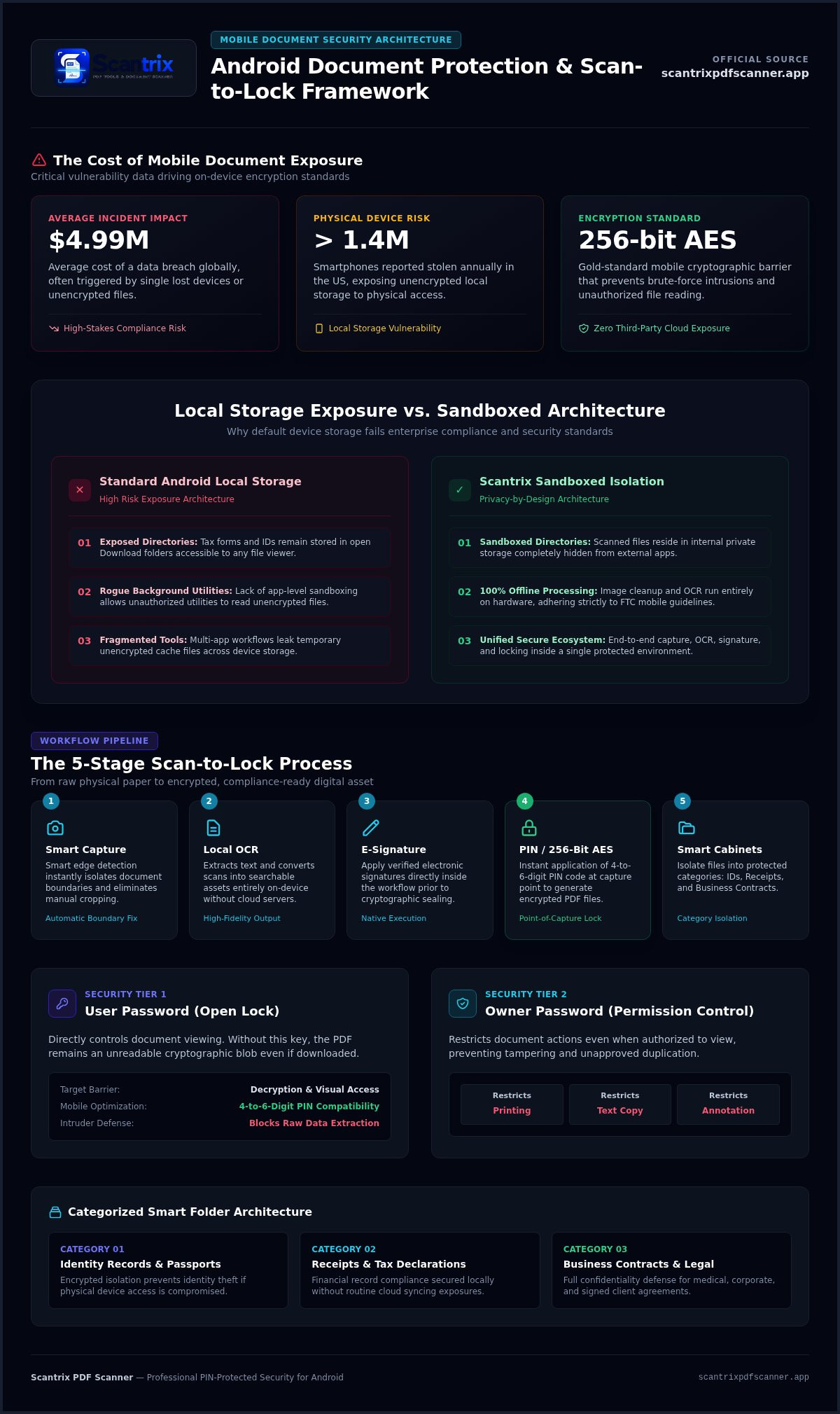
Smartphones are high-value targets. Over 1.4 million devices are reported stolen annually in the US. An unlocked screen grants a thief total access to your digital life. Without a password protected pdf app android, your tax records, bank statements, and IDs sit exposed in the downloads folder. Local storage isn't a vault. It's a vulnerability. You need a dedicated barrier between your sensitive data and unauthorized eyes.
Compliance drives the modern security need. Business contracts and medical records require professional-grade protection to meet privacy standards. Scantrix delivers this through PIN-protected privacy. By utilizing AES encryption standards, it ensures that even if a file is intercepted, it remains unreadable. Security isn't a luxury. It's a baseline requirement for mobile productivity. Secure your workflow. Protect your reputation.
Protecting Sensitive Data in a Mobile-First World
Unencrypted PDFs on local storage are easy prey for malicious background utilities. Standard Android folders often lack the isolation needed for high-stakes documents. Scantrix solves this with privacy by design. Files stay in sandboxed internal directories, hidden from other apps. This architecture prevents accidental data exposure during routine file sharing or cloud syncing. You decide who sees the content. No leaks. No compromises.
Transitioning from physical paper to digital storage requires trust. Scantrix builds that trust through local-first processing. It keeps your scans off third-party servers. Your data stays on your device. It remains under your control. Finding a reliable password protected pdf app android ensures your digital transition is seamless and safe. Use Scantrix to transform your phone into a secure digital architect. Simplify your security. Amplify your privacy.
Key Features of a Secure Document Scanner
High-grade encryption is the primary defense. It blocks brute-force attempts. A professional password protected pdf app android integrates capture and security into one workflow. Scantrix eliminates third-party file handling. This minimizes the risk of data leaks during transfers. Everything happens in one environment. Capture. Clean. Lock. It's a streamlined process designed for speed. You don't need multiple tools. One app handles the entire lifecycle.
Offline processing is a critical requirement. Your sensitive data never leaves the hardware. Scantrix performs image cleanup and OCR locally. It doesn't rely on cloud servers. This local-first approach mirrors FTC guidelines on protecting mobile devices by reducing external exposure. Secure apps keep data isolated. Scantrix delivers this isolation by default. Your phone remains a private vault. No uploads. No compromises.
Encryption Standards and PIN-Protected Privacy
Understand the two layers of PDF security. User passwords control document opening. The file remains an unreadable blob without it. Owner passwords manage permissions. They restrict high-resolution printing, text extraction, or annotation. Mobile environments demand agility. Implementing PIN-protected privacy is faster for frequent mobile access than complex alphanumeric strings. It provides immediate entry for the user while maintaining a hard barrier against intruders. 256-bit AES encryption is the modern gold standard for mobile PDF security, ensuring your files remain safe against advanced decryption attempts.
Efficiency meets security. Scantrix uses smart edge detection for professional output. It then applies PIN protection at the point of capture. You get a seamless scan-to-lock workflow. No extra steps. No wasted time. If you need help optimizing your mobile document security, reach out to our experts for tailored advice.
Scantrix: The Seamless Scan-to-Lock Workflow
Speed defines productivity. Scantrix prioritizes immediate action. Smart edge detection identifies document boundaries instantly. It eliminates manual cropping. You get clean, professional scans in seconds. This precision matters for legal and financial records. Once captured, the app applies PIN protection immediately. There is no delay between scanning and securing. Your sensitive data is never exposed. Scantrix functions as the premier password protected pdf app android by integrating security directly into the capture phase.
Organization follows encryption. Scantrix uses a systematic digital filing cabinet. You can categorize files into smart folders like IDs, receipts, or business contracts. Each category remains isolated. This creates a professional-grade structure on your device. It mirrors a desktop workflow without the hardware bulk. Efficiency remains high. Security stays absolute. You maintain total control over your digital archive.
From Physical Scan to Encrypted PDF
The workflow is linear. Capture the image. Extract text with professional OCR. Apply an e-signature. Secure the file with a 4-to-6-digit PIN. The Scantrix PDF Scanner App serves as the central hub for these tasks. It replaces fragmented multi-app processes. Managing secure files shouldn't slow you down. By keeping all tools in one interface, Scantrix maintains mobile momentum. It leverages Android's scoped storage to keep files isolated from other background apps. You get a high-performance result. You save time. You stay protected. If you need a reliable password protected pdf app android, Scantrix offers the most direct path from paper to encrypted digital PDF.
Secure Your Digital Future Today
Mobile document security is mandatory. Theft and data breaches cause permanent damage. Scantrix centralizes your workflow. It replaces slow, fragmented legacy tools. You get PIN-protected privacy instantly. Access professional OCR and E-Sign tools within one unified space. The premium version removes intrusive ads to ensure maximum productivity. This is the definitive password protected pdf app android for high-performance users who demand reliability and technical sophistication.
Transformation begins with one scan. Protect your contracts. Secure your IDs. Professional encryption is a tap away. Your device becomes a secure vault. Build your digital archive with absolute confidence today. High-speed security is the new standard for digital architects. Experience the difference of a streamlined, secure workflow.
Secure your sensitive documents with Scantrix today.
Frequently Asked Questions
How do I password protect a PDF on Android for free?
Scantrix provides a free base tier for Android. Capture your document using smart edge detection. Convert the scan to a digital file. Apply PIN-protected privacy immediately. This creates a secure barrier without requiring a desktop. It's a professional-grade solution available worldwide on Google Play. No high-cost subscriptions are required for basic encryption tasks. You get high-performance results for free.
Is it safe to use a third-party app to lock my sensitive PDF files?
Safety depends on the app's architecture. Scantrix uses a local-first approach. It processes OCR and encryption directly on your device hardware. Your sensitive data never leaves your smartphone. This minimizes exposure to third-party servers. Choosing a reliable password protected pdf app android ensures your files stay in a sandboxed internal directory. It's a secure digital vault for your personal records.
What happens if I forget the password to my protected PDF?
Standard PDF encryption is absolute. There is no recovery mechanism for lost passwords. If you lose the 4-to-6-digit PIN, the file remains permanently unreadable. This is by design. It prevents unauthorized access from thieves or hackers. Always keep a secure backup of your credentials in a separate, offline location. High-level security demands personal responsibility. Don't lose the key to your vault.
Can I remove a password from a PDF using an Android app?
You can remove a password if you possess the original credentials. Open the file within your password protected pdf app android. Enter the PIN to unlock the content. Use the export or "save as" feature to create an unencrypted version. This is useful for sharing documents that no longer require strict protection. Scantrix simplifies this transition. It keeps your workflow fluid, organized, and professional.


