

Unauthorized access to mobile devices surged by 78% this year. That's not just a statistic. It's a warning. Your default photo gallery isn't a safe. It's an open door for metadata scrapers and accidental cloud leaks. Mastering how to store sensitive documents on phone hardware is now essential for digital survival.
This 2026 guide delivers a professional workflow for capturing, encrypting, and safeguarding your private files. We'll explore hardware-isolated containers, PIN-protected vaults, and high-performance scanning tools. You'll transform your Android device into a secure, professional-grade vault. Move from vulnerability to total control. Access your data instantly. Keep it invisible. Secure your future.
Key Takeaways
- Bypass vulnerable photo galleries. Learn how to store sensitive documents on phone hardware using dedicated, encrypted vaults.
- Enable mandatory PIN protection. Ensure your private data stays offline to prevent unauthorized cloud sync and data leaks.
- Optimize document capture. Use smart edge detection to create professional-grade PDF scans of contracts and identification cards.
- Streamline your workflow. Utilize OCR and e-signature tools to manage sensitive files with precision and speed.
The Vulnerability of Default Mobile Document Storage
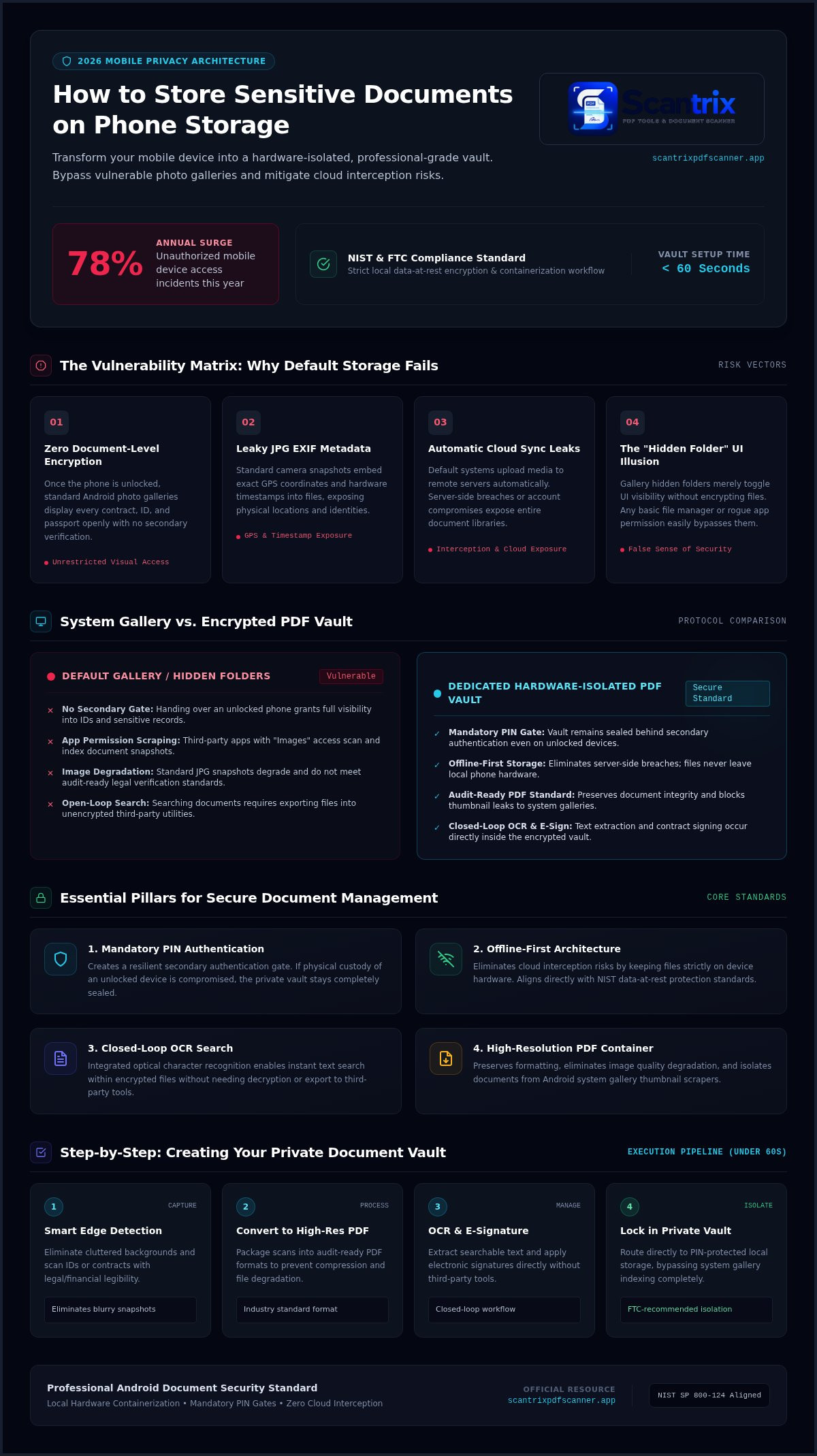
Default photo galleries prioritize convenience over security. Most users snap a photo of a passport. They leave it in the camera roll. This is a mistake. Standard Android galleries lack document-level encryption. Once your phone is unlocked, every file is visible. Standard JPG formats contain "leaky" metadata. This includes GPS coordinates and device timestamps. These factors increase your mobile device security risks. One breach exposes your identity.
Cloud sync creates immediate exposure. Services often upload sensitive data to remote servers by default. If your cloud account is compromised, your IDs are gone. App permissions intensify the threat. Many third-party tools request access to your entire "Images" folder. Granting this permission gives apps a direct window into your private life. You must change your approach to how to store sensitive documents on phone storage. Relying on default settings is a liability for anyone learning how to store sensitive documents on phone hardware.
Why Hidden Folders Aren't Secure Enough
Hidden folders are UI illusions. They remove files from view but don't encrypt the data. A basic file manager can bypass these visibility toggles easily. True security requires hardware-isolated, PIN-protected vaults. You need a dedicated environment. Professional workflows prioritize high-resolution PDFs. These files maintain data integrity. They support internal password gates. Don't just hide files. Encrypt them. Move beyond the gallery. Secure your workflow.
Essential Features for Secure Document Management
Security starts with local control. You need more than a device password. Mandatory PIN-protected privacy prevents unauthorized physical access. If someone grabs your unlocked phone, your vault remains sealed. This layer is critical for anyone learning how to store sensitive documents on phone devices. It creates a secondary authentication gate. No PIN. No access. Data stays safe.
Offline-first storage is the new gold standard. Most scanner apps push data to the cloud instantly. This creates an interception risk. Keeping documents strictly on-device eliminates server-side breaches. Your files never leave your hardware without your consent. This strategy aligns with the NIST guidelines for mobile device security. It focuses on data-at-rest protection and containerization. Secure capture. Local encryption. Zero cloud exposure.
Integrated OCR text extraction adds utility without risk. You can search within encrypted files instantly. No need to decrypt and export to third-party search tools. This maintains a closed-loop environment. You keep your productivity high. You keep your security tight. Efficiency meets privacy.
The Power of Local PDF Vaults
PDF is the professional standard. It preserves formatting and supports internal encryption. Unlike JPGs, PDFs don't leak thumbnails or metadata to your system gallery. Using PIN-protected privacy creates a digital safe within your Android device. It isolates sensitive contracts from your personal photos. This systematic organization ensures you find what you need. It ensures your data remains professional and audit-ready. If you have specific questions about setting up your secure vault, get in touch for expert guidance.
Step-by-Step: Creating Your Private Document Vault
Capture with precision. Use smart edge detection to eliminate cluttered backgrounds and achieve professional, clean scans of IDs or contracts. This step is fundamental when mastering how to store sensitive documents on phone hardware. High-quality scans ensure that every detail remains legible for legal or financial verification. Don't settle for blurry snapshots.
Convert to high-resolution PDF. Maintain data integrity. PDF is the industry standard for sensitive documentation. It prevents the image degradation found in standard JPGs and ensures your documents remain audit-ready. This format also allows for better containerization within secure apps, keeping your files organized and professional.
Secure the output. Transfer files directly into an authenticated vault. Avoid the system gallery. This prevents third-party apps from scraping your data or thumbnails. Adopting this isolated workflow supports FTC recommendations on protecting phone data by keeping sensitive information behind a secondary layer of authentication.
Using Scantrix for Professional-Grade Security
Launch the Scantrix PDF Scanner App. Enter the settings menu to activate PIN-protected privacy. This creates a secure, hardware-isolated environment for your files. It's built specifically for Android users who demand high-level privacy without complexity. Your vault remains local and encrypted.
Execute the professional workflow. Scan the page. Use OCR text extraction for searchability. Apply an electronic signature to contracts. Secure the final PDF in your private vault. Transform physical paperwork into digital assets with zero friction. This is the definitive method for how to store sensitive documents on phone storage safely. This entire sequence takes under sixty seconds.
Ready to upgrade your mobile security? Explore our detailed breakdown of the App to Lock PDF Files on Android: The 2026 Security Guide for advanced encryption tips and professional scanning techniques.
Secure Your Digital Identity Now
Default storage is a liability. You've learned that true privacy requires bypassing the system gallery and adopting a local, encrypted workflow. Professional document management is no longer optional. By implementing PIN-protected privacy and smart edge detection, you eliminate common mobile vulnerabilities. This systematic approach is the definitive answer for how to store sensitive documents on phone hardware without compromising speed. It's about moving from accidental exposure to intentional security.
Experience a no-ad professional environment designed for high-performance results. Transform your smartphone into a secure digital safe today. Access your files instantly while keeping them invisible to third-party scrapers. Secure your documents now with Scantrix PDF Scanner on Google Play. Take control of your data. Protect your identity. Start scanning with total confidence.
Frequently Asked Questions
Is it safe to store my passport or ID on my phone?
Storing IDs on your phone is safe only when using hardware-isolated encryption. Standard galleries expose your data to metadata scrapers and accidental cloud sync. Professional workflows utilize PIN-protected vaults to isolate sensitive files. This ensures your passport remains inaccessible even if your device is unlocked. Keep your documents offline to eliminate cloud-based interception risks. Security requires intentional isolation.
What happens if I lose my phone with sensitive documents on it?
A PIN-protected vault provides a critical secondary defense layer. Thieves often observe device passcodes in public before a snatch-and-grab. A separate, encrypted area requires a distinct code to open. This prevents unauthorized access to your identity documents. Enable remote wipe through your Google Account to clear all data if recovery is impossible. Protect your identity with layered authentication.
Can other apps see my documents if they are PIN-protected?
No. PIN-protected containers prevent other apps from scraping your data. Most applications request broad storage permissions. They can index your camera roll and downloads folder easily. Moving documents into a secure vault bypasses these system-level scans. Your files remain invisible to ad trackers and social media scrapers. Isolation is the key to maintaining a professional-grade security environment.
How do I encrypt an existing PDF on my Android phone?
Import the file into your secure scanner application. The Scantrix PDF Scanner allows you to move existing PDFs from your downloads folder into an encrypted vault. This action locks the file behind a secondary PIN gate. It removes the document from public directories. It's the most direct method for how to store sensitive documents on phone storage with total privacy.


