

Your smartphone is a liability. It holds bank statements, contracts, and personal IDs. One lost device often leads to a total data leak. You deserve better than basic file folders. You need a dedicated pin protected pdf app to build a secure mobile office. We'll show you how to safeguard sensitive files with professional-grade encryption on your Android device. It's about total document privacy. It's about fast access for authorized users. This guide covers how to scan, OCR, and lock documents in one seamless workflow. Stop worrying about unauthorized access. Start using professional tools that value your time and security. We'll explore the "Scan-to-Secure" architecture required for 2026. Secure your files. Protect your identity. Maintain your professional edge. Your data stays yours. Your workflow stays fast.
Key Takeaways
- Eliminate local threats. Standard folders provide zero protection against unauthorized physical access to sensitive data.
- Secure individual files. Use a pin protected pdf app to lock specific documents rather than entire device directories.
- Automate digital transitions. High-speed OCR creates searchable, secure archives from any physical document instantly.
- Streamline the workflow. Scantrix integrates smart edge detection and professional encryption into one efficient Android utility.
Why You Need a PIN Protected PDF App in 2026
Mobile security is mandatory. Your smartphone is a target. Physical theft happens. Digital breaches occur. Standard folders fail. They provide no local isolation. A dedicated pin protected pdf app builds a wall around your data. It secures tax records. It locks legal contracts. It hides identity documents. Professional-grade encryption is the only solution. You need a tool that isolates sensitive files from the rest of your system. Control your data. Ensure your privacy. Stay ahead of threats.
The Risks of Unprotected Mobile Documents
Unencrypted files are a liability. Many mobile applications demand broad storage permissions. These apps can scan every un-locked document on your phone. If your device is stolen, your personal information is exposed instantly. Learning about the PDF file format and security features helps you understand the technical necessity of encryption. Standard passwords often fall short. You need document-level locking. This ensures professional compliance for mobile storage. It keeps your data invisible to unauthorized eyes. Scantrix delivers this protection for Android users. It transforms your phone into a secure professional hub.
- Block apps from reading private documents.
- Prevent local access on lost devices.
- Maintain professional data standards.
Your documents deserve better than default settings. Secure your mobile office with Scantrix PDF Scanner. It's fast. It's reliable. It works. Don't wait for a breach to happen. Lock your files now.
Essential Features of Secure Document Apps
Security requires specific architecture. Basic storage isn't enough. A professional pin protected pdf app isolates data at the file level. This prevents system-wide leaks from other compromised applications. Prioritize tools with high-speed OCR. It creates searchable archives from physical scans instantly. Fast retrieval saves time. Precision matters. Integrated e-signatures keep entire workflows digital. No paper trails. No physical vulnerabilities. High-performance apps must handle data cleanly. Avoid tools that store unencrypted temporary files during the conversion process. This is a critical security gap. Professional software clears cache immediately. It follows federal cybersecurity standards and best practices to maintain end-to-end integrity.
Evaluating Encryption and Access Controls
Biometric locks offer speed. PINs provide deep, deliberate security. Use both for dual-layer defense against physical theft. Organization is vital. Your chosen app should offer secure folder structures within the encrypted vault. This keeps business contracts and personal records separate. Professional output is non-negotiable. "No-Watermark" features ensure document integrity for legal and official use. Scantrix delivers these capabilities in one streamlined Android interface. It's built for innovators who value speed and technical sophistication. If you need to discuss specific security protocols or enterprise features, reach out for expert assistance regarding your mobile document strategy.
- Document-level isolation.
- Zero-trace temporary storage.
- Professional e-signature integration.
- High-speed OCR processing.
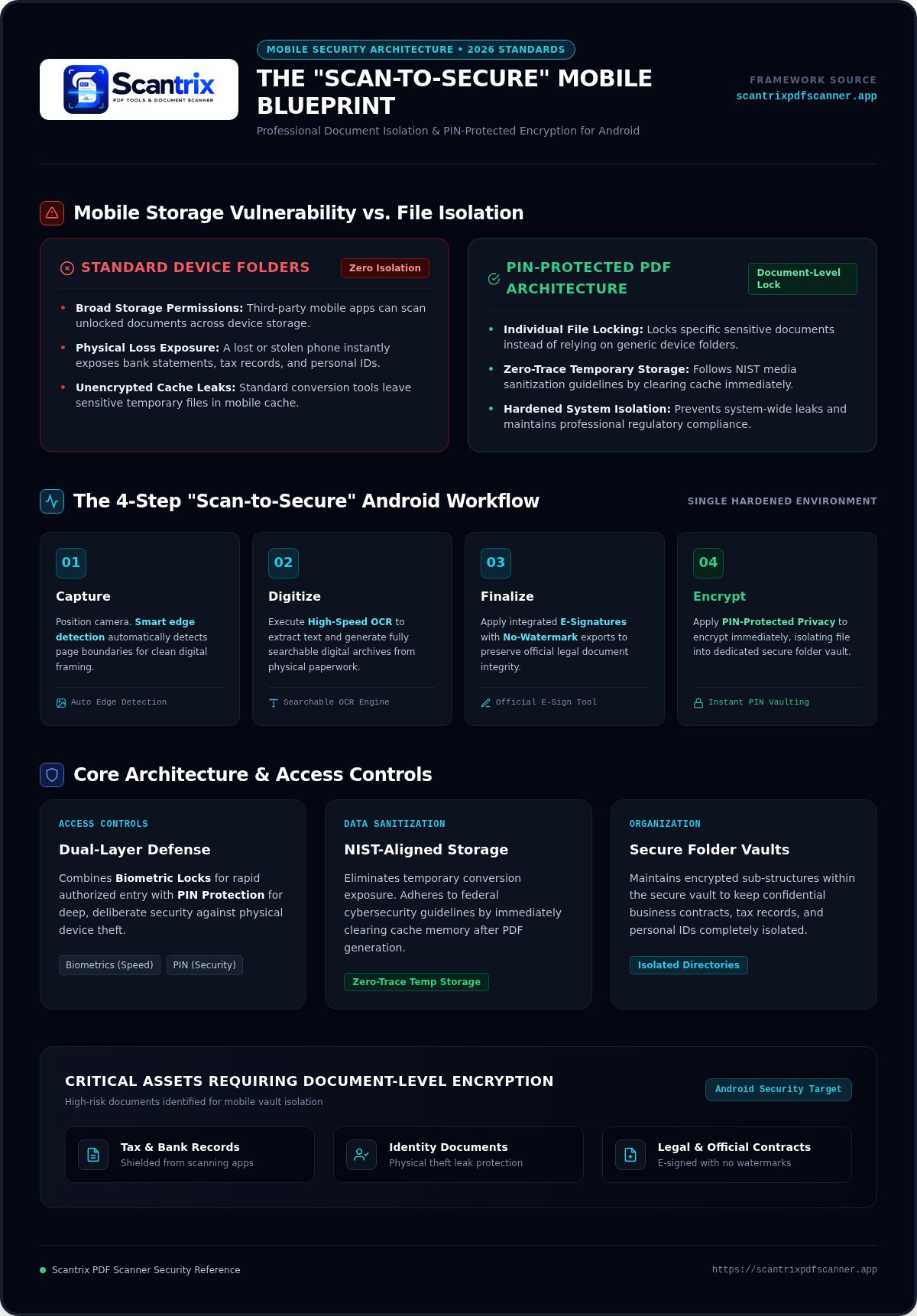
Secure Your Workflow with Scantrix PDF Scanner
Scantrix eliminates workflow friction. It merges smart edge detection with immediate PIN protection. This is a pin protected pdf app engineered for the Android power user. Scan documents. Extract text. Apply PIN. The entire process happens in one secure interface. Standard methods often leave data exposed in temporary storage. Scantrix closes this gap. It follows NIST guidelines on document and data security to ensure every file is handled with professional precision. No leaks. No delays. Just high-performance results.
The edit-to-scan workflow is streamlined. It removes the need for third-party tools or cumbersome encryption processes. You manage the full lifecycle of your document within a single, hardened environment. This architecture prevents unencrypted data from sitting in your phone's general storage. It's the "Scan-to-Secure" standard required for 2026. Efficiency meets absolute privacy.
How to Lock Your First PDF with Scantrix
Open the Scantrix PDF Scanner App. Position your camera. The smart edge detection captures the page automatically. Next, use high-speed OCR to digitize content or the e-signature tool to finalize your file. Once ready, select the PIN-protected privacy option. This encrypts the file instantly. Your document is now isolated from unauthorized local access. For deep-dive configurations, check our App to Lock PDF Files on Android: The 2026 Security Guide. It covers advanced vault setup and organization. Master your mobile security today. Protect your assets with confidence.
- Capture with smart edge detection.
- Digitize with high-speed OCR.
- Finalize with e-signature tools.
- Encrypt with PIN-protected privacy.
Master Your Mobile Document Security
Document security is a professional requirement. You've learned why basic storage fails. You've identified the essential features for 2026. Now, implement the solution. A dedicated pin protected pdf app ensures your sensitive data remains isolated and encrypted. Scantrix provides the architecture you need. It combines smart edge detection with pro-grade OCR. It delivers high-performance results with no watermarks and PIN-protected privacy. Transform your Android device into a secure digital vault today. Don't leave your identity to chance. Take control of your workflow. Secure your files. Protect your future. Your data stays private. Your output stays professional. Every scan is a step toward total document control. Download Scantrix PDF Scanner for Android to safeguard your mobile office now.
Frequently Asked Questions
How does a PIN protected PDF app differ from a phone lock?
A phone lock is a general perimeter defense. A dedicated pin protected pdf app provides document-level isolation. If you hand your phone to someone, your specific files remain encrypted. It prevents unauthorized local access from other apps with storage permissions. This creates a secondary security layer for sensitive records. Isolation is the key to professional mobile document management.
Can I still use OCR on a PIN-protected document?
Yes. Scantrix allows you to perform OCR text extraction before applying the security layer. Once you apply the PIN, the digitized text becomes part of the encrypted file. This ensures your archives are both searchable and secure. You get the benefit of rapid data retrieval without compromising document privacy. Professional scanning requires both speed and absolute security.
What happens if I forget my PDF PIN?
PIN protection uses local encryption for maximum privacy. If you forget your PIN, the document becomes inaccessible. This prevents unauthorized brute-force attempts. Professional apps typically don't store your PIN on external servers. Always maintain a secure backup of your access codes in a trusted password manager. High-security protocols prioritize data protection over easy recovery.
Is it safe to store tax documents in a mobile scanner app?
It is safe if the app utilizes professional-grade encryption and local storage. Scantrix provides PIN-protected privacy to secure tax receipts and legal contracts. This isolates files from the general Android system. Avoid apps that store unencrypted temporary files during the scanning process. Local, PIN-locked storage remains the professional standard for mobile document safety in 2026.


