

Physical paper is a liability. It occupies space, obscures critical data, and creates security risks. You likely feel the weight of overflowing filing cabinets and the panic of missing tax documents. It's a source of friction you don't need. Learning how to go paperless at home is the only sustainable strategy for a modern, high-performance household. You need speed. You need precision.
This streamlined guide helps you master the transition from physical clutter to a secure, mobile-first digital archive in three actionable steps. We eliminate the need for bulky hardware. We focus on professional-grade results using the tools already in your pocket. You'll learn how to digitize records with desktop-quality accuracy, organize files for instant retrieval, and protect sensitive data with PIN-level security. Your streamlined, paper-free future starts now.
Key Takeaways
- Audit your document inventory. Separate high-priority records from temporary clutter to focus your digitization efforts.
- Master how to go paperless at home by converting your Android device into a high-performance, professional scanner.
- Optimize capture efficiency. Use smart edge detection for professional, desktop-quality results without the bulky hardware.
- Protect your archive. Implement PIN-protected privacy and establish cloud redundancy to ensure your data remains secure.
Assessing Your Paper Trail and Setting Digital Goals
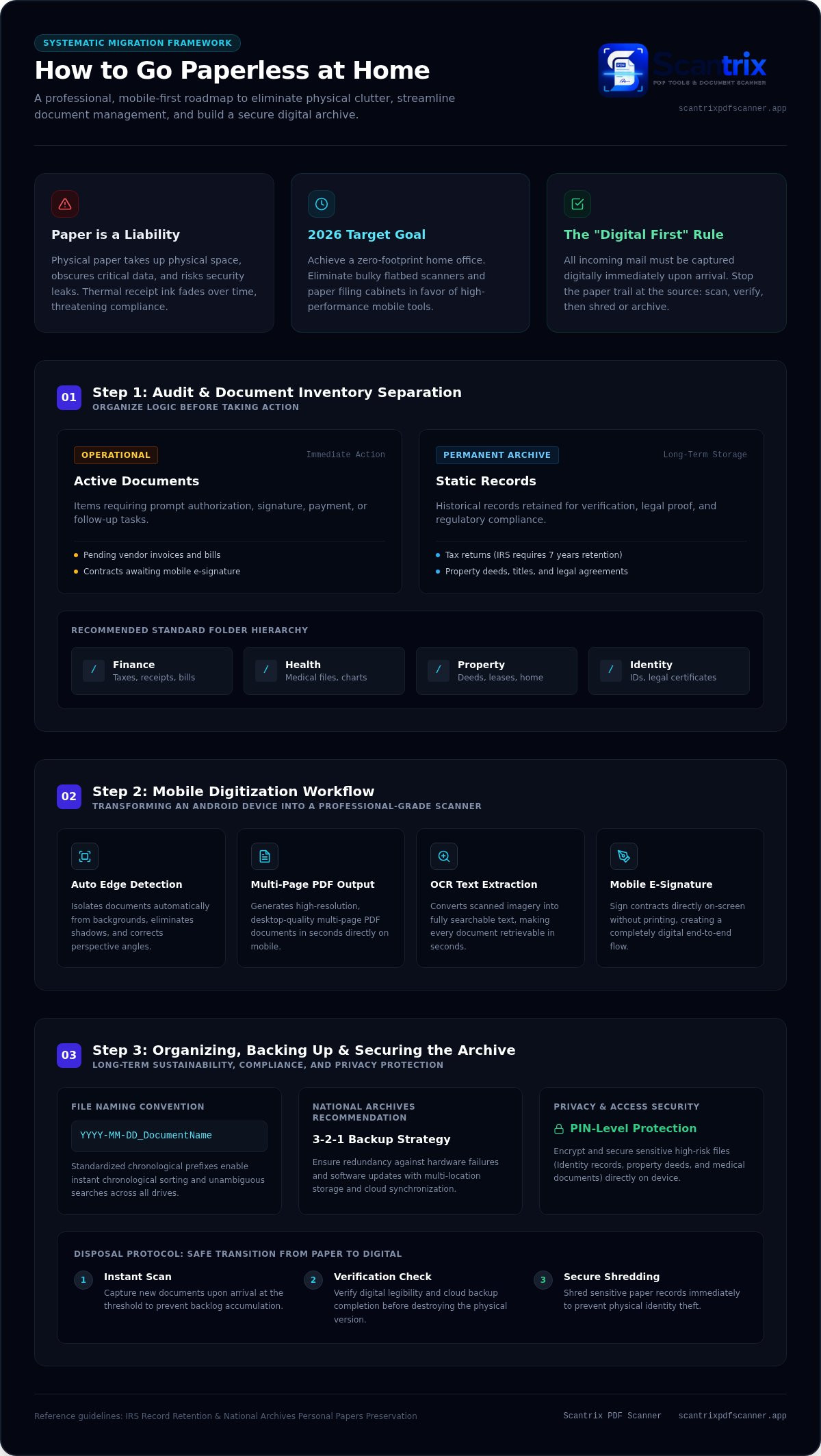
Physical clutter is a productivity killer. It hides critical data and slows your workflow. To master how to go paperless at home, start with a comprehensive audit. Locate your primary paper sources. Utility bills, medical records, and tax receipts often form the largest volume. These documents create unnecessary friction. Transitioning to a paperless office environment requires clear digital goals. Set a 2026 target for a zero-footprint home office. Implement a "Digital First" rule immediately. All incoming mail must be captured digitally upon arrival. Physical copies are shredded or archived. This stops the accumulation at the source. It's about speed and efficiency.
Categorizing Documents for Seamless Digital Migration
Organization precedes digitization. Understanding how to go paperless at home requires logic before action. Divide your inventory into two distinct streams:
- Active Documents: Items requiring signatures or immediate action, such as contracts and pending invoices.
- Static Records: Historical data for long-term retention like tax returns and property deeds.
Determine retention requirements. Tax records often require seven years of accessibility. Temporary receipts only need a digital scan for expense tracking. Build a logical folder hierarchy using categories like Finance, Health, Property, and Identity. This structure ensures instant retrieval. Prioritize sensitive files early. Identity documents and legal contracts require encrypted storage. Use Scantrix to handle the capture process with precision. High-speed digitization starts with a clear plan. Execute it.
Implementing the Mobile Digitization Workflow
High-end hardware is obsolete. You don't need a bulky flatbed scanner or expensive desktop equipment. Your Android device is a professional-grade capture tool. It's faster. It's mobile. Mastering how to go paperless at home starts with the right software. Use automatic edge detection to isolate documents from any background. This technology removes shadows and corrects perspectives instantly. It produces high-resolution multi-page PDFs in seconds. Capture receipts immediately. Physical thermal ink fades. Digital archives preserve data indefinitely. This ensures compliance with IRS record retention guidelines and protects your financial history.
Capturing and Converting with High-Precision Tools
Precision is the goal. Deploy Scantrix PDF Scanner for professional-grade mobile captures. It transforms your phone into a high-performance digital architect. After capture, apply OCR text extraction to make every file fully searchable. You'll locate critical data in seconds without manual sorting. This eliminates the need for physical filing cabinets. When contracts require authorization, bypass the printer entirely. Utilize mobile e-signature tools to sign documents directly on your screen. This creates a streamlined, end-to-end digital workflow that saves time and space. It's the most effective method for how to go paperless at home in 2026. For specific implementation advice, reach out to us to optimize your setup.
Organizing and Securing Your Home Digital Archive
Capture is only the start. Organization ensures sustainability. Migrate your digitized files to a secure digital filing cabinet to eliminate physical friction. A professional archive requires redundancy. Hardware fails. Software updates. Establish a cloud redundancy plan today. Follow the National Archives recommendations for digitizing personal papers to implement a robust 3-2-1 backup strategy. Use standardized naming conventions like "YYYY-MM-DD_DocumentName". This facilitates instant searching and logical sorting. Consistency is your most powerful tool.
System maintenance is mandatory. Scan new documents the moment they cross your threshold. Don't permit a physical backlog to form. Verify the digital copy's clarity and backup status before destroying the original. Shred sensitive physical documents to prevent identity theft. This disciplined workflow is essential for how to go paperless at home. It transforms your home into a high-performance, paper-free environment. Efficiency requires zero compromise.
Implementing PIN Protection and Privacy Layers
Privacy is a technical requirement. Storing sensitive records on a mobile device requires professional-grade security. Secure your IDs, property deeds, and medical files with PIN-protected privacy layers. Enable biometric authentication or passcode locks within your scanner app. This prevents unauthorized access if your device is lost or stolen. Conduct a digital audit every ninety days. Refine your folder structures. Remove obsolete files. This proactive security protocol is the final step in how to go paperless at home. Achieve total control over your data.
Achieve a Zero-Footprint Home Office
Physical paper is obsolete. Your transition depends on three pillars: a rigorous audit, professional mobile capture, and high-security storage. Mastering how to go paperless at home requires a shift from physical storage to digital precision. You've learned to identify clutter sources, utilize mobile scanning workflows, and implement redundant backup strategies. The tools for this transformation are already in your pocket. Efficiency is the standard. Friction is the enemy.
Take control of your home archive today. Utilize professional features like automatic edge detection, OCR text extraction, and PIN-protected security to safeguard your most sensitive records. Start your streamlined journey now. Download Scantrix PDF Scanner for Android to begin digitizing your world with absolute precision. Your organized, paper-free future is ready.
Frequently Asked Questions
How do I start going paperless at home with just a phone?
Install a professional-grade scanner app immediately. Capture high-volume items like bills and mail as they arrive. Use smart edge detection to ensure clarity and professional results. This is the first step in how to go paperless at home. Convert captures into searchable PDFs. Shred physical originals once you verify the digital backup. Speed and consistency are vital.
Is it legal to keep digital-only copies of tax receipts?
Yes. Tax authorities accept digital records if they remain legible and complete. These archives must accurately reflect the information on the original paper documents. Maintain these files for the required retention period. Digital records are more durable than thermal paper. They prevent data loss from fading or physical damage. Always check specific national guidelines for final confirmation.
What is the best app for a paperless home on Android?
Scantrix PDF Scanner is the premier choice for Android users. It provides professional features like OCR text extraction and automatic edge detection. These tools ensure desktop-quality results on a mobile device. It simplifies how to go paperless at home by integrating e-signatures and secure document organization. It is built for high-performance, minimalist home office management.
How can I securely store scanned IDs and sensitive documents?
Utilize PIN-protected privacy features within your scanning application. This adds a critical security layer for sensitive PDFs like IDs and medical records. Enable biometric locks for immediate, secure access. Store these files in an encrypted digital filing cabinet. Always maintain a redundant backup in a secure cloud environment. Protect your data with professional-grade, high-performance tools.


