

Your smartphone is a portable law office. It's not just for calls. You need to scan legal documents on Android with absolute precision. Grainy images and unsecure uploads are professional risks. We understand the frustration of unreadable text and clunky multi-app workflows. You deserve better results. This guide shows you how to turn your device into a high-performance, secure scanning powerhouse. It's about speed and security.
You'll learn to produce crisp, 300 DPI PDFs that meet 2026 federal court standards. We focus on encrypted storage and integrated e-signatures. Learn to protect sensitive client data while maintaining a streamlined, professional workflow. We'll explore smart edge detection, OCR text extraction, and PIN-protected privacy. Transform your mobile device into a reliable digital architect. Your efficient, high-precision document management starts here. Follow these steps for professional-grade output.
Key Takeaways
- Achieve court-grade precision. Use smart edge detection to eliminate shadows and perspective distortion for perfect PDF captures.
- Secure sensitive data. Learn how to scan legal documents on Android using PIN-protected privacy to keep client information out of public galleries.
- Make documents searchable. Utilize OCR text extraction to turn physical paperwork into actionable, editable digital assets.
- Streamline your workflow. Apply professional e-signatures directly within your scanning app to finalize contracts without leaving your device.
Mastering Legal-Grade Document Capture on Android
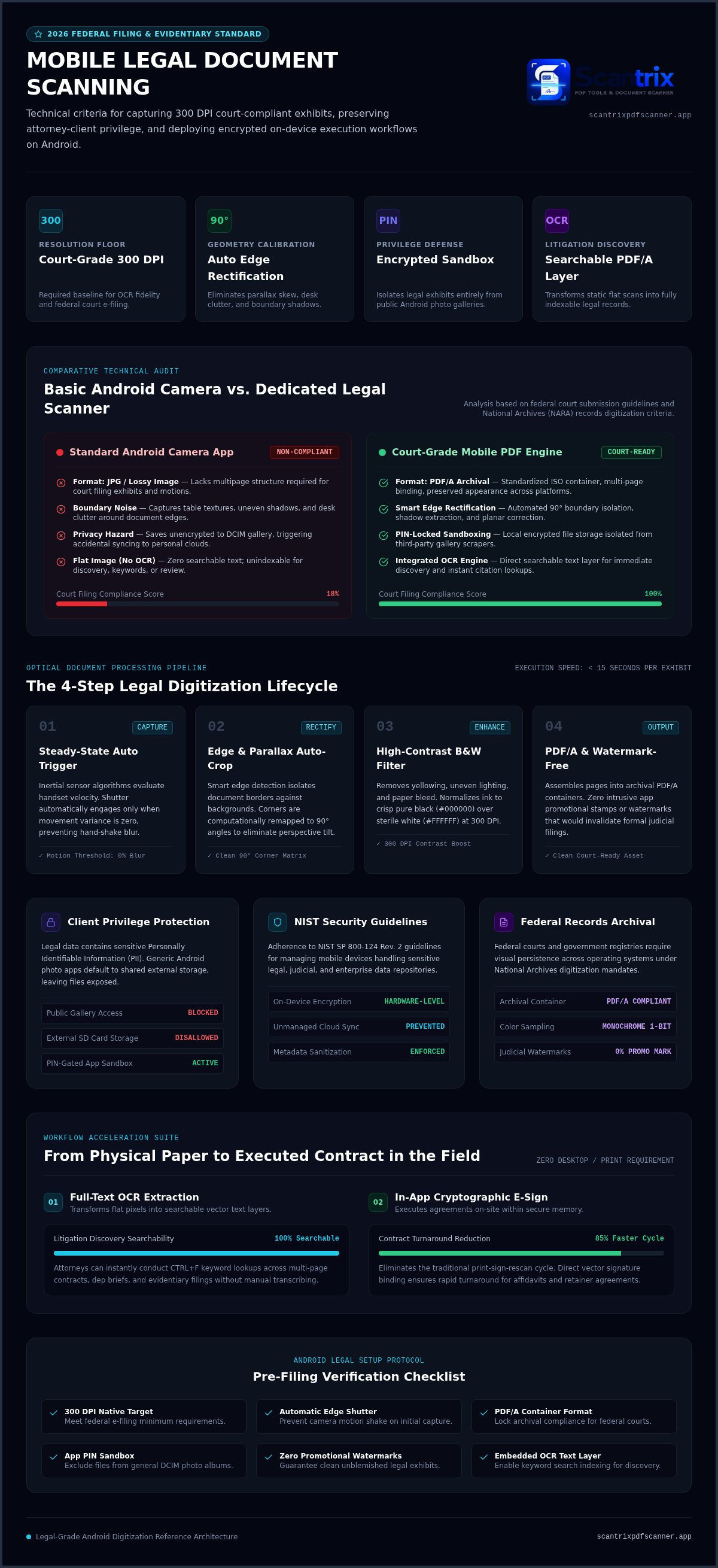
Legal documents demand visual integrity. Court filing compliance mandates a minimum of 300 DPI resolution. Standard camera apps fail. They leave shadows. They distort perspective. They include messy backgrounds. Professional tools eliminate these variables instantly. Smart edge detection is the digital standard for mobile legal scanning in 2026. It identifies document boundaries. It discards the desk or carpet. You get a clean, isolated file every time you scan legal documents on Android.
Professional captures prioritize clarity:
- High Contrast: Sharp black text on white backgrounds.
- Resolution: 300 DPI minimum for OCR accuracy.
- Auto-Cropping: Zero background noise.
Precision Scanning: Beyond the Basic Camera App
Efficiency begins with the right capture mode. Enable automatic capture in your settings. This feature triggers the shutter only when the frame is steady. It prevents the blur caused by manual shake. To achieve perfect 90-degree corners, utilize an auto edge detection pdf scanner. This technology corrects parallax errors automatically.
Choose PDF output for all submissions. JPG files are for photos, not contracts. They lack the multi-page integrity needed for exhibits. For long-term preservation, ensure your files meet PDF/A archival standards. This format preserves visual appearance across systems. It's the mandatory choice for federal e-filing portals. When you scan legal documents on Android, professional formatting is non-negotiable. It signals competence. It ensures readability. It protects the record.
Ensuring Security and Compliance for Scanned Legal Files
Legal documents house sensitive PII. Security is mandatory. Generic scanning utilities often fail. They save captures to public photo galleries. This exposure risks client confidentiality. Professional mobile scanning requires an isolated environment. You must separate legal files from personal photos. Using a dedicated app to lock pdf files on android ensures attorney-client privilege remains intact. It prevents accidental cloud syncs to unmanaged accounts. Your data stays local. Your data stays private.
Compliance depends on strict technical benchmarks. The National Archives provides clear federal records digitization standards for document validation. These guidelines prioritize metadata integrity and format stability. When you scan legal documents android, your workflow must mirror these rigorous requirements. Secure your data. Protect your reputation. Reliability is the only option in legal practice.
PIN Protection and Secure Document Storage
Implement PIN-protected privacy immediately. It acts as a final barrier. If your device is lost, your client data stays encrypted. Avoid saving raw images to external SD cards. They lack native encryption. Choose apps that utilize internal, encrypted storage silos. This systematically blocks unauthorized access. Professional output must be clean. Verify your software doesn't insert watermarks. Intrusive branding can invalidate official court filings. Maintain a sterile, professional appearance for every exhibit. Every pixel matters.
Modern legal work demands high-performance tools. If you need assistance configuring a secure mobile workflow, consult our technical team for professional guidance. We help you maintain compliance without sacrificing speed.
Optimizing the Legal Workflow: OCR and E-Signatures
Efficiency defines the modern legal practice. A simple image is insufficient for litigation or discovery. You must scan legal documents on Android to create actionable data. Static files hinder progress. Professional workflows require searchable text and immediate execution. OCR text extraction transforms flat images into searchable, editable text layers. This allows for rapid keyword indexing during document review. It eliminates manual data entry. It saves hours of administrative work.
Legal professionals must prioritize data integrity throughout this digital transformation. Following NIST mobile device security guidelines ensures that your on-device encryption meets federal standards for sensitive data handling. High-tech tools provide the security and speed required for current legal standards. Integrated e-signatures remove the need for physical printing or desktop software. You can execute contracts in the field. Learn how to sign pdf documents on phone to finalize agreements instantly. This seamless transition from physical paper to a signed digital file accelerates your billing cycle. It improves client satisfaction.
From Paper to Signed PDF in Seconds
Professional transformation happens in three distinct steps:
- Capture: Scan legal documents on Android using smart edge detection for a clean, professional base without background noise.
- Process: Run OCR text extraction to enable keyword searching and text selection within the file.
- Execute: Apply a secure e-signature directly within the Scantrix PDF Scanner app and export the final PDF.
Your document is now court-ready, searchable, and legally binding. No friction. No delays. Just high-performance results.
Elevate Your Legal Document Management
Precision scanning is now a mobile reality. You have the technical tools to capture high-resolution PDFs and secure them with professional PIN-protected privacy. No more grainy images. No more security risks. High-accuracy OCR text extraction ensures every document is searchable and actionable for immediate review. By utilizing no-watermark legal-grade exports, you maintain a sterile and professional reputation for every court filing. It is now easy to scan legal documents android with absolute confidence and systematic efficiency. Your smartphone is a high-performance legal assistant. Eliminate technical friction and protect your client data with a streamlined, secure workflow. Contact Scantrix to secure your professional scanning workflow and master your digital transitions today. Modern law requires modern speed. You're ready to lead.
Frequently Asked Questions
Is it legal to scan court documents with an Android phone?
Yes. Federal Rules of Evidence 1003 and 1002 establish that digital duplicates are admissible as originals in most legal proceedings. You must demonstrate that the scan is a true representation of the original document. High-resolution captures fulfill this requirement. Always verify specific jurisdiction rules for wet-ink requirements on original wills or promissory notes before filing.
How do I ensure my mobile scan is high enough quality for legal use?
Target a resolution of 300 DPI to meet federal CM/ECF and state e-filing standards. Use smart edge detection to eliminate perspective distortion and shadows. Ensure the document is well-lit and the text is sharp. Scantrix provides high-accuracy OCR text extraction to make your captures searchable. Avoid low-resolution JPG formats; export only as professional-grade PDFs.
What is the best way to secure sensitive legal scans on Android?
Isolate your files from the public photo gallery immediately. Use PIN-protected privacy to encrypt the local storage silo within your app. This prevents unauthorized access if you lose your device. Avoid saving sensitive PII to unencrypted SD cards. Professional apps ensure your data remains local and secure. This practice aligns with ABA ethical duties for mobile document processing.
Can I add an electronic signature to a scanned document on my phone?
Yes. Integrated e-signature tools allow you to finalize contracts directly after you scan legal documents on Android. This process is governed by the federal ESIGN Act and state UETA adoptions. Capture the document, run OCR, and apply your signature. Export the final PDF immediately to maintain a seamless, high-speed professional workflow without needing desktop software.


