

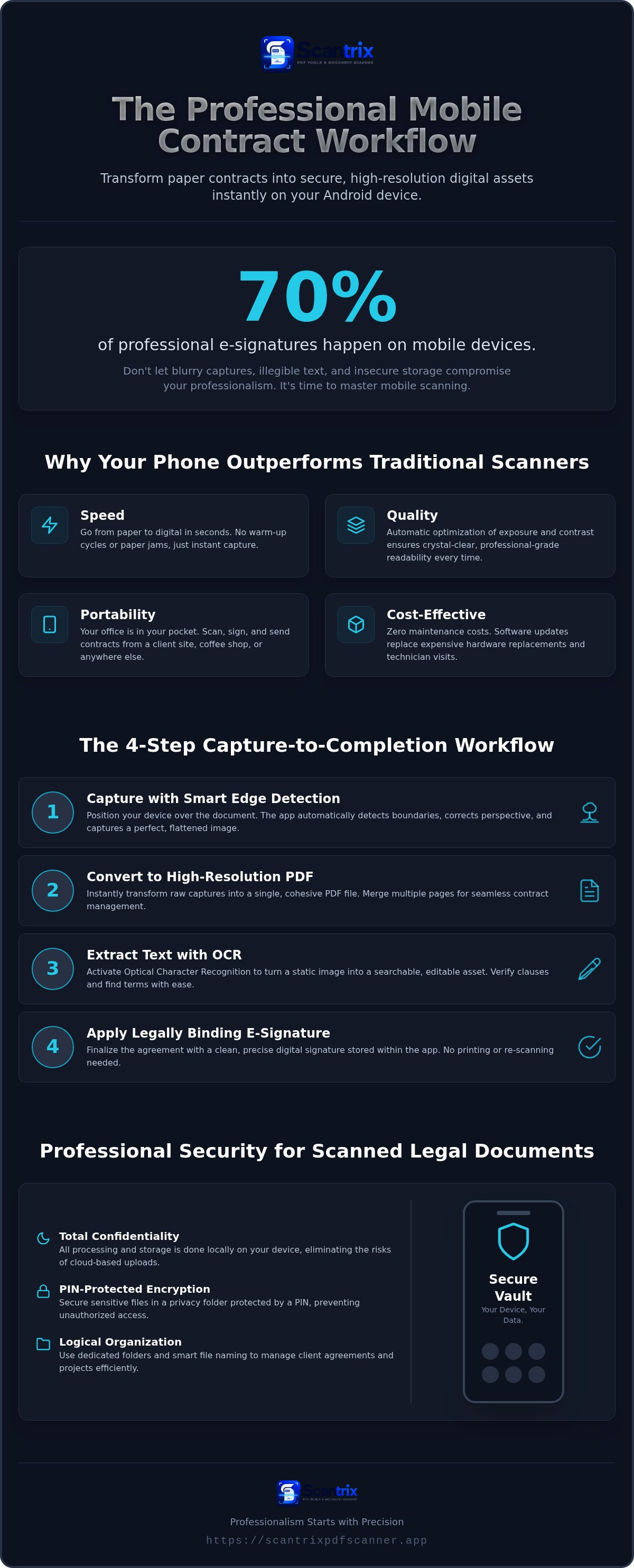
Seventy percent of professional e-signatures occur on mobile devices. Yet many users still struggle with blurry captures, illegible text, and insecure storage. You deserve better. You need to scan contracts with phone tools that deliver professional results instantly. This 2026 guide masters the transition from paper to digital states. We provide a streamlined mobile workflow for high-resolution scanning, legally binding signatures, and encrypted storage. Learn to eliminate friction. We examine how the Scantrix PDF Scanner App facilitates a capture-to-completion cycle on a single Android device. You will master smart edge detection, OCR text extraction, and PIN-protected privacy folders. Stop settling for low-quality photos. Start producing crystal-clear PDF contracts that command respect. Professionalism starts with precision.
Key Takeaways
- Replace bulky hardware with high-performance mobile sensors. Capture agreements instantly with professional-grade clarity.
- Master the precise four-step workflow to scan contracts with phone devices. Transform physical pages into high-resolution PDFs automatically.
- Secure sensitive legal clauses with PIN-protected privacy folders. Prevent unauthorized access to confidential document storage on Android.
- Execute legally binding agreements using built-in e-signature tools. Utilize OCR text extraction to turn static scans into editable digital assets.
Why Scanning Contracts with Your Phone Beats Traditional Methods
Fast. Efficient. Mobile. Traditional desktop hardware is obsolete in high-stakes legal environments. When you scan contracts with phone technology, you eliminate wait times and bulky equipment. It's a field-ready solution for the modern professional. Modern smartphone scanner apps utilize advanced hardware sensors to capture high-fidelity data instantly. Your Android device becomes a high-performance capture tool.
- Speed: Agreements move from paper to digital in seconds. No warm-up cycles. No paper jams.
- Quality: Professional software optimizes exposure and contrast automatically. Standard camera apps produce shadows and glare. Scantrix ensures crystal-clear readability.
- Portability: Your office fits in your pocket. Execute deals at a coffee shop, a client site, or a transit hub.
- Cost: Maintenance is zero. Regular software updates replace expensive technician visits and hardware replacements.
The transition is seamless. You stop being tethered to a desk. You start closing deals wherever they happen. It's about technical sophistication and reliability.
Smart Edge Detection vs. Manual Cropping
Precision matters. Manual cropping wastes time. It results in jagged, unprofessional borders that signal a lack of attention to detail. The Scantrix PDF Scanner App uses smart edge detection to identify document boundaries automatically. It corrects perspective. It flattens curves. You get a perfect rectangle every time. Standard photos look like snapshots. Scantrix scans look like original digital files. Smart edge detection is a productivity multiplier that transforms a simple photo into a professional legal document.
The 4-Step Workflow to Scan and Sign Contracts on Android
Efficiency defines success. A fragmented process creates errors. Use the Scantrix PDF Scanner App to consolidate your mobile workflow into four definitive stages. When you scan contracts with phone technology, you replace hours of manual labor with seconds of automated precision. It's the most direct path to a finalized agreement.
- Capture: Position your Android device over the document. The smart auto-detection system frames the page instantly. It eliminates manual adjustments.
- Convert: Transform the raw capture into a high-resolution PDF. Merge multiple pages into a single file for cohesive contract management.
- OCR: Activate OCR text extraction. This allows you to verify clauses or search for specific terms within the scanned image. Accuracy is paramount.
- Sign: Finalize the agreement. Apply your signature without the need for physical printing or re-scanning.
This linear progression ensures nothing is missed. You move from physical paper to a secured digital state without leaving the app. If you encounter complex document layouts, contact us for technical guidance on optimizing your capture settings.
Adding Secure E-Signatures Instantly
Digital ink provides a superior aesthetic. Scanned pen signatures often appear pixelated or faint. Within Scantrix, you can create and store a precise digital signature. This ensures consistency across all legal documents. Learning to sign directly on your phone saves hours of administrative labor. It maintains the professional integrity of your contracts. You don't need a printer. You don't need a desktop. You just need a reliable mobile tool. Professionalism meets immediate execution. The result is a clean, legally binding document ready for distribution.
Professional Security for Scanned Legal Documents
Security is non-negotiable. Legal contracts contain sensitive clauses and private data. Standard receipts don't require high-level protection, but professional agreements do. When you scan contracts with phone utilities like Scantrix, your data remains on the device. Local processing eliminates the risks associated with web-based uploads. It ensures total confidentiality. Your device becomes a secure vault.
- Confidentiality: Treat every scan as a high-security asset. Scantrix prioritizes local storage over vulnerable cloud transfers.
- Encryption: Protect sensitive data from unauthorized local access. Your professional files stay private and inaccessible to others.
- Organization: Manage complex, multi-part vendor agreements with ease. Use dedicated folders to separate clients or projects logically.
- Efficiency: Find specific contracts instantly. Use smart file naming conventions to eliminate manual searching and administrative friction.
Structure creates speed. An organized digital vault allows you to retrieve critical information during negotiations without delay. It's about maintaining a streamlined, professional workflow from capture to storage. You stay in control of your data.
PIN-Protected Privacy for Sensitive Legal Files
Shared devices present a unique security challenge. You need a digital barrier. Learning how to lock PDF files on Android is essential for safety. Scantrix provides PIN-protected privacy folders to secure your most critical documents. This prevents accidental exposure to unauthorized users or colleagues. The feature transforms your Android device into a professional-grade legal environment. For complex enterprise setups or specific security requirements, contact Scantrix for professional support. Secure your transition from physical to digital states with confidence. Professionalism requires protection.
Finalize Your Professional Digital Workflow
Precision and speed are now at your fingertips. You've mastered the four-step workflow to digitize, sign, and secure legal documents on Android. Traditional hardware cannot match this level of portability or performance. When you scan contracts with phone technology, you reclaim your time. You eliminate the need for bulky scanners and complex desktop software. Every agreement becomes a high-resolution PDF instantly. Your sensitive data remains protected within local, encrypted folders. It's a technical solution for a modern world.
Experience an ad-free scanning environment with high-accuracy OCR extraction and PIN-protected privacy. Upgrade your contract workflow with Scantrix PDF Scanner to experience the difference. The transition to a paperless, professional office is complete. You're ready to close deals with confidence. Success is just one scan away. Your mobile legal office is now fully operational.
Frequently Asked Questions
Is it legal to sign a contract using a phone app?
Yes. The ESIGN Act of 2000 and UETA provide the legal foundation for electronic signatures in the U.S. These laws give digital signatures the same weight as physical ones. Approximately 78% of U.S. law firms now utilize e-signature software. Scantrix includes a professional E-signature tool to finalize legally binding agreements directly on your Android device.
How do I ensure my phone scan looks professional and not like a photo?
Use smart edge detection to scan contracts with phone accuracy. This technology identifies document borders and corrects perspective distortions automatically. It transforms a simple photo into a high-resolution PDF. Scantrix optimizes exposure and contrast to ensure text is crisp and legible. The final output mirrors the quality of a professional flatbed scanner without the bulky hardware.
Can I scan multi-page contracts into a single PDF file?
Yes. You can capture multiple pages in sequence and merge them into a single PDF file. This is critical for managing multi-part vendor agreements. Scantrix facilitates a continuous scanning workflow. Just point, capture, and repeat. The app organizes the pages into one professional document. It eliminates the need for external file converters or complex desktop software.
How do I protect scanned contracts from being seen by others on my phone?
Utilize PIN-protected privacy folders to secure your documents locally. This creates an encrypted environment on your phone for sensitive legal data. It's essential for professionals using shared devices. You can scan contracts with phone security that prevents unauthorized access. Scantrix processes all data on-device. This local approach offers superior protection compared to web-based tools that require cloud uploads.


