

You don't need a bulky flatbed scanner or a destroyed spine to produce archive-quality digital pages. Mastering how to scan a book with android phone hardware comes down to disciplined lighting and smart processing, not heavy desktop gear. Still, bound volumes fight back. Dark gutter shadows swallow words near the binding, curved page lines ruin legibility, and snapping consecutive pages one by one creates a tedious, slow workflow.
Digitizing research shouldn't require hours of frustrating manual cleanup. You can easily convert curved book spreads into crisp, flat PDFs with stark black text and pure white backgrounds right from your pocket. This guide reveals the exact capture techniques, edge detection controls, and rapid batch OCR workflows needed to produce flawless digital documents in seconds.
Key Takeaways
- Eliminate deep gutter shadows and keystone distortion by aligning dual cross-angled lights and keeping your lens parallel to the page spread.
- Learn how to scan a book with android phone batch tools to capture entire multi-page chapters in minutes without focal drift.
- Rely on automated smart edge detection to crop page margins instantly, stripping away background surfaces and skewed borders.
- Convert static image captures into lightweight, searchable PDFs with mobile OCR for rapid keyword lookups and text extraction.
Setting Up Your Lighting and Book Geometry for Phone Scanning
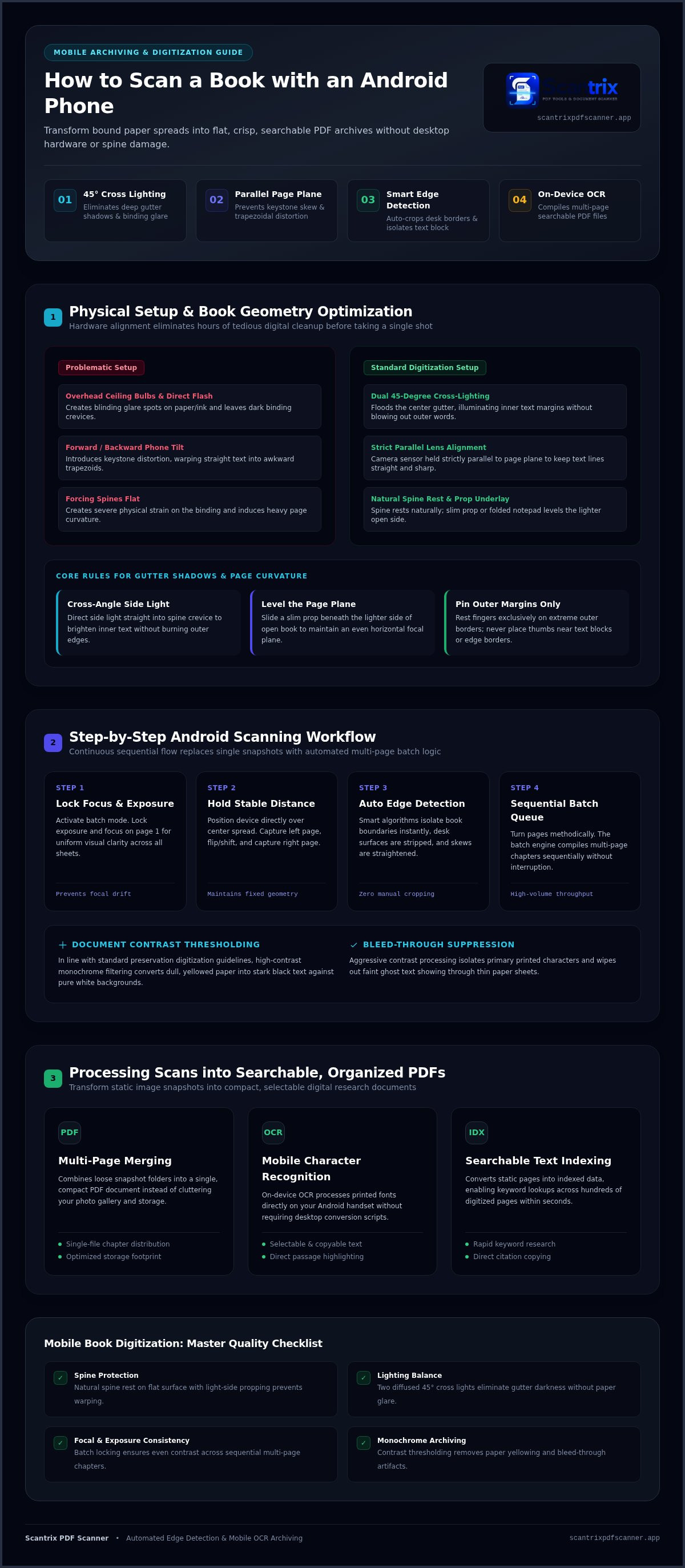
Hardware setup dictates software success. When learning how to scan a book with android phone sensors, physical alignment eliminates hours of tedious digital cleanup. Overhead ceiling bulbs cast harsh shadows across the page. Direct smartphone flashes create blinding glare spots on paper and ink. You bypass both issues with balanced cross-lighting.
Position two diffused light sources at 45-degree angles on opposite sides of your book. This dual-angle illumination floods the center gutter and removes dark binding crevices. Next, align your Android phone strictly parallel to the page spread. A slight forward or backward tilt introduces keystone distortion, skewing straight text lines into awkward trapezoids. Never force a tight spine completely flat against a hard table. Let the spine rest naturally to reduce physical strain and avoid severe page warping.
Eliminating Gutter Shadows and Page Curvature
Adapting the foundational principles of book scanning to a smartphone setup requires three fast adjustments:
- Cross-angle side illumination: Direct side light straight into the spine crevice to brighten inner text margins without blowing out outer words.
- Level the page plane: Slide a slim prop or folded notepad beneath the lighter side of the open book to maintain an even, horizontal focal plane.
- Pin the outer margins: Rest fingers exclusively on extreme outer borders. Never place thumbs near text blocks where they interfere with automated page boundaries.
Mastering this physical baseline simplifies how to scan a book with android phone tools and yields crisp, balanced results.
Step-by-Step: How to Scan Book Pages with Your Android Phone
Execution speed depends on continuous flow. Rather than taking single snapshots and manually adjusting frames, modern mobile tools automate the entire process. Learning how to scan a book with android phone apps means replacing heavy hardware with smart capture logic. Open your scanning app and activate batch mode immediately. Lock your exposure and focus on the first page to ensure uniform visual clarity across every subsequent sheet.
Maintain a stable distance. Hold your device steady directly over the center spread, capture the left page, flip or shift, and capture the right. Advanced mobile algorithms automatically identify page perimeters, straighten slight skews, and isolate the print area from your desk surface.
Leveraging Multi-Page Capture and Smart Edge Detection
To digitize an entire chapter efficiently, deploy an auto edge detection pdf scanner like Scantrix PDF Scanner. The application isolates book boundaries instantly, eliminating manual cropping.
- Continuous sequential capture: Turn pages methodically while the camera remains focused. The batch engine compiles each page sequentially without interruption.
- Document contrast thresholding: In line with standard preservation digitization guidelines, apply high-contrast monochrome filtering to convert dull, yellowed paper into crisp white backgrounds with stark black text.
- Bleed-through suppression: Aggressive contrast processing wipes out faint ghost text showing through thin paper sheets.
If you need custom guidance for setting up high-volume mobile archiving workflows, feel free to reach out to our team for practical scanning tips.
Processing Book Scans into Searchable, Organized PDF Documents
A loose folder of image files solves nothing. Raw book captures consume unnecessary device storage and clutter your photo gallery. Modern processing combines these separate scans into a single, compact PDF document. Multi-page merging packages an entire chapter into a clean file ready for immediate reading, archiving, or sharing.
Understanding how to scan a book with android phone software means transforming dead pixels into dynamic text. Instead of relying on external desktop suites or complicated conversion scripts, mobile optical character recognition handles the entire conversion directly on your handset.
Extracting Text via Mobile OCR and Digital Archiving
Once you run character recognition across the file, static print becomes selectable data. You can easily highlight key passages, copy direct citations, or learn how to copy text from a scanned document on Android for instant research notes.
- Searchable text indexing: On-device OCR processes printed fonts directly, letting you search keywords across hundreds of digitized pages within seconds.
- Structured local organization: Route completed chapters straight into a digital filing cabinet app Android system to catalog reference material by title, topic, or date.
- On-device PIN security: Protect confidential study notes and proprietary manuscripts using PIN-protected document security to keep sensitive records locked safely on your phone.
This streamlined pipeline turns manual book scanning into an organized, fully searchable digital library.
Upgrade Your Mobile Book Digitization Workflow
Capturing archival-quality digital pages doesn't require complex hardware. Mastering how to scan a book with android phone tools comes down to smart technique and purposeful software. Balanced lighting removes gutter shadows. Smart edge detection automatically crops page boundaries instantly. Batch scanning combines entire book sections into single PDFs in seconds, while high-accuracy mobile OCR extracts text from book pages effortlessly.
Stop wrestling with distorted margins and blurry text. You hold a complete preservation studio in the palm of your hand. If you have questions about streamlining document pipelines or optimizing mobile capture setups, contact our document scanning specialists today to upgrade your personal research library.
Frequently Asked Questions
Can you scan a book with an Android phone without flattening the spine?
Yes, you can scan bound books without damaging their binding. Forcing a tight spine flat risks cracking the glue. Instead, let the volume rest partially open at a natural angle. Modern scanning tools automatically detect curved boundaries, crop extraneous backgrounds, and apply perspective correction. This preserves the physical book while capturing clean, readable digital facsimiles right on your device.
How do I avoid shadows in the middle of a book when scanning with a phone?
Eliminate gutter shadows by turning off your phone flash and setting up two cross-angled light sources. Position diffused lamps at 45-degree angles on either side of the open spread. This setup directs light straight into the binding groove, washing out center darkness. Mastering this lighting balance is essential when learning how to scan a book with android phone hardware cleanly.
How can I convert scanned book pages into searchable text on Android?
Convert scans into live text using on-device optical character recognition. After capturing pages, run the OCR engine inside Scantrix PDF Scanner. The software processes printed typography and embeds an invisible text layer over the scan. This allows you to search specific terms, select paragraphs, and copy study excerpts directly from your generated PDF document without manual transcription.
What is the fastest way to scan multiple book pages on Android?
Enable continuous batch capture in your mobile scanner app. Locking the camera's focus and exposure allows you to flip and snap pages continuously without resetting framing. Smart edge detection trims each border in the background. Discovering how to scan a book with android phone batch workflows lets you compile dozens of sequential pages into a single merged PDF within minutes.


