

Bulky flatbed scanners belong in the past. Paper piles clutter desks, manual receipt sorting burns billable hours, and physical contracts leave confidential data exposed. Most enterprise tools only add friction with steep learning curves and bloated server setups. You don't need them. Choosing a streamlined paperless office app android users rely on transforms your phone into an instant, high-performance document hub.
Managing business records should feel effortless, not administrative. You already know paper slows your operations down, yet migrating to digital workflows often feels daunting. This guide shows you how to eliminate physical paperwork and build an efficient, secure paperless workflow directly on Android. We explore how smart edge detection, mobile OCR text extraction, and local PIN protection streamline your entire capture-to-signature process in seconds.
Key Takeaways
- Deploying a dedicated paperless office app android professionals trust replaces slow flatbed hardware with agile, pocket-sized capture.
- Smart edge detection and automated perspective correction instantly transform messy physical sheets into crisp, standard PDFs.
- Integrated mobile OCR text extraction turns static printed documents into editable, searchable digital assets without cloud lag.
- Built-in PIN protection and local file processing secure sensitive business records while keeping the entire capture-to-signature loop on your phone.
The Mobile Paperless Office: Why Android Scanning Replaces Desktop Hardware
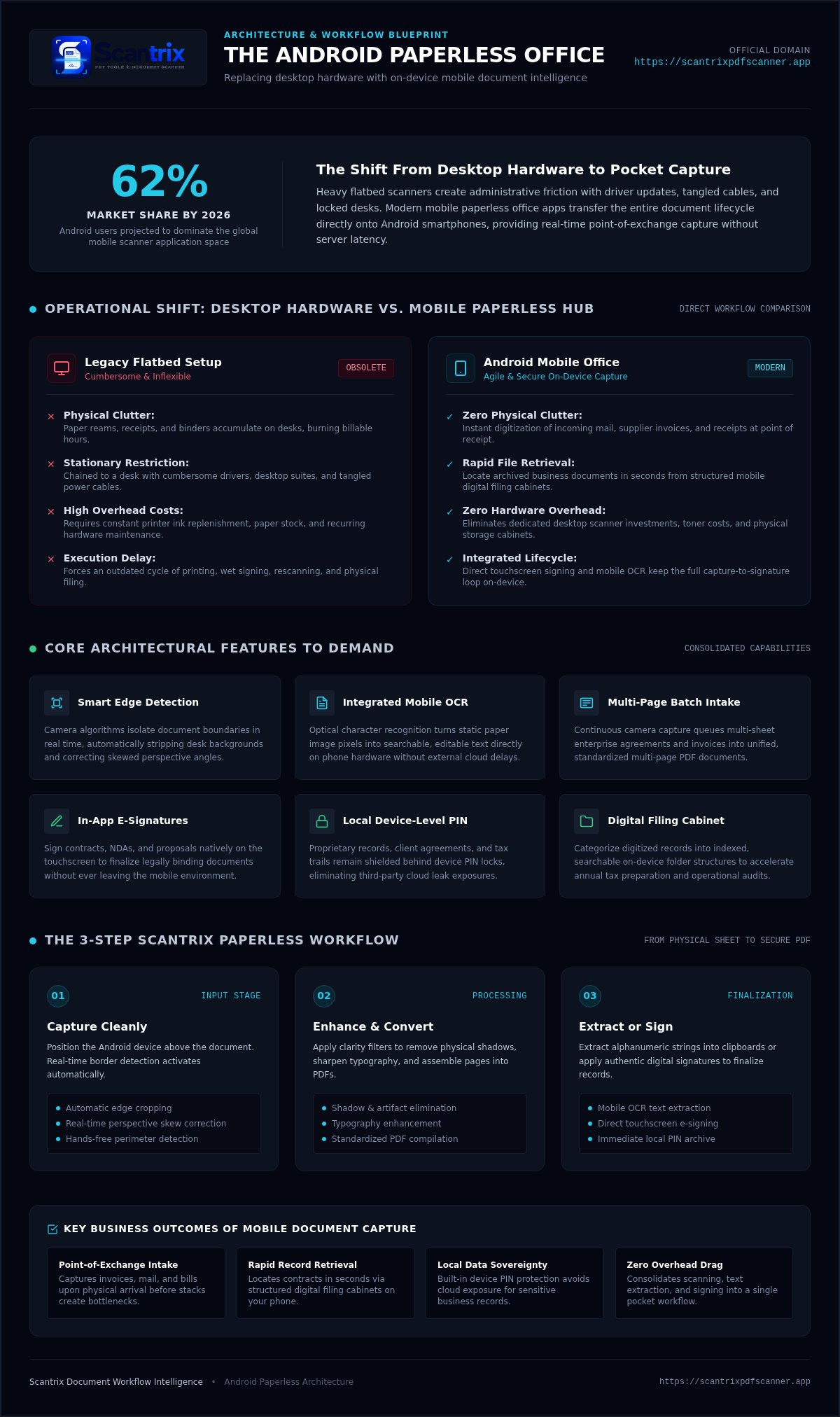
A mobile paperless office transfers document management entirely to your phone. Heavy flatbed scanners chain you to a desk. They require manual drivers, tangled cables, and cumbersome software suites. In contrast, modern smartphones deliver agile, pocket-sized digitization wherever business happens. By 2026, Android users account for 62% of the mobile scanner app market, proving that professionals prefer fast, on-device document capture over static desktop setups.
Replacing bulky hardware with an agile paperless office app android professionals use delivers clear operational advantages:
- Zero physical clutter: Clear desk space instantly by digitizing incoming mail, invoices, and notices.
- Rapid file retrieval: Locate archived business records in seconds instead of digging through paper binders.
- Lower operational costs: Eliminate printer ink, paper reams, and expensive hardware maintenance.
Adopting a modern paperless office strategy no longer requires complicated servers or enterprise-grade IT infrastructure. Direct mobile utilities capture documents at the source, processing clean digital assets immediately.
Eliminating Administrative Bottlenecks with Real-Time Mobile Capture
Paper receipts, supplier bills, and paper contracts create instant friction when left in stacks. Capture them immediately upon arrival. Digitizing incoming paperwork at the point of exchange keeps records up to date. You can implement the digital filing cabinet concept to categorize records into structured, searchable folders right on your device. This straightforward habit accelerates tax preparation, speeds expense tracking, and builds an organized financial paper trail without desktop delays.
Core Features to Demand from a Paperless Office App on Android
Single-purpose tools waste valuable time. Switching between separate apps for scanning, editing, and signing creates unnecessary operational drag. A capable paperless office app android professionals rely on must consolidate the entire capture lifecycle into one fluid, dependable utility.
Demand these core capabilities before adopting any mobile document tool:
- Intelligent edge detection: Hardware-grade camera algorithms detect document borders automatically, removing desk backgrounds and correcting skewed angles instantly.
- Integrated OCR text extraction: Direct optical character recognition transforms flattened image pixels into searchable, editable text without requiring desktop software.
- Multi-page batch processing: Rapid intake queues let you capture multi-sheet contracts continuously and compile them into a unified PDF in seconds.
Securing Digital Confidentiality with In-App Signatures and Local Locks
Agreements require rapid execution. Built-in e-signature tools eliminate the outdated cycle of printing, signing, and rescanning physical paper. Sign contracts, NDAs, and invoices directly on your touchscreen with precision. Learn how to sign PDF documents on your phone to finalize business agreements without leaving your mobile workflow.
Data privacy remains non-negotiable. Sensitive client records, financial statements, and employee files demand robust protection against unauthorized eyes. Device-level PIN locks safeguard proprietary archives directly on your hardware, eliminating cloud vulnerability risks. If you want tailored recommendations for securing your document architecture, feel free to reach out to our support team.
How to Build an Efficient Paperless Workflow Using Scantrix
Executing an end-to-end digital paper trail does not require external servers or complex toolchains. A dedicated paperless office app android users deploy turns messy paperwork into clean, actionable digital files through an immediate, on-device sequence:
- Step 1: Capture cleanly. Position your phone over the sheet. The built-in scanner detects document borders in real time, auto-crops extraneous edges, and adjusts perspective angles instantly.
- Step 2: Enhance and convert. Apply clarity filters to remove shadows, sharpen typography, and compile pages into standard, professional PDF documents.
- Step 3: Extract or sign. Run mobile OCR to pull critical alphanumeric strings into editable clipboards, or apply authenticated digital signatures to finalize agreements before filing.
Optimizing Document Archival and Long-Term Digital Filing
Clean scans form the backbone of dependable filing. Leveraging smart scanning edge detection technology ensures high visual fidelity across skewed tax receipts and wrinkled agreements alike. Maintain a consistent nomenclature protocol; categorize converted records by calendar year, vendor name, or project milestone to simplify audit retrieval.
Finally, protect critical business records with secondary PIN locks. By processing and storing documents locally on your Android handset, Scantrix keeps confidential files off third-party clouds while restricting unauthorized local access behind robust passcodes. Your operational pipeline stays fast, compliant, and completely self-contained.
Modernize Your Mobile Paperless Workflow Today
Eliminating physical clutter no longer demands complicated enterprise servers or bulky hardware. Operating an agile paperless office app android users trust keeps your entire document lifecycle responsive and fully portable. Smart edge detection delivers crisp borders on contact. Direct OCR text extraction and touchscreen e-signatures eliminate desktop printer dependency entirely. Meanwhile, integrated PIN protection safeguards your confidential contracts and tax records directly on your local device.
Take immediate charge of your daily administrative routine. Replacing slow paper handling with instant mobile processing saves valuable hours every week while keeping your digital files organized. Ready to optimize your document pipeline with Scantrix? Contact our team to get started and turn your Android phone into an efficient, secure paperless workstation.
Frequently Asked Questions
Can an Android app fully replace a dedicated desktop scanner?
Yes, for daily operational workflows, an Android app replaces traditional desktop scanners entirely. Smartphone cameras combined with automated edge detection and perspective correction produce crisp, publication-grade PDFs instantly. You capture contracts, tax forms, and receipts wherever you work. Unless your organization requires massive industrial feeders processing thousands of sheets continuously, mobile scanning handles every business documentation demand with superior agility.
How do paperless office apps protect sensitive business documents on Android?
Reliable utilities secure business files by processing documents locally and locking sensitive folders behind passcodes. A privacy-first paperless office app android professionals choose stores records directly on the device rather than uploading files to third-party servers. Built-in PIN protection safeguards confidential payroll data, client agreements, and financial statements from unauthorized access, keeping proprietary information fully isolated and secure.
What is the difference between taking a photo and using a document scanner app?
A standard camera photo merely saves a raw image containing cast shadows, perspective skew, and desk clutter. Document scanner apps actively identify paper boundaries, crop extraneous backgrounds, and flatten curved sheets automatically. They enhance text contrast, assemble multiple pages into cohesive PDFs, and run character recognition so the resulting files behave as clean, professional business assets.
Can I extract editable text from scanned paper documents on Android?
Yes, you can extract editable text instantly using on-device optical character recognition. When running a capable paperless office app android users capture a document and trigger integrated OCR to convert printed typography into digital characters. You can copy invoice totals, contract clauses, or tracking numbers directly to your clipboard, eliminating manual data retyping and speeding up administrative reporting.


