

A quick smartphone snapshot is not a true digital document. You already know the daily friction: dark overhead shadows, curved page edges, and valuable hours lost retyping printed text manually into spreadsheets or emails. When figuring out how to digitize paper documents android workflows shouldn't force you to settle for distorted images or a cluttered camera roll.
True mobile digitization turns messy paper stacks into sharp, professional PDFs in seconds. In this guide, you will master a streamlined mobile workflow to capture, convert, and organize your files with speed and precision. We will break down automated edge detection to eliminate manual cropping, high-accuracy mobile OCR to extract editable text instantly, and straightforward methods to maintain a secure, paperless filing system directly on Android.
Key Takeaways
- Raw camera snaps create uneven shadows and skew; learn how to digitize paper documents android users can rely on for crisp, flat PDFs.
- Smart edge detection identifies page boundaries instantly, removing the manual cropping headache from multi-page physical stacks.
- Integrated mobile OCR converts static print into selectable, editable digital text within seconds of capture.
- Direct on-device e-signing and PIN-protected vaults let you execute agreements and secure sensitive files without a computer.
Why Traditional Android Camera Snaps Fail for Paper Documents
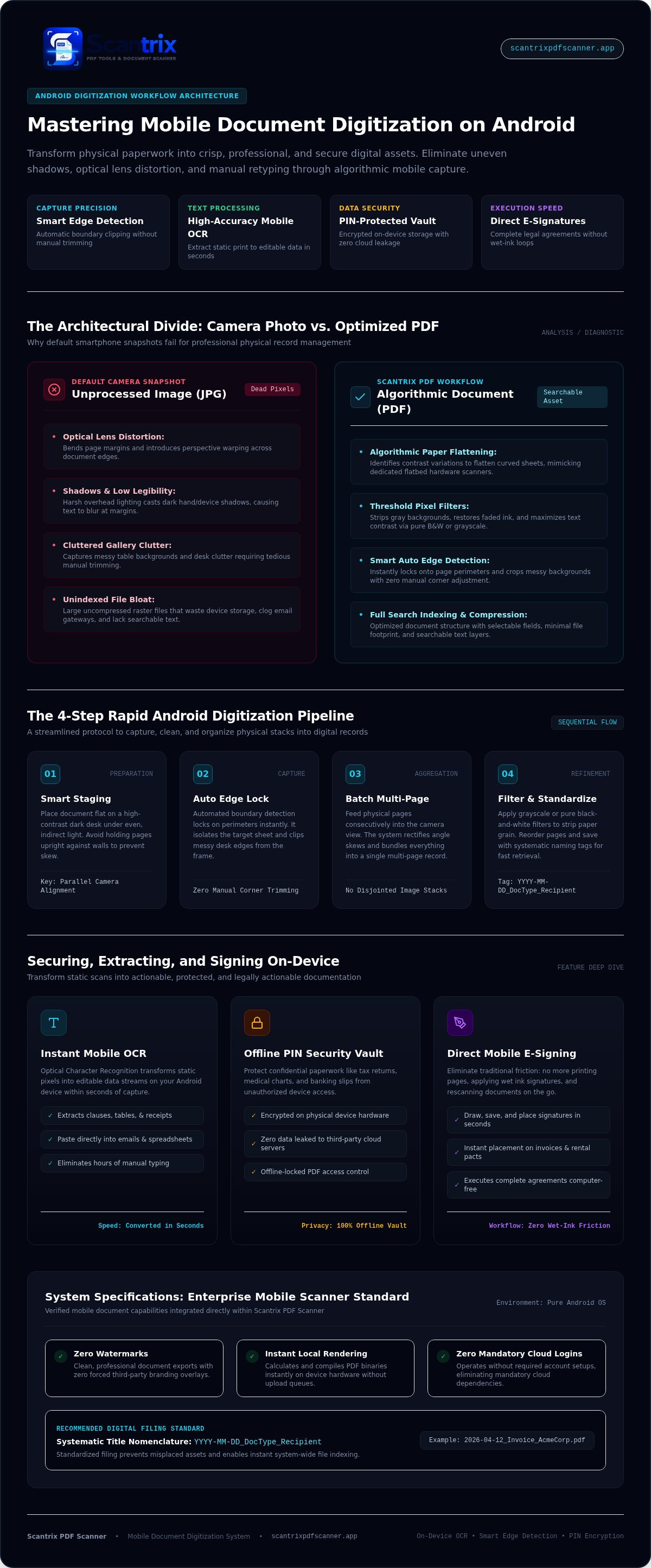
Snapping a photo with your default camera app produces an image, not a usable document. Smartphone lenses introduce optical distortion, bend page margins, and capture harsh overhead glare. Without algorithmic correction, text blurs at the edges, casting deep shadows across vital paragraphs. Dedicated mobile scanning software solves this instantly. Built-in algorithms identify contrast variations to flatten curved paper, mimicking how a hardware image scanner captures flat sheets without perspective distortion.
When mastering how to digitize paper documents android users frequently rely on basic camera scenes that leave messy backgrounds intact. Dedicated capture engines isolate the target sheet immediately. Modern tools integrate smart auto edge detection technology, clipping messy table edges out of the final frame automatically. The process delivers clean boundaries with zero manual trimming required.
The Key Differences: Image Files vs. Optimized PDF Documents
A standard photo produces an uncompressed JPG. These graphic files quickly waste device memory and clog email gateways during transmission. Purpose-built PDF scanning tools run aggressive threshold filters directly on the pixel data. They eliminate gray backgrounds, restore faded ink, and maximize text contrast. Crucially, PDF structures enable search indexing and selectable data fields, turning static paper records into searchable digital assets instead of dead image pixels.
Step-by-Step: How to Digitize Paper Documents on Android Fast
Speed starts with smart staging. Place your document flat on a high-contrast background, like a dark desk surface under even, indirect light. Avoid holding pages upright against walls or typing pads. High contrast lets algorithms isolate page perimeters instantly. Position your Android camera roughly parallel to the paper. Automated boundary detection locks on, snaps the shot, and removes the need for tedious manual corner adjustments.
When planning how to digitize paper documents android users often settle for disjointed single captures. Batch scanning solves this issue. Feed pages consecutively into the camera view. The system registers each sheet, rectifies angle skews, and bundles everything into one multi-page record. This assembly mirrors efficient, modern digital filing cabinet practices that keep related paperwork together rather than scattered across your gallery.
Refining and Assembling Multi-Page Scans on Your Device
Fine-tune pages before final export. Use built-in editing controls to refine your document bundle in seconds:
- Apply threshold filters: Select grayscale or pure black-and-white to strip background shadows and paper grain.
- Adjust sequence order: Reorder, rotate, or append extra pages to ensure linear reading flow.
- Standardize file titles: Save using systematic tags such as
YYYY-MM-DD_DocType_Recipientfor zero-friction indexing later.
Zero watermarks, instant local rendering, and zero mandatory cloud logins make mobile conversions seamless. If you need enterprise integration advice or technical assistance with your workflow setup, reach out directly to our team.
Securing, Extracting, and Signing Your Scanned Files
Document processing doesn't stop once you render a clean PDF. Physical records often trap valuable data that needs editing or immediate action. Modern optical character recognition transforms static pixels into editable data streams on your device. Instead of manually retyping paragraphs, you can copy text from scanned documents on Android in seconds. This allows you to paste clauses, tables, and receipts directly into emails, spreadsheets, or note-taking apps.
Confidential records also require robust device-level protection. Tax returns, medical charts, and banking slips shouldn't linger in unprotected folders. Securing these files with offline PIN-protected security locks creates an impenetrable barrier against unauthorized device access. The files stay encrypted directly on your hardware without leaking data to third-party cloud servers.
Completing the Paperless Loop: E-Signatures and Access Control
Finalizing agreements on the go requires speed. Traditional loops involve printing pages, signing with wet ink, and rescanning, which wastes immense time. A dedicated mobile e-signature tool lets you draw, save, and position your authenticated signature directly onto invoices or rental agreements in seconds. When discovering how to digitize paper documents android users benefit most from integrated utilities. Scantrix PDF Scanner consolidates smart edge detection, local OCR extraction, contract signing, and PIN privacy into one streamlined, watermark-free mobile engine.
Upgrade Your Mobile Document Workflow Today
Eliminating physical paper clutter no longer requires clunky flatbed hardware or bloated desktop suites. When you master how to digitize paper documents android devices transform into rapid, self-contained productivity hubs. Automatic edge detection eliminates tedious manual cropping in real time. Accurate on-device OCR text extraction turns static print into actionable data within seconds, while local PIN protection safeguards confidential records directly on your storage.
Capture clean pages. Lock down private agreements. Accelerate your daily administrative output without friction, sluggish upload delays, or forced watermarks. To simplify your mobile conversion process and establish a clean, paperless routine, digitize your paper documents fast with Scantrix PDF Scanner and take absolute command of your files today.
Frequently Asked Questions
Can I digitize paper documents on Android without using a desktop scanner?
Yes, your smartphone camera completely replaces traditional flatbed hardware when paired with dedicated scanning tools. By learning how to digitize paper documents android users capture high-resolution images, flatten perspective distortions automatically, and compile multipage sheets into professional PDF records in seconds. You eliminate cable setups, driver installations, and desk-bound limitations entirely.
What is the fastest way to extract editable text from scanned documents on Android?
The fastest method uses integrated optical character recognition directly within your scanner application. Built-in OCR processes captured text locally on your device without forcing tedious cloud uploads. You instantly copy parsed paragraphs, tables, or numbers to your clipboard, allowing immediate pasting into outgoing emails, digital contracts, or spreadsheet workflows.
Are scanned PDF documents legally binding when signed directly on an Android phone?
Yes, electronic signatures applied to mobile scans generally carry the same legal weight as wet-ink pen marks under federal frameworks like the ESIGN Act and UETA. Built-in mobile e-signature utilities embed your signature directly onto the generated PDF layer. Certain specialized paperwork, including wills and specific court filings, may still mandate original physical signatures.
How do I protect confidential scanned paperwork from unauthorized access on Android?
Use scanner apps equipped with offline PIN-protected security locks to isolate private files locally. This confines sensitive records to an encrypted directory rather than saving them exposed in your open media gallery. It safeguards tax forms and health records from other device users without broadcasting data over unprotected public networks.


