

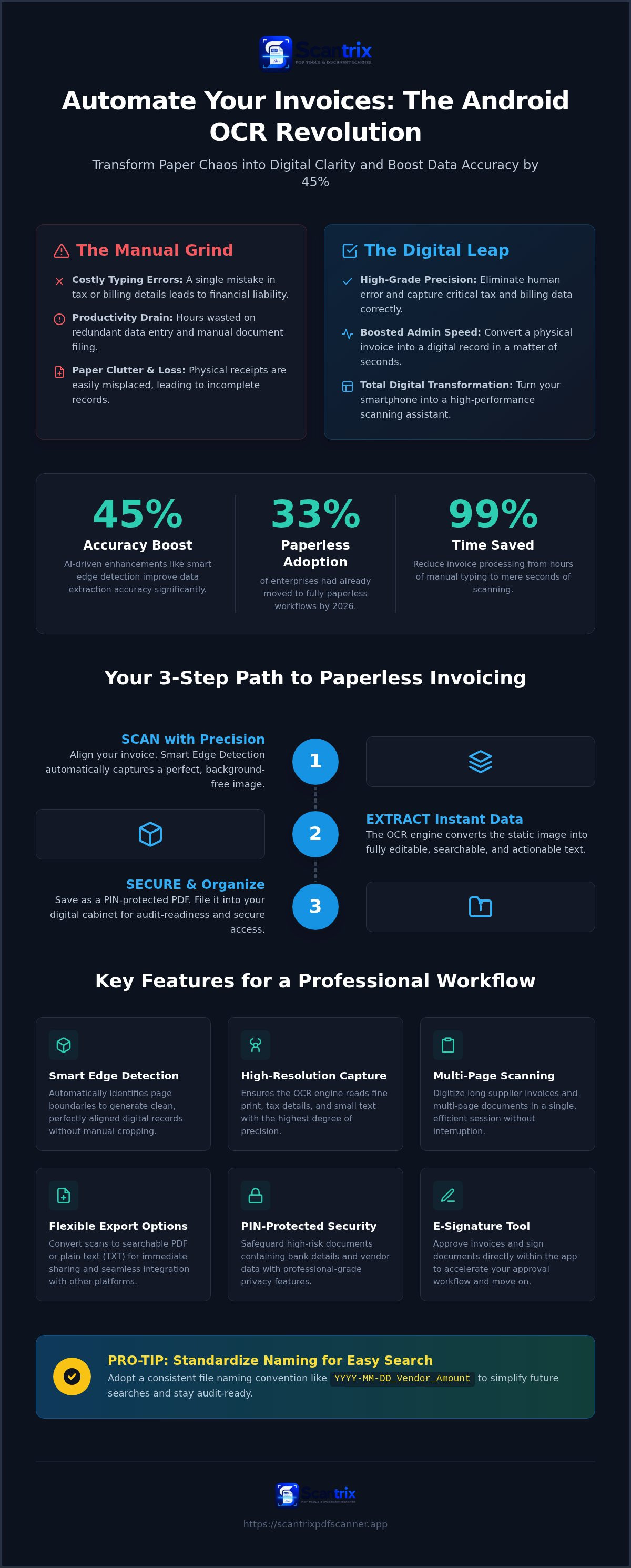
Manual data entry is a relic. In 2026, 33% of enterprises have already moved to fully paperless workflows. You know the frustration of lost receipts. You understand the cost of a single typing error. It's a productivity drain. Document filing shouldn't consume your afternoon.
Stop typing. Start scanning. This guide explores the most efficient tools for ocr for invoices android to transform paper into digital assets. You'll learn to extract text with 45% more accuracy using modern AI integration. We'll show you how to capture perfect scans and secure financial data with PIN protection. This article covers high-speed text extraction, professional-grade PDF output, and seamless document organization. Turn your smartphone into a high-performance assistant. Achieve total digital transformation.
Key Takeaways
- Convert physical images into editable text formats. Eliminate manual data entry and administrative lag instantly.
- Deploy professional ocr for invoices android to minimize human error. Capture critical tax data with high-grade precision.
- Utilize smart edge detection for complex, multi-page documents. Generate clean, high-resolution digital records in seconds.
- Protect sensitive financial data with PIN-protected privacy features. Maintain secure, professional document management on your mobile device.
Why Android OCR is Essential for Invoice Management
Efficiency is a non-negotiable business requirement. Manual data entry isn't just slow; it's a liability. Optical Character Recognition (OCR) technology solves this by transforming static invoice images into editable, searchable text formats. For solo entrepreneurs and mobile professionals, utilizing ocr for invoices android replaces the need for bulky, expensive desktop hardware.
Modern mobile applications now rival desktop scanners in character recognition precision. You gain immediate results through a streamlined digital workflow. The benefits are clear:
- Eliminate manual typing: Stop wasting hours on redundant data entry.
- Reduce human error: Avoid costly mistakes in tax and billing details.
- Boost administrative speed: Move from receipt to record in seconds.
Capture data instantly. Process payments faster. Stay organized without the clutter of physical paper. By shifting to a mobile-first approach with the Scantrix PDF Scanner App, you turn your smartphone into a high-performance administrative assistant. It's a professional-grade solution for the modern economy.
The Role of Smart Edge Detection in OCR Accuracy
Accuracy starts with the capture. Poorly cropped images or skewed angles cause recognition failures. Smart edge detection ensures perfect document alignment by identifying page boundaries in real time. This technology eliminates the guesswork from mobile scanning. It creates a systematic foundation for data extraction.
Auto-cropping removes distracting background noise. It focuses the recognition engine strictly on the relevant invoice data. Research indicates that AI-driven enhancements can lead to a 45% improvement in accuracy. You get clean, professional results every time. Perfect frames lead to perfect data. Don't settle for blurry, unreadable captures.
Key Features to Look for in an Invoice OCR App
Performance matters. Selecting a tool for ocr for invoices android requires a focus on technical specifications. You need professional-grade results. Don't settle for basic camera apps. High-resolution capture is mandatory. It ensures the engine reads fine tax details and small print correctly. Multi-page scanning is equally vital. It allows you to digitize long supplier invoices in a single session. This eliminates the need for repeated manual triggers. Efficiency follows logic.
Export flexibility builds utility. Convert scans to searchable PDF or plain text for immediate sharing across your network. Modern software leverages advanced invoice data extraction techniques to ensure every digit is captured with precision. Speed meets accuracy. Workflow friction disappears. Results appear instantly.
Securing Your Financial Data on Mobile
Invoices are high-risk documents. They contain bank details, vendor addresses, and pricing strategies. Standard gallery apps offer zero protection against unauthorized access. You need a dedicated app to lock PDF files on Android to mitigate these risks. Scantrix prioritizes your security. It provides PIN-protected privacy to ensure your financial history stays confidential. This professional-grade layer prevents data leaks. It protects your business integrity. Secure your records. Maintain total control.
Reach out to our team if you have questions about implementing secure mobile OCR solutions for your business.
How to Process Invoices Fast with Scantrix OCR
Speed defines the modern office. Open Scantrix. Align your invoice. Let smart edge detection capture the frame automatically. It identifies boundaries instantly. It removes background clutter. You get a perfect crop every time. No manual adjustments. No wasted seconds. Processing ocr for invoices android shouldn't be complex. This tool makes it effortless.
Trigger the engine. Extract text from the image without delay. High-performance ocr for invoices android functionality turns static images into actionable data. Review the results. Correct any minor discrepancies. If approval is necessary, use the built-in e-signature tool. Sign. Approve. Move on. The transition from paper to digital occurs in real time.
Finalize the process. Save your document as a secure, PIN-protected PDF. Organize it within your digital filing cabinet. Systematic storage prevents loss. It ensures audit readiness. Your smartphone is now a complete document management hub. You control the data. You own the workflow.
Optimizing Your Mobile Invoice Workflow
Consistency creates speed. Learn how to copy text from a scanned document on Android to paste data directly into accounting platforms. Avoid manual typing. Use a standardized naming convention: YYYY-MM-DD_Vendor_Amount. This simplifies future searches. Deploy the Scantrix PDF Scanner App to maintain professional-grade standards. It's built for high-performance users who value time. Results are immediate. Productivity is maximized.
Master Your Digital Workflow
Paper clutter is a productivity bottleneck. You now have the blueprint for total administrative transformation. Professional-grade ocr for invoices android eliminates manual errors and accelerates payment cycles. No physical scanner is required. Your smartphone handles high-resolution captures and secure storage with absolute precision. Results are immediate. Efficiency is the standard.
Prioritize your data integrity. Deploy PIN-protected security to safeguard sensitive financial records. Transition from physical receipts to actionable digital data in seconds. It's time to reclaim your schedule. Focus on growth. Let technology handle the details. Scan. Extract. Secure. Done. This is the modern standard for mobile business management.
Take the final step toward a paperless office. Download Scantrix PDF Scanner for Android to experience professional OCR extraction today. Build a smarter business. Start now.
Frequently Asked Questions
Can I use Android OCR for handwritten invoices?
Yes, but results depend on legibility. Modern ocr for invoices android engines in 2026 show significant improvements with handwritten text. Scantrix uses advanced extraction to process diverse invoice styles. Always verify handwritten totals before final filing. It's about combining digital speed with human oversight. Clearer handwriting ensures higher character recognition accuracy.
Is OCR for invoices accurate enough for tax purposes?
Professional ocr for invoices android tools achieve high precision. Tax authorities require absolute accuracy, so manual review remains essential. Use the scan as your primary record and extracted text for digital bookkeeping. Secure your financial history with PIN protection. This ensures audit readiness and maintains strict data privacy across your mobile workflow.
How do I convert a scanned invoice to an editable Excel file on Android?
Scan the document using Scantrix. Trigger the OCR text extraction engine. Pull data instantly. Copy the resulting text from the app. Paste it into a mobile spreadsheet application like Google Sheets. This workflow eliminates manual typing errors. It's a rapid transition from physical paper to a structured, editable digital format.
What is the best free OCR app for Android invoices in 2026?
Scantrix PDF Scanner is a top-tier choice for Android. It offers professional-grade OCR, smart edge detection, and PIN-protected privacy. While Microsoft Lens provides unlimited scanning, Scantrix includes specialized e-signature tools. Use the edit-to-scan workflow. Results are immediate. It converts your smartphone into a high-performance assistant without the need for expensive desktop hardware.


