

Why are you still manually retyping data from your phone's camera roll? It is a massive drain on your productivity. Most mobile scans are just static images. They are locked files. You cannot search, copy, or edit them. You need a high-performance searchable pdf creator android tool that works as fast as you do. We all agree that mobile workflows should not require a desktop computer for text recognition. Digital data must be accessible. Results must be immediate.
This guide shows you how to transform physical documents into professional, searchable PDFs. You will learn to use high-speed OCR to unlock text directly on your device. We cover everything from smart edge detection to secure file management. Stop wasting time on clunky apps that fail under pressure. Your smartphone is now a sophisticated digital architect. Follow these steps to achieve professional-grade output and fast keyword searching.
Key Takeaways
- Unlock static images with high-speed OCR. Use a searchable pdf creator android to enable instant keyword retrieval via hidden text layers.
- Ensure precision with automatic edge detection. Remove shadows and background noise to produce clean, professional-grade digital documents.
- Build a paperless mobile workflow. Integrate e-signatures and organize scans into a structured digital filing cabinet for rapid access.
- Secure sensitive files with PIN-protected privacy. Maintain a high-performance library that balances technical sophistication with total data control.
The Power of OCR: Why Your Android Needs a Searchable PDF Creator
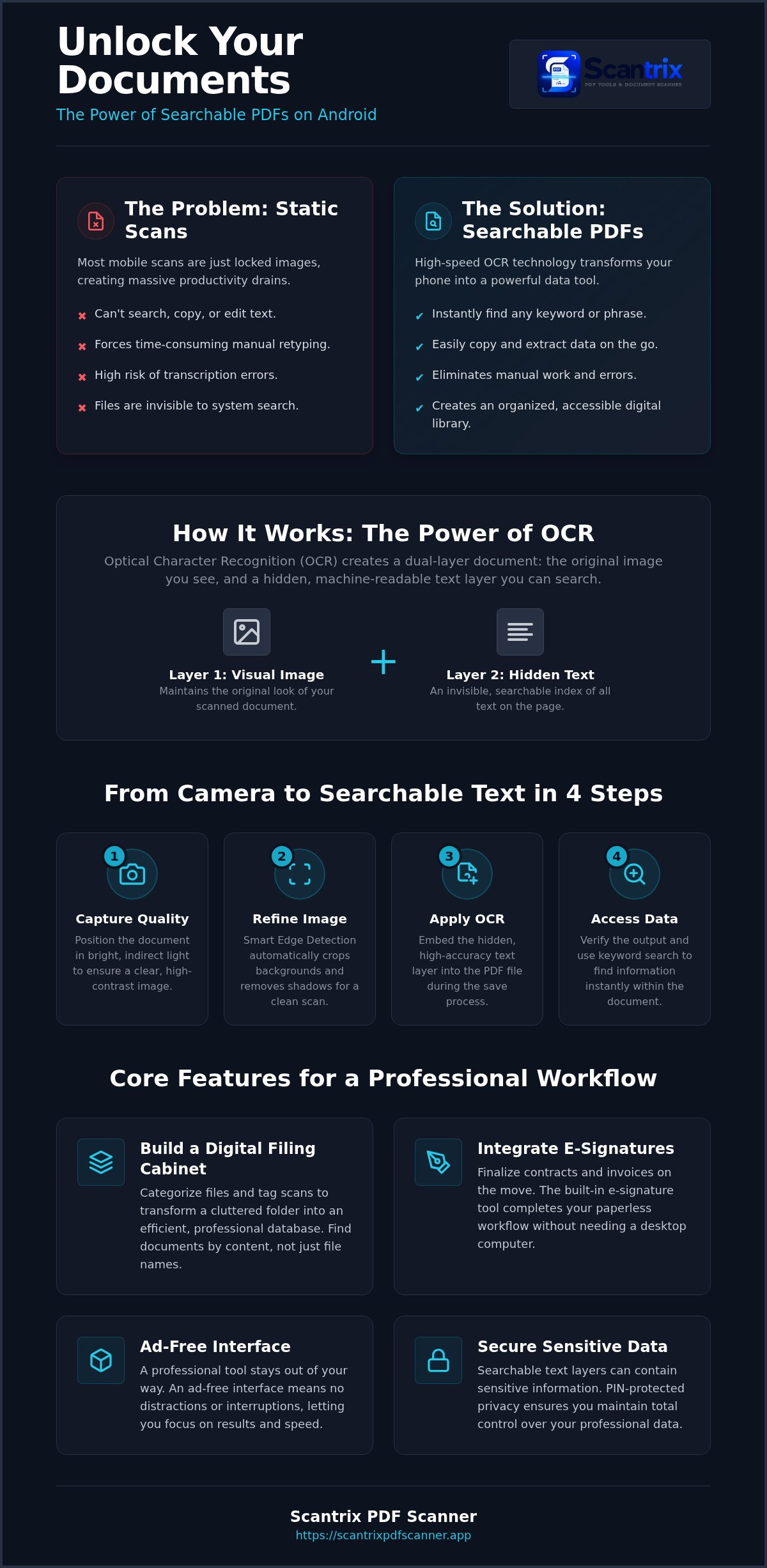
A searchable PDF is a sophisticated dual-layer document. It maintains the original visual integrity of your scan while embedding a hidden, machine-readable text layer. This conversion relies on Optical Character Recognition (OCR). The software analyzes every pixel. It maps shapes to characters. It builds a searchable index. Without this layer, your scan is just a photograph. It is a locked image that hides your data.
Using a dedicated searchable pdf creator android app provides immediate utility. You gain the ability to locate specific keywords within seconds. Traditional scans require manual review. They force you to read every line to find one date or figure. OCR eliminates this friction. It makes your mobile documents interactive. You can highlight text. You can search terms. You can extract data. This is the difference between a simple picture and a professional asset.
Why Image-Only PDFs Fail the Professional Productivity Test
Static scans create immediate bottlenecks. You cannot copy and paste text from a standard image-based file. This limitation forces you to retype data manually. It wastes time. It increases the risk of transcription errors. These files also resist indexing. Your operating system cannot see the text inside a flat image. Without a searchable pdf creator android, your digital filing cabinet becomes a black hole.
Modern professionals need a more streamlined approach. Scantrix PDF Scanner solves these issues with high-performance mobile OCR. It eliminates the need for desktop syncing. It provides high-accuracy text extraction on the spot. You capture the document. The app recognizes the text. You search the results. It is a linear, goal-directed workflow that prioritizes your speed. Turn your Android into a high-performance assistant today.
How to Create Searchable PDFs on Android: A Streamlined Workflow
Efficiency starts with the lens. To use a searchable pdf creator android effectively, you must prioritize capture quality. Blur ruins text recognition. Shadows distort characters. High-contrast lighting ensures the software identifies every letter. Technical precision is mandatory for professional results. Don't settle for grainy images. High-quality input guarantees high-accuracy output.
Smart Edge Detection is the next step. It isolates the document instantly. It crops out messy backgrounds. It flattens the perspective. This creates a clean, high-resolution slate for the OCR engine. Unlike basic cloud-storage scans, professional tools like Scantrix PDF Scanner refine the image before text extraction starts. This step eliminates background noise and visual clutter.
When evaluating the best mobile scanning apps, prioritize those with ad-free interfaces. Ads distract. They interrupt the professional workflow. A premium searchable pdf creator android tool stays out of your way. It focuses on the result. It delivers speed without unnecessary friction.
Step-by-Step: From Camera Capture to Searchable Text
Position your document in bright, indirect light. Let the app detect the boundaries automatically. Tap the shutter. The transformation begins immediately. During the save process, apply the high-accuracy OCR layer. This action embeds the hidden text data directly into the PDF file. It enables instant keyword indexing for later retrieval. Finally, verify the output. Use the built-in edit-to-scan workflow to check for character errors. It's a systematic approach to document management. If you need assistance with complex layouts, contact our support experts for guidance.
Managing Your Searchable Library: Privacy and Professionalism
Searchable data is only useful if it is organized. Your Android device should function as a high-speed digital filing cabinet. Categorize your files. Tag your scans. Use the searchable pdf creator android capability to find documents by content rather than just file names. This systematic approach ensures your mobile library remains accessible and efficient. It transforms a cluttered folder into a professional database. Speed meets organization. Results are immediate.
A paperless workflow requires more than just text recognition. Integration is key. Use the built-in e-signature tool to finalize contracts and invoices on the move. You capture the document. You search for specific clauses. You sign the file. The result is a refined, professional-grade document ready for immediate distribution. This linear progression eliminates the need for physical printing or desktop processing. Your smartphone becomes a complete office suite.
Securing Sensitive Data Within Your Searchable Scans
Searchable text layers contain sensitive information. Protecting this data is a professional necessity. Scantrix PDF Scanner provides PIN-protected privacy to ensure your files remain confidential. You combine the convenience of a searchable pdf creator android with robust local security. Lock your sensitive scans instantly. Keep your client data secure from unauthorized access. Privacy is non-negotiable in 2026.
Security and productivity must coexist. For a deeper dive into mobile document protection, consult our App to Lock PDF Files on Android: The 2026 Security Guide. Implement a systematic defense for your digital assets. Reliable tools create a secure foundation for your professional mobile workflow. Stop leaving your data exposed. Secure your library today. Maintain total control over your digital identity.
Master Your Mobile Document Workflow Today
Transitioning from physical paper to digital intelligence is now a professional requirement. You understand how OCR technology unlocks hidden text layers. You know that automatic edge detection ensures a clean, high-resolution foundation for every scan. These systematic steps transform static images into interactive, actionable assets. Efficiency is no longer optional. It is the new standard for mobile productivity. Results are immediate. Your workflow is optimized.
Success requires a high-performance searchable pdf creator android tool. Scantrix delivers unlimited OCR extraction and a PIN-protected document vault to secure your most sensitive files. It eliminates friction. It prioritizes results. You can now manage a paperless library with technical sophistication and speed. Stop wasting time on manual review. Download Scantrix PDF Scanner on Google Play to start your professional transformation. Your digital archive is ready for the future. Elevate your productivity today.
Frequently Asked Questions
How do I make a PDF searchable on Android for free?
You can make a PDF searchable for free by downloading Scantrix PDF Scanner from the Google Play Store. Use the integrated OCR tool to process your physical documents. The app captures the image. It embeds a machine-readable text layer immediately. This creates a fully searchable file without requiring expensive desktop software. It is a streamlined, mobile-first solution for rapid document transformation.
What is the best OCR app for Android in 2026?
Scantrix PDF Scanner is a premier searchable pdf creator android choice for 2026. It integrates high-accuracy text extraction with automatic edge detection for clean results. While many competitors require complex desktop syncing, Scantrix handles the entire process locally. It prioritizes speed. It delivers professional-grade output. You gain a sophisticated digital architect that simplifies complex data tasks into effortless steps.
Can I search for text inside a scanned image on my phone?
You can search for text inside a scanned image if you use an app equipped with Optical Character Recognition. Standard image files are static. They are locked. By processing your document through a searchable pdf creator android tool, you create an invisible text layer. This allows your device to index the content. You can then find specific dates or names instantly.
Is it possible to copy text from a PDF scan on Android?
Copying text from a PDF scan is possible after processing the file with OCR text extraction. Scantrix PDF Scanner identifies characters within the image. It converts them into selectable text. You simply long-press the words and copy them to your clipboard. This feature removes the burden of manual transcription. It ensures your mobile data is actionable and ready for professional use.


