

A smartphone camera is not a document scanner. Most users settle for messy edges and blurry text; they shouldn't. You've likely felt the frustration of shadows ruining a capture or sensitive data sitting unprotected in your gallery. It's a common pain point that demands a technical resolution. It's time for a professional upgrade.
This guide demonstrates the most efficient way to scan photos to pdf android using 2026's high-performance tools. You'll learn to leverage smart edge detection to eliminate backgrounds instantly. We also explore OCR text extraction and PIN-protected privacy features that keep your sensitive documents secure. From organizing multi-page reports to generating crisp, professional-grade PDFs, you'll master the transition from physical to digital states with zero friction. Your Android device is now a sophisticated digital architect.
Key Takeaways
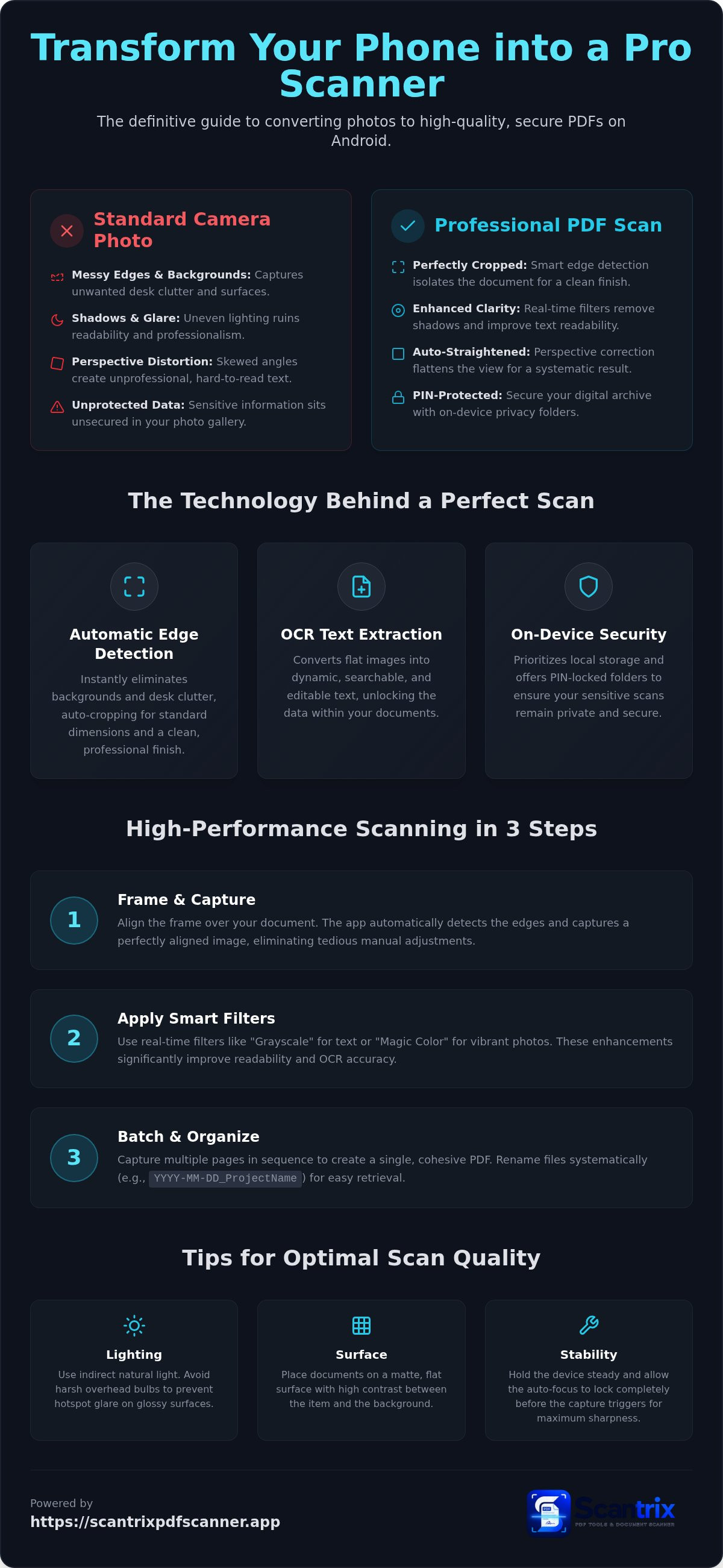
- Eliminate messy backgrounds and perspective errors using automatic edge detection for a clean, professional finish.
- Discover the most efficient workflow to scan photos to pdf android with real-time filters that enhance document readability.
- Convert physical images into searchable, editable data using integrated OCR text extraction technology.
- Protect your digital archives with PIN-locked privacy folders, ensuring sensitive scans remain secure on-device.
Why Professional Photo-to-PDF Conversion Requires Smart Technology
A standard image file is a flat visual record. A professional PDF is a structured, searchable asset. Relying on basic camera apps to scan photos to pdf android often yields amateur results. Images saved as JPEGs lack standardized margins. They don't support multi-page layering. Professional conversion transforms these snapshots into uniform documents. It ensures consistency across every file you generate.
Manual cropping is a productivity killer. It leads to inconsistent document sizes and unprofessional visuals. You shouldn't spend minutes dragging corners on a screen when you scan photos to pdf android. Perspective correction is equally critical. Physical scans often occur at awkward angles. This creates distorted text blocks and skewed lines. Intelligent software identifies these geometric errors. It flattens the view. It aligns the content. This creates a systematic, goal-directed result. For high-volume digitization, a rapid, staccato workflow is essential. You need immediate action. You need instant results.
The Impact of Automatic Edge Detection on Scan Quality
Background clutter ruins document professionality. Smart Edge Detection eliminates desk surfaces and shadows instantly. It isolates the document from the environment. Auto-cropping then maintains standard dimensions across all pages. This precision provides the clean data required for Optical Character Recognition (OCR). Text extraction thrives on high-contrast, perfectly aligned captures. Smart edge detection is a productivity multiplier that turns your phone into a high-performance assistant.
Step-by-Step: How to Scan Photos to PDF on Android
Open Scantrix. Align the frame. The app detects document edges automatically. Capture the image. This is the fastest method to scan photos to pdf android without tedious manual adjustments. The software handles technical alignment instantly so you focus on the content. It's a professional-grade solution for a high-performance workflow.
Apply real-time filters immediately. Use "Grayscale" for text-heavy photos or "Magic Color" for vibrant accuracy. These enhancements significantly improve Optical Character Recognition (OCR) performance. Clearer pixels lead to precise text extraction. Professional output requires these technical refinements. Don't settle for raw camera snapshots that look amateur and unpolished.
Batch your workflow. Capture multiple pages in sequence. Scantrix organizes these into a single, cohesive file. Rename the document using a systematic format like YYYY-MM-DD_ProjectName. Professional naming ensures instant retrieval in high-pressure environments. Avoid generic "Scan_1" labels that clutter your storage. Systematic organization leads to systematic success.
Optimizing Your Scan Environment for Best Results
- Lighting: Use indirect natural light. Avoid overhead bulbs to prevent hotspot glare on glossy photos.
- Surface: Position photos on a matte, flat surface. Ensure high contrast between the photo and the background.
- Stability: Hold the device steady. Let the auto-focus lock before the capture triggers.
For complex projects, leverage the multi-page PDF scanning capability. This creates a seamless flow for multi-sheet contracts or photo albums. Transitioning to a paperless workflow is a strategic move toward productivity. Learn more about digitizing paper documents to maximize your efficiency. If you require specific feature walkthroughs, get in touch with us for professional support.
Maximizing Value: OCR and Security for Your Scanned Photos
Static images are dead data. Professional workflows require searchable assets. When you scan photos to pdf android, integrated OCR technology unlocks the hidden content. It transforms flat pixels into dynamic text. This enables instant keyword search within high-volume documents. It facilitates rapid data extraction for spreadsheets or project reports. Scantrix PDF Scanner provides this high-performance capability directly on your phone. No third-party uploads. No privacy leaks. It's a localized, secure transformation.
Security is non-negotiable. Sensitive documents demand on-device protection. Many generic apps compromise privacy by forcing cloud synchronization. Scantrix prioritizes local storage. Use the workflow benefits of mobile e-signatures to finalize scanned contracts instantly. This eliminates the need for printing or desktop software. The experience is entirely ad-free. It's a focused, professional environment designed for productivity. No distractions. Just results.
Implementing PIN-Protected Privacy and OCR
Efficiency starts with accessibility. Open your scan. Select the OCR tool. Learn how to copy text from a scanned document to repurpose data in seconds. This eliminates manual retyping errors. For sensitive assets like IDs or financial receipts, activate the security vault. Establish a PIN-protected folder to isolate critical files. This creates an encrypted barrier on-device. It ensures your scan photos to pdf android results remain private even if the device is shared. Your data stays local. Your workflow stays secure.
Optimize Your Mobile Digitization Workflow
Professional document management demands high-performance tools. You've discovered how smart technology eliminates manual errors through instant precision. Automatic edge detection ensures every capture looks polished. Integrated OCR and E-Signature tools transform static photos into searchable, actionable assets. Security is paramount. PIN-protected privacy keeps your sensitive files secure on-device without risky cloud transfers. It's the most reliable way to scan photos to pdf android today. This systematic approach saves time and guarantees professional-grade results. Your phone is now a sophisticated digital architect. Take control of your physical archives and experience a seamless transition to digital excellence. Download Scantrix PDF Scanner for free on Google Play to upgrade your productivity. High-speed efficiency starts now.
Frequently Asked Questions
How do I combine multiple photos into one PDF on Android?
Use the batch scanning feature in Scantrix. Open the app and capture your first image. Continue capturing additional pages in sequence. The software automatically organizes these individual frames into a single, cohesive multi-page file. This is the most efficient way to scan photos to pdf android for long-form reports or multi-sheet contracts. Tap save to generate the unified file instantly.
Is there a free Android app to scan photos to PDF without watermarks?
Scantrix PDF Scanner provides a professional, ad-free experience for all users. It delivers clean, high-performance output without the intrusive branding found in generic alternatives. You don't need a desktop computer or physical scanning services to get results. Download the app from Google Play to generate professional-grade PDFs for free. It's a premium tool for users who value technical sophistication.
Can I extract text from a photo after converting it to PDF?
Yes. You can use integrated OCR Text Extraction to transform static images into searchable, editable content. This technology identifies characters within the PDF and allows you to copy them directly to your clipboard. It eliminates manual retyping errors. Scantrix processes this data on-device to ensure your sensitive information remains private. It's a sophisticated digital architect for your complex mobile workflows.
How do I ensure my scanned PDF looks like a professional document?
Leverage smart edge detection and real-time filters. These tools eliminate background clutter and correct perspective errors instantly. High-contrast filters enhance text readability while maintaining color accuracy. This ensures your scan photos to pdf android results look like they came from a professional flatbed scanner. Consistent document sizes and sharp edges project a sense of reliability and technical sophistication to every recipient.


