

Over 33% of enterprises shifted to paperless workflows in 2026. Your Android device is now a mobile headquarters. You value speed. You demand quality. Low-resolution conversions and forced watermarks disrupt your professional image. Security is non-negotiable. Online-only tools often expose your private data to external servers. Selecting the right jpg to pdf android app determines your daily efficiency. It's about precision. It's about trust.
This guide reveals the most efficient apps to transform images into high-quality, professional PDF documents on your Android device instantly. We analyze the top-performing converters for 2026. You'll explore tools that prioritize smart edge detection, high-speed processing, and secure, local storage solutions. Get ready to streamline your workflow and secure your digital documents with elite precision.
Key Takeaways
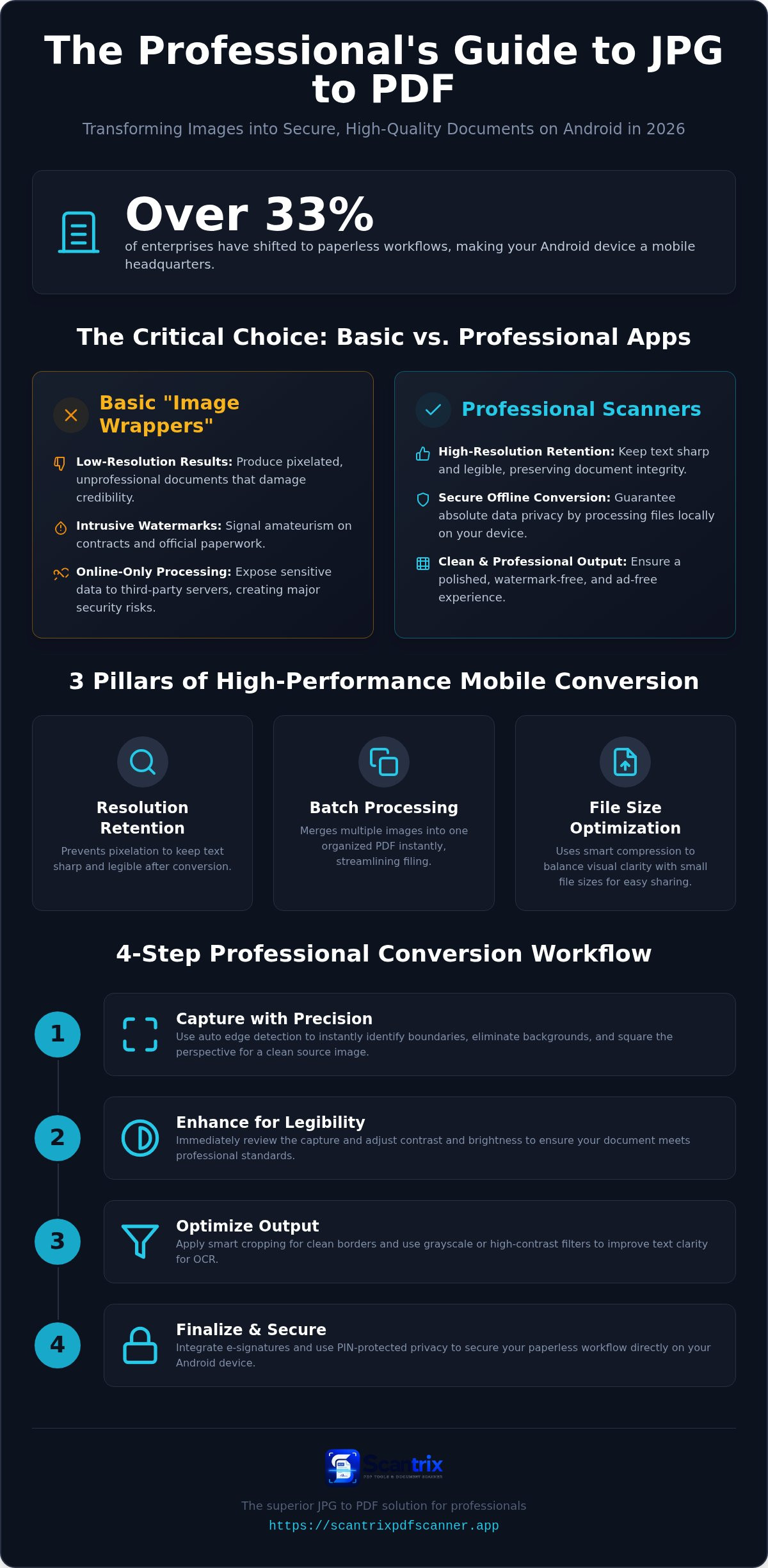
- Distinguish basic image wrappers from professional scanners. Avoid low-resolution results and intrusive watermarks that damage professional credibility.
- Identify a secure jpg to pdf android app. Prioritize local storage to eliminate security risks inherent in online-only converters.
- Master the conversion workflow. Use smart edge detection and contrast adjustments to ensure maximum legibility and clean crops.
- Finalize documents instantly. Integrate e-signatures and PIN-protected privacy to secure your paperless workflow on any Android device.
Evaluating the Top JPG to PDF Android Apps in 2026
The app market is saturated with low-tier software. Most converters are merely basic image wrappers. They lack document intelligence. A professional jpg to pdf android app must do more than change a file extension. It must preserve the technical integrity of the Portable Document Format (PDF). In 2026, professional credibility is fragile. Watermarks on a contract signal amateurism. Intrusive ads waste billable hours and distract from high-stakes tasks. Offline conversion is the gold standard. It ensures absolute data privacy. It guarantees speed during field work. You don't need a signal to finalize a deal. Local processing eliminates the security risks found in web-based alternatives. Your sensitive data stays on your device. It never touches a third-party server.
Key Performance Metrics for Mobile Converters
Systematic efficiency relies on three critical pillars. First, resolution retention. Professional tools prevent pixelation. They keep text sharp and legible after the transformation. Second, batch processing. You need the capability to merge multiple images into one organized document instantly. This streamlines your digital filing. Third, file size optimization. High-definition output is useless if it's too large for standard email attachments. Advanced apps use smart compression. They balance visual clarity with small file footprints. This ensures your documents reach their destination without bounce-backs or storage errors. High-performance apps deliver these results without friction. They transform your phone into a high-grade production tool.
Step-by-Step: Converting Images to Professional PDFs on Android
High-quality results start with the lens. Launch your jpg to pdf android app. Position the document on a flat surface. Use auto edge detection to identify boundaries instantly. This technology eliminates background noise. It squares the perspective automatically. Hold your device steady. Let the AI trigger the shutter. This ensures a clean, distraction-free source image. It removes the need for manual cropping later.
Review the capture immediately. Adjust contrast. Boost brightness. These steps are vital for maximum legibility. A dark, muddy image fails in a professional setting. Fine-tuning ensures your document meets best practices for professional PDFs. Standardized formats ensure cross-platform compatibility. Once satisfied, use your chosen jpg to pdf android app to finalize the file. Save directly to secure local storage or your verified cloud provider. Your workflow remains uninterrupted and organized.
Optimizing Image Quality Before Conversion
Precision defines professional output. Utilize smart document cropping. This makes the final PDF look like a high-grade scan. It doesn't look like a casual photo. Clean borders reinforce your professional authority. Apply grayscale or high-contrast filters next. This step improves text clarity for high-accuracy OCR engines. Better clarity means better text extraction and searchability. It transforms raw pixels into actionable data.
Lighting is the final variable. Refer to our guide on how to scan documents without a scanner for advanced lighting techniques. Avoid overhead shadows. Minimize glare. Consistent lighting prevents processing errors. These small adjustments lead to superior results every time. For specific technical support with your conversion needs, you can reach out to our specialist team.
Why Scantrix is the Superior JPG to PDF Solution for Professionals
Generic converters stop at the file extension. Scantrix extends the entire document lifecycle. Professionals require more than a simple image swap. You need a comprehensive toolset. Selecting a high-performance jpg to pdf android app is a strategic choice for mobile productivity. Integrate electronic signatures directly into your conversion process. This eliminates the need for expensive third-party software. It saves time. It finalizes contracts on the spot. Security remains a baseline requirement. Maintain absolute privacy with PIN-protected folders. Your converted files remain shielded from unauthorized access. This tool is expert tested and reviewed for high-stakes environments. It delivers reliability when your reputation is on the line.
The edit-to-scan workflow provides total control over the final product. Refine your documents after the initial capture. Adjust borders. Enhance visual clarity. Fix alignment issues. You don't have to restart the process if the first shot isn't perfect. This systematic approach ensures every output meets rigorous professional standards. It transforms your Android device into a sophisticated digital architect. Speed meets precision. Problem meets immediate solution. Your workflow stays lean and your output stays sharp.
Beyond Conversion: OCR and Secure Storage
Static images become dynamic assets. Scantrix provides advanced utility through high-performance features designed for modern productivity:
- Instant Text Extraction: Leverage high-accuracy OCR technology to pull text from converted images for immediate editing or sharing.
- Digital Filing Cabinet: Store sensitive legal or financial documents in a secure, organized digital environment on your device.
- Professional Grade Results: Download the Scantrix PDF Scanner App for elite mobile conversion today.
Elevate Your Mobile Productivity Now
Efficiency defines modern professional success. You've learned to identify high-performance tools. You know how to optimize your scanning process. A reliable jpg to pdf android app must provide more than just a conversion. It must ensure document security. It must guarantee visual clarity. Scantrix delivers these results without intrusive watermarks or distracting advertisements. You gain access to professional OCR text extraction and PIN-protected document privacy instantly. This systematic approach transforms your mobile device into a high-grade production tool. Don't settle for amateur wrappers that compromise your data. Secure your files. Streamline your output. Finalize your contracts with confidence. You're ready to lead the paperless transition with precision and speed.
Download Scantrix PDF Scanner for Android to experience professional-grade results today.
Frequently Asked Questions
How do I convert multiple JPGs into one PDF on Android?
You convert multiple images by utilizing batch processing features. Open your chosen jpg to pdf android app. Select the images from your gallery or capture them sequentially using the camera. The software organizes these frames into a single, cohesive document. This process streamlines your digital filing. It ensures all related images stay together in one professional file for immediate sharing or storage.
Will converting JPG to PDF reduce the image quality?
Quality loss is preventable with professional software. Expert converters preserve resolution during the transformation. They keep text sharp and legible. Scantrix utilizes smart compression algorithms to balance high-definition clarity with small file footprints. You get crisp documents suitable for email attachments without the blurriness common in low-tier image wrappers. It ensures your output remains professional and highly readable.
Are there any free Android apps that convert JPG to PDF without watermarks?
High-quality apps like Scantrix provide watermark-free results. Many generic converters ruin document credibility with forced branding. You don't need to pay for basic professionalism. A professional jpg to pdf android app should offer clean, unbranded output as a standard feature. This maintains your professional image. It ensures your contracts and reports look official. You get high-grade results without visual clutter.
Is it safe to use online JPG to PDF converters for sensitive documents?
Online converters are unsafe for sensitive data. They upload your private files to third-party servers. This creates significant security vulnerabilities. Local processing is the superior choice for privacy. Apps that work offline keep your data on your device. Scantrix enhances this protection with PIN-protected folders. It's the secure way to handle legal or financial documents without risking external exposure.


