

Your professional reputation shouldn't be held hostage by a "Free Trial" watermark. It looks amateur. It feels cheap. In a high-stakes business environment, a blurred logo in the corner of your contract can kill a deal. You need a document scanner no watermark android solution. You need clarity. You need speed. Most importantly, you need results that don't scream "free app."
We understand the frustration of hidden fees and intrusive branding. This article delivers a solution. Discover how to generate professional-grade PDFs with sharp text and zero branding clutter. We've vetted the best tools for 2026. This guide breaks down high-performance apps like Scantrix. We analyze edge detection speed, OCR accuracy, and secure storage options. Stop settling for amateur output. Start scanning with precision. Secure your data. Elevate your workflow.
Key Takeaways
- Eliminate amateur branding. Discover why a document scanner no watermark android is essential for maintaining high-stakes professional credibility.
- Benchmark 2026 performance. Compare Scantrix against industry giants to identify the fastest, login-free scanning solution for your mobile workflow.
- Optimize scan quality. Use smart edge detection and precision filters to remove distortion and enhance text clarity instantly.
- Streamline your output. Secure sensitive files with PIN-protected privacy and execute contracts using integrated e-signature tools.
The Search for a Document Scanner with No Watermark on Android
Finding a reliable document scanner no watermark android app is a persistent challenge in 2026. Most "free" tools hide a catch. They capture the image but insert a branding logo during export. This creates friction. A true "no watermark" scanner provides clean, high-fidelity PDFs. It treats your document as a priority. Scantrix solves this. It focuses on systematic organization. It delivers professional-grade output without the clutter of forced branding.
Mobile scanning mirrors traditional Image scanner technology. Your phone replaces bulky hardware. It requires precision. Scantrix is a premier document scanner no watermark android choice because it delivers this through smart edge detection. High-contrast filters enhance clarity. The goal is simple. Transform physical paper into a digital asset. No distractions. No forced logos. Just clear, usable files for your digital archive.
Why Clean Branding-Free PDFs Matter for Business
Watermarks undermine professional credibility. In legal environments, an app tag looks amateur. It suggests you don't invest in proper tools. It interferes with OCR accuracy. It blocks readability. Clean PDFs keep your work the focus. If you're new to mobile capture, learn how to scan documents without a scanner for foundational tips on lighting and positioning.
Professional presentation builds trust. When sharing contracts, clarity is non-negotiable. Branded overlays obscure text. They clutter margins. They signal a "budget" approach. Scantrix removes these barriers. It provides clean exports by default. This ensures every PDF reflects your standards. You can even use the integrated e-signature tool to finalize documents instantly. Professional tools yield professional results. Efficiency starts here.
Comparing Scantrix vs Adobe and Evernote: The 2026 Performance Test
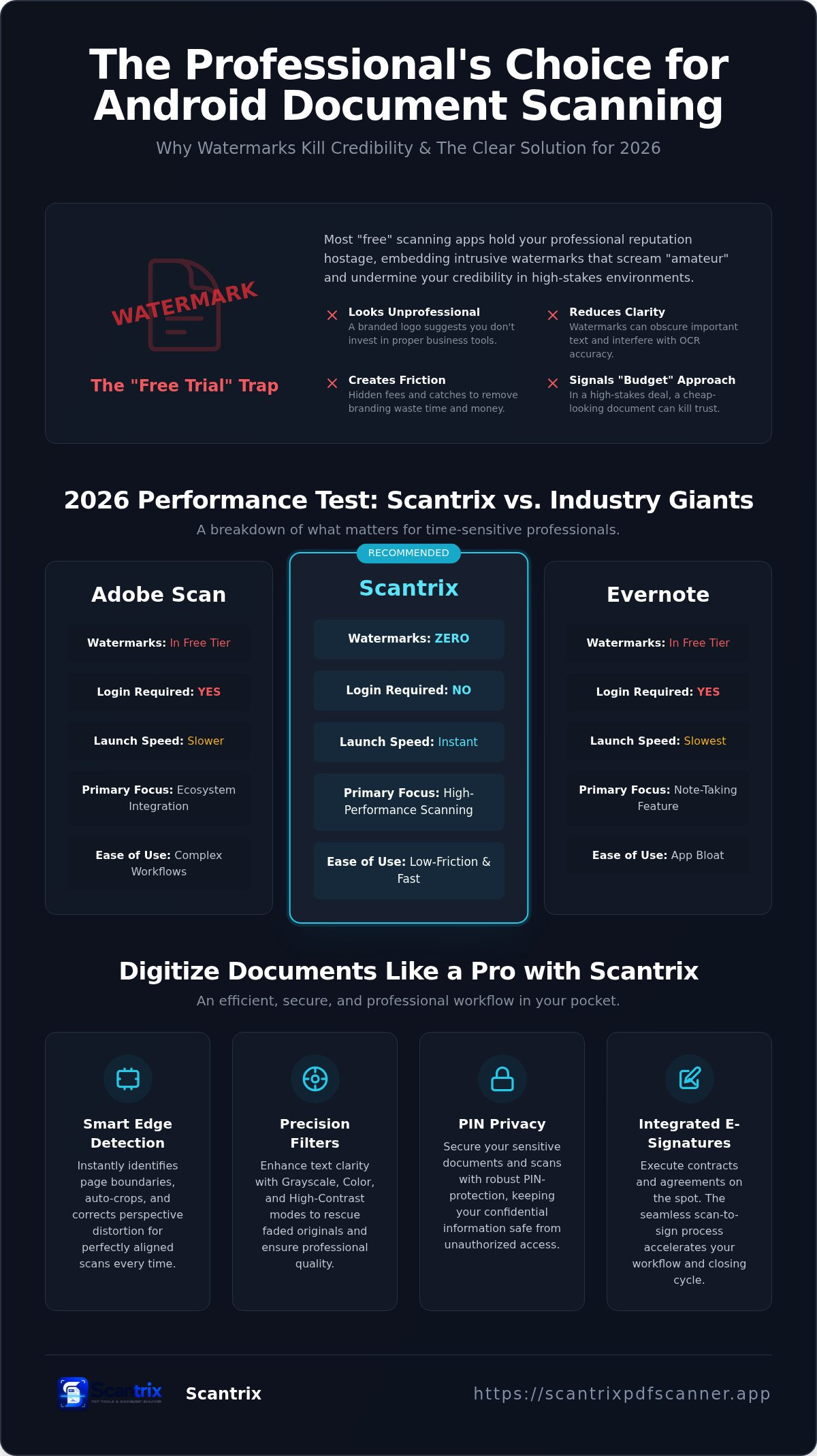
Speed defines the modern mobile office. Large ecosystems like Adobe and Evernote often dominate the best document scanning apps lists, but they carry significant baggage. These apps are heavy. They require mandatory cloud accounts. They force you into complex workflows for a simple task. Scantrix prioritizes a low friction-to-scan ratio. It launches instantly. It bypasses the login screen. This makes it the superior document scanner no watermark android for time-sensitive professionals who value immediate results over ecosystem bloat.
Performance isn't just about launch speed. It’s about output. Choosing a document scanner no watermark android shouldn't mean sacrificing quality for storage. Scantrix optimizes every scan for mobile sharing. It captures high-resolution images while minimizing file size. This prevents email bounce-backs. It ensures your PDFs remain sharp on any screen. Unlike Evernote, which treats scanning as a secondary feature for note-taking, Scantrix treats the document as the primary asset. The result is a lean tool that respects your device's storage and your productivity.
Evaluating OCR Accuracy and Text Extraction Quality
Reliable text extraction is a 2026 baseline. Scantrix handles low-light captures and complex multi-column layouts with precision. It converts physical text into editable digital formats without loss of data. If you need a step-by-step walkthrough for this process, read our guide on how to copy text from a scanned document on android. This systematic approach eliminates manual typing errors. It secures your workflow. For custom implementation needs, contact our technical support team for assistance.
How to Digitize Professional Documents Using Scantrix
Professional document capture requires technical precision. Scantrix automates the process. Smart edge detection identifies page boundaries instantly. It eliminates manual cropping. It corrects perspective distortion automatically. You get a perfectly aligned digital copy in one tap. This efficiency makes it the leading document scanner no watermark android solution for 2026. It transforms your phone into a high-performance office tool.
Visual clarity depends on the right filter. Use Grayscale to preserve text sharpness while minimizing file size. Select Color mode for documents with critical visual data. High-Contrast mode rescues faded or low-quality originals. These tools ensure every scan meets corporate standards. Export your files directly to PDF. The output remains clean. No intrusive logos. No hidden branding. Your work stays the focus.
Integrating E-Signatures and PIN Privacy for a Secure Workflow
Security is a core requirement. Use the integrated e-signature tool to execute contracts on the spot. The scan-to-sign process takes seconds. It removes the need for physical printing. It accelerates your closing cycle. For detailed instructions, follow our guide on how to sign PDF documents on your phone. It's a seamless transition from capture to completion.
Confidentiality is paramount for financial documents. Scantrix includes PIN-protected privacy. This secures sensitive files directly on your device. It prevents unauthorized access during sharing or storage. You don't need complex desktop software for high-level security. Everything stays mobile. Everything stays private. Professional results. Secure delivery. Total control.
Master Your Professional Mobile Workflow
Professionalism demands branding-free documents. Watermarks are a liability in corporate environments. They obscure text and signal amateur tools. Scantrix eliminates these barriers. It provides clean, high-fidelity exports. This ensures your contracts maintain total credibility. Efficiency depends on smart automation. Automatic edge detection captures perfect boundaries. Built-in OCR extracts data without manual entry. These features save time. They reduce friction. They allow you to focus on high-impact tasks.
Security remains a primary concern for 2026. Integrated e-signatures and PIN-protected privacy secure your sensitive assets directly on the device. No desktop software is required. Transition to a cleaner, faster digital archive. Scantrix is the definitive document scanner no watermark android choice for modern experts. Stop settling for cluttered PDFs. Elevate your digital standards with a tool built for peak performance.
Download Scantrix PDF Scanner for professional, watermark-free scanning on Android and master your productivity today.
Frequently Asked Questions
Is there a document scanner for Android that is truly free and has no watermark?
Scantrix provides a document scanner no watermark android solution that's free to download. It delivers professional-grade output without intrusive branding. While many competitors hide watermarks behind a paywall, Scantrix allows you to export clean PDFs immediately. It prioritizes your professional reputation. You get sharp, high-contrast results that are ready for corporate or legal use.
How do I remove a watermark from a scanned PDF on Android?
Removing watermarks from existing PDFs is complex and often requires expensive desktop software. It's more efficient to use a document scanner no watermark android like Scantrix for the initial capture. This avoids the problem entirely. By selecting a tool that exports clean files by default, you preserve document quality and eliminate the need for post-processing edits.
Can I scan multi-page documents without watermarks using Scantrix?
Scantrix handles multi-page documents with ease. You can scan multiple sheets in a single session. The app compiles them into one organized PDF file. Every page is exported without watermarks or forced logos. This systematic approach ensures your long-form contracts and reports remain professional. It is the ideal tool for digitizing extensive physical archives quickly and cleanly.
Is Scantrix PDF Scanner safe for scanning sensitive legal documents?
Scantrix is built for security. It includes PIN-protected privacy to lock sensitive files on your device. This feature ensures that legal documents remain confidential. The app offers integrated e-signatures and smart edge detection for precise results. It functions as a reliable digital assistant for professionals who handle high-stakes paperwork and require secure, on-device document management.


