

Compression isn't the solution to oversized documents; precision capture is. Most mobile users struggle with bloated files because they scan background clutter instead of raw data. If you need to know how to scan to a small pdf on android, you've likely felt the frustration of an email bounce-back. Slow uploads kill productivity. Grainy, over-compressed text looks amateur. You deserve a workflow that prioritizes both speed and professional-grade quality.
It's time to master a high-performance system for document digitization. You'll learn to capture high-quality, low-weight documents that maintain absolute clarity. This guide covers smart edge detection to eliminate bulk and on-device OCR to streamline file architecture. We'll show you how to achieve compact sizes, professional-grade legibility, and secure processing without the friction of traditional scanning apps. Results are immediate. Your files stay small. Your security remains intact.
Key Takeaways
- Eliminate digital bloat. Identify how uncropped backgrounds and unnecessary image data inflate file sizes.
- Master the professional process for how to scan to a small pdf on android by using high-contrast surfaces and smart edge detection.
- Optimize document architecture. Use OCR text extraction to convert heavy image files into lightweight, searchable documents.
- Enhance sharing efficiency. Consolidate multi-page scans into a single, professional file structure for rapid delivery.
Understanding PDF Bulk: Why Standard Mobile Scans Are Too Large
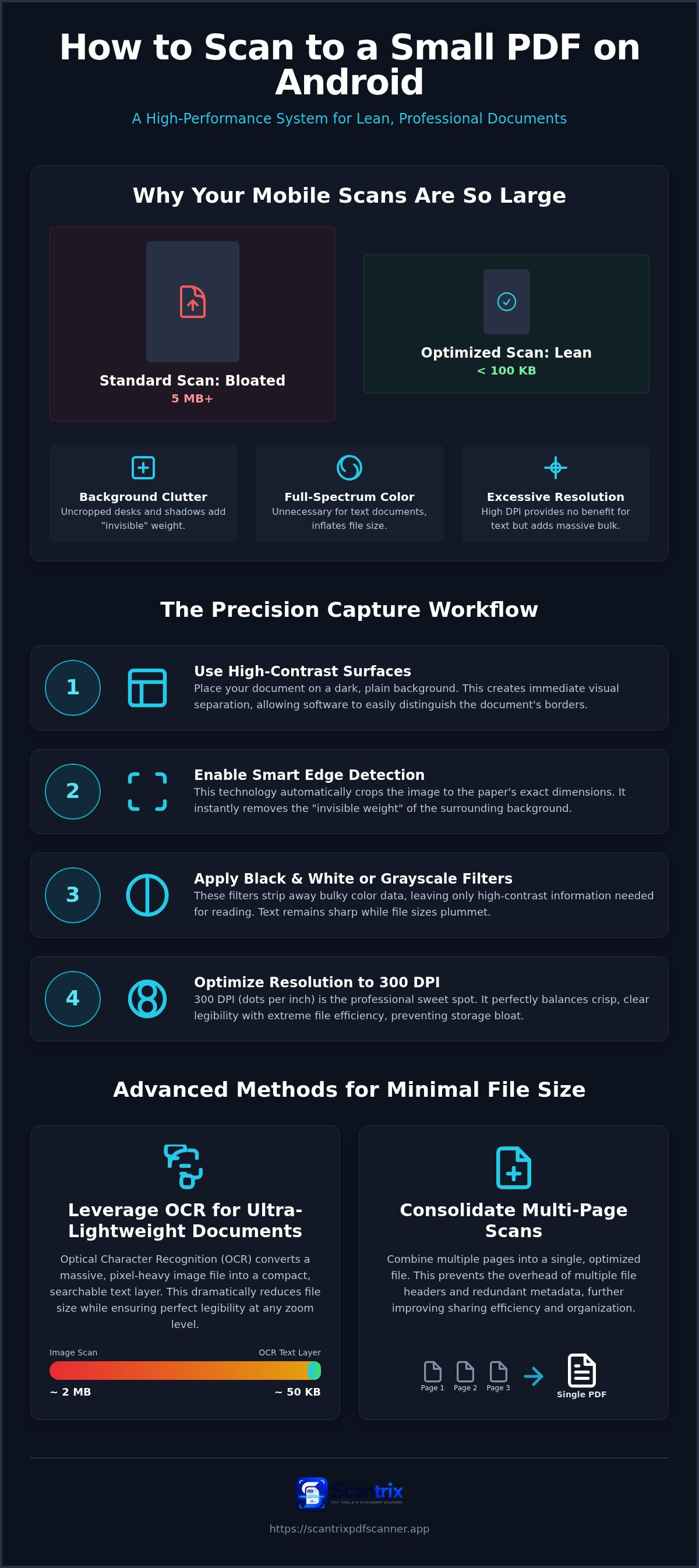
Modern smartphone cameras are engineered for high-fidelity photography, not lean documentation. They capture millions of pixels by default. This creates massive raw image files that lack optimization. When these images are saved as PDFs, the file size reflects every unnecessary detail. Learning how to scan to a small pdf on android starts with identifying these hidden data sinks. Uncropped backgrounds and desk shadows aren't just visual distractions. They represent "invisible" weight. Every pixel of a wooden tabletop or a carpeted floor adds kilobytes to your final document. These details serve no professional purpose. They only congest your digital workspace.
High-resolution color data is another primary culprit. Standard mobile captures often retain full-spectrum color information for simple black-and-white text. This exceeds professional requirements for document sharing. By Understanding PDF Technology, users can see how high-resolution images and complex formatting inflate file sizes unnecessarily. Professional documents require clarity, not artistic depth. Capturing data at the wrong scale ensures your files remain too large for instant delivery. Precision matters more than raw pixel count.
The Role of DPI and Resolution in Mobile Storage
Resolution directly dictates storage requirements. For professional mobile scanning, 300 DPI is the sweet spot. This setting balances crisp legibility with extreme file efficiency. Excessive resolution provides no visual benefit for text-based documents. It only bloats device storage and stalls email servers during the upload process. DPI, or dots per inch, is the primary metric for file optimization and document clarity. Utilizing a professional utility like the Scantrix PDF Scanner App ensures your scans stay within these efficient parameters. High-performance scanning requires this technical balance. Avoid the bloat. Prioritize the data.
Capturing Optimized Data: How to Scan to a Small PDF on Android
High-performance scanning begins before you tap the shutter. Precision starts with your environment. Position your document on a high-contrast surface. Use a dark background for light-colored paper. This creates immediate visual separation. It allows the software to distinguish document borders from the surroundings. When you learn how to scan to a small pdf on android, you realize that environment dictates efficiency. A clean background prevents the camera from capturing unnecessary textures or shadows that inflate file weight.
Automatic edge detection is your primary tool for data reduction. It eliminates background pixels instantly. This technology crops the image to the exact dimensions of the paper. It removes the "invisible" weight of the tabletop or desk. Next, apply grayscale or black-and-white filters. These filters strip away complex color data bulk. They leave only the high-contrast information needed for reading. Text remains sharp. File sizes plummet. You achieve a professional result without the bloat of standard camera captures.
Professional Workflow with Scantrix PDF Scanner
Professional results depend on specialized utilities. Launch Scantrix and align your document. Smart edge detection locks onto the borders immediately. It's rapid. It's precise. Apply professional filters to sharpen text while dropping file size. For more on this, see Smart Scanning: The Ultimate Guide to Auto Edge Detection PDF Scanners (2026). This workflow ensures every scan is optimized for speed and storage. Save your documents directly to a secure, PIN-protected folder. This maintains maximum privacy and organization. If you need assistance with your mobile workflow, contact our support team for expert guidance.
Post-Capture Refinement: Advanced Methods for Minimal File Size
Refinement is the final stage of optimization. After capturing the document, you must refine the digital structure. Standard scans often contain redundant metadata. They store hidden thumbnails and camera-specific headers. This data serves no purpose in a professional PDF. Removing these elements trims the final file size without touching the document's content. Consolidating multi-page scans into a single, optimized file further improves sharing efficiency. It prevents the overhead of multiple headers. Mastering how to scan to a small pdf on android involves more than just the camera. Efficiency requires a streamlined architecture. A single file with a unified structure transmits faster than a collection of separate images.
Leveraging OCR for Ultra-Lightweight Documents
OCR extraction transforms your workflow. It converts massive, pixel-heavy image files into compact, text-based assets. A text layer is significantly lighter than a high-resolution image. By prioritizing text data, you reduce the reliance on complex image compression. This ensures legibility remains perfect at any zoom level. For detailed workflow tips, consult our guide on How to Copy Text from a Scanned Document on Android: A 2026 Guide. Modern professionals use this method to bypass traditional compression limits. It's a technical upgrade for a leaner digital footprint. This approach solves the problem of grainy text after low-quality compression. For enterprise-grade scanning solutions tailored to your business, contact our professional support team today. We provide the tools for high-performance digitization.
Maximize Your Digital Efficiency
Document digitization requires precision. Bloated files result from poor capture habits. By mastering how to scan to a small pdf on android, you eliminate unnecessary data at the source. High-contrast surfaces and smart edge detection strip away background bulk instantly. These steps ensure your documents remain lightweight, professional, and ready for immediate delivery. Efficiency is a choice.
Scantrix provides a high-performance toolkit for mobile professionals. Automatic edge detection technology removes background noise. Professional-grade OCR extraction converts heavy images into lean text layers. Secure on-device PIN protection keeps your confidential data private. It's a systematic approach to technical sophistication. Achieve flawless results. Reclaim your productivity today.
Optimize Your Mobile Workflow: Contact Scantrix Today
Frequently Asked Questions
How do I scan a PDF on Android so it is small enough to email?
Use smart edge detection to remove background pixels immediately. This eliminates unnecessary data from the start. Apply grayscale filters to strip away heavy color information. If you need to know how to scan to a small pdf on android, prioritize capturing only the document. High-contrast backgrounds help the sensor lock onto borders. Smaller captures lead to faster email delivery.
Can I reduce the size of a scanned PDF without losing text quality?
Yes, by utilizing OCR text extraction. This process converts heavy image data into lightweight text layers. It maintains perfect legibility at any zoom level without the graininess of standard compression. You bypass the trade-off between size and clarity. This technical refinement creates professional-grade documents that occupy minimal storage space. It's a precise alternative to traditional file shrinking.
Does black and white scanning make the PDF file size smaller?
Black and white scanning significantly reduces file size. It removes full-spectrum color data that documents don't require. A standard color scan captures millions of shades for simple text. This creates massive files. Switching to a high-contrast black-and-white filter isolates the ink from the page. You get a sharp, professional result with a fraction of the digital footprint.
Is it safe to compress sensitive business documents on my phone?
Safety depends on the processing method. Scantrix uses on-device processing to ensure your data never leaves the hardware. This eliminates the risks associated with cloud-based compression tools. You maintain absolute control over confidential files. For added security, utilize PIN-protected privacy to lock sensitive folders. Secure, local optimization is the standard for modern mobile professionals.


