

Your smartphone is a professional workstation. It shouldn't produce amateur results. Finding the best free pdf scanner for android often requires a choice between clarity and privacy. You likely deal with blurry text or intrusive watermarks. These obstacles slow your workflow. We understand the need for speed and precision.
This roundup identifies the most efficient, secure, and feature-rich scanning tools for 2026. We promise to help you transform your device into a high-performance digital office. You'll discover how to achieve desk-top quality PDFs with secure local storage. We'll evaluate industry staples alongside streamlined alternatives like Scantrix PDF Scanner. Expect a focus on rapid OCR, integrated signing, and professional-grade output. Our analysis prioritizes tools that offer smart edge detection and PIN-protected privacy without complex account requirements.
Key Takeaways
- Professional results demand high-resolution capture and instant edge detection. Eliminate blurry text immediately.
- Identify the best free pdf scanner for android by comparing output quality against privacy and account requirements.
- Transform images into editable documents using advanced OCR. Simplify business tasks with integrated e-signature tools.
- Secure your digital office with PIN-protected local storage. Maintain privacy without relying on mandatory cloud synchronization.
Selection Criteria for Professional Android Scanning Tools
Professional scanning demands more than a simple camera click. It requires technical precision. The best free pdf scanner for android must bridge the gap between mobile convenience and desktop clarity. High-resolution capture is non-negotiable. Noise reduction ensures text remains sharp, not grainy. Speed defines your productivity. Instant processing allows you to move from physical paper to digital file without delay. This evolution in Image scanning technology enables mobile devices to rival dedicated hardware.
Utility integration marks the difference between a toy and a tool. Professional workflows depend on accessible features. OCR text extraction should be immediate. E-signatures must be integrated directly into the export path. If these features are buried behind menus, they fail the efficiency test. Look for tools that prioritize a linear, logical progression. Capture. Transform. Secure. The result should be a clean, desk-top quality PDF every time.
Performance Metrics for High-Volume Digitalization
Digitalizing stacks of documents requires a specific rhythm. Accuracy at scale is critical. Selecting the best free pdf scanner for android involves evaluating an auto edge detection pdf scanner for its ability to handle varied backgrounds. Precision matters. Avoid apps that force intrusive watermarks on your free exports. Professional documents must remain clean and unbranded.
Prioritize a staccato workflow. Capture the image. Crop automatically. Save instantly. These three steps should take seconds. High-volume tasks shouldn't feel like a chore. Efficiency is the goal. Scantrix PDF Scanner focuses on this rapid execution. It's designed to strip away the bloat and deliver results. You gain a professional digital office in your pocket. Don't settle for less than immediate clarity.
Comparative Analysis of Top Free Scanning Solutions
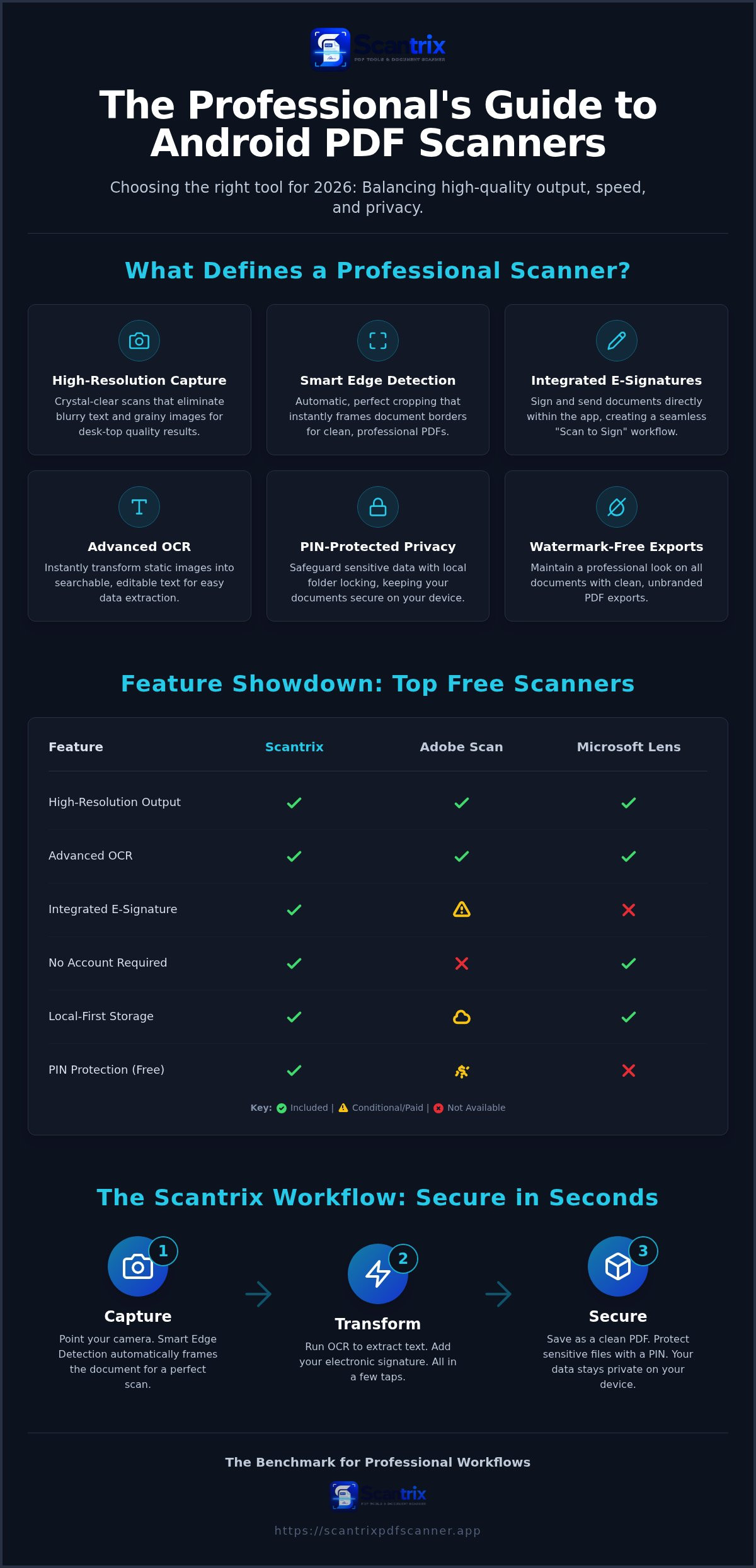
Adobe Scan delivers high-resolution results. It utilizes AI for perspective correction. The output is professional. But the requirement for an Adobe ID creates immediate friction. Cloud sync is mandatory. Microsoft Lens is reliable for Office users, though its retirement in 2026 means professionals must seek long-term alternatives. It lacks a robust folder system for high-volume organization. These apps are expert tested and reviewed for basic needs. They often miss the mark for users who value speed and local control.
Scantrix PDF Scanner targets this efficiency gap. It provides professional-grade security without the bloat. You get smart edge detection and fast processing. No account is required for core functions. No cloud sync is forced. Your documents remain private on your device. This local-first approach defines the best free pdf scanner for android for privacy-conscious users. It transforms your phone into a secure vault. Capture. Sign. Secure. The workflow is seamless.
Competitive Feature Mapping and Efficiency Ratings
OCR accuracy is the ultimate performance test. Adobe and Scantrix perform well on handwritten notes and complex receipts. Organization is equally vital. A digital filing cabinet app android should simplify retrieval, not complicate it. Scantrix includes PIN protection for specific folders. Contrast this with subscription-heavy models. Adobe Scan requires an Acrobat Pro subscription for password protection. Scantrix offers a unique ad-supported unlock for premium tools. This ensures accessibility for every user. If you have questions about specific workflows, connect with our support experts.
Scantrix PDF Scanner: The Benchmark for Professional Workflows
Scantrix PDF Scanner redefines mobile efficiency. It eliminates the friction found in legacy apps. The process is linear. Capture. Transform. Finalize. Smart Edge Detection handles document borders automatically. You get perfect alignment instantly. This precision makes it the best free pdf scanner for android for users who value professional output. No more manual cropping. No more wasted time.
The transformation stage adds intelligence to your files. Use OCR text extraction to convert static images into editable text. It's fast. It's accurate. Once processed, you can add an electronic signature directly to the scan. This "Scan to Sign" workflow saves hours of manual effort. Your Android device becomes a complete contract management center. It's a professional tool for a digital age.
Advanced Toolsets for Secure Document Management
Security is integrated, not an afterthought. You can implement PIN-protected privacy to safeguard sensitive business data. Unlike competitors who hide encryption behind expensive subscriptions, Scantrix prioritizes your privacy as a standard feature. Files remain on your device. Local organization ensures immediate access. You don't need an internet connection to retrieve critical documents. This makes it the best free pdf scanner for android for secure, offline operations.
The edit-to-scan workflow allows for rapid document adjustments. Crop. Filter. Sharpen. Every tool is accessible. This staccato rhythm keeps you moving. Scantrix acts as a silent assistant. It simplifies complex tasks into effortless steps. Professional results are now standard. Experience high-speed capture and advanced utility. Your digital office is ready.
Modernize Your Professional Scanning Workflow
Professional document management in 2026 requires more than basic image capture. It demands precision and privacy. We've explored the criteria for selecting the best free pdf scanner for android. Performance hinges on three critical pillars. Rapid capture. Intelligent transformation. Absolute security. You don't have to compromise on quality or deal with intrusive watermarks. Your mobile device is now a high-performance office tool.
Scantrix PDF Scanner delivers these essentials without the friction of mandatory cloud accounts or complex logins. You gain automatic edge detection for perfect borders every time. Use integrated e-signatures to finalize contracts on the go. Your sensitive data remains protected through secure PIN protection and local storage. It's time to eliminate the bloat of legacy apps. Download Scantrix PDF Scanner for professional Android scanning and start your digital transformation today. Efficiency is within reach.
Frequently Asked Questions
What is the best free pdf scanner for android without watermarks?
Scantrix PDF Scanner provides professional-grade, watermark-free exports for your business documents. It ensures your PDFs remain clean and unbranded for a polished appearance. This clarity defines the best free pdf scanner for android for high-stakes environments. You get automatic edge detection and noise reduction without visual interruptions. It's a streamlined tool for users who value professional output and immediate results.
Can I scan a document to PDF for free on my phone?
You can scan any document to PDF for free using your smartphone's camera and a dedicated utility app. Scantrix converts physical paper into digital files in seconds. The app handles perspective correction and color filtering automatically. This eliminates the need for bulky office hardware. You gain a portable digital office that fits in your pocket and operates with technical precision.
How do I extract text from a scanned PDF on Android?
Extracting text requires Optical Character Recognition (OCR) technology. Scantrix offers built-in OCR text extraction to identify and convert characters from scanned images into editable data. It's an efficient solution for digitizing receipts, contracts, or notes without retyping. Just capture the document and activate the transformation tool. You move from a physical state to a digital, searchable format instantly.
Is it safe to use a free PDF scanner app for sensitive documents?
Security varies by application, so prioritize tools that offer local storage and encryption. Scantrix protects sensitive documents with PIN-protected privacy layers. Files stay on your device rather than syncing to external servers. This local-first strategy makes it the best free pdf scanner for android for managing confidential data. It provides a reliable vault for your professional documentation without requiring complex account setups.


