

You're searching for a ghost. Evernote Scannable for Android doesn't exist as a standalone application. While iOS users enjoy effortless scanning, Android professionals are often left with slow, ad-heavy tools that deliver blurry results. You need speed. You need clarity. Finding a high-performance evernote scannable for android alternative is no longer a luxury; it's a productivity requirement. You deserve a tool that respects your time and your data.
We understand the frustration of failed edge detection and manual cropping. This article highlights Scantrix as the premier solution for 2026. It replaces friction with high-speed automation. You'll discover how to achieve point-and-shoot PDF creation and seamless OCR text extraction. We compare the market leaders to ensure your digital workflow remains fast, secure, and professional. Stop settling for subpar mobile scans. Start capturing document data with technical precision and absolute reliability.
Key Takeaways
- Understand the Android productivity gap. Learn why Evernote Scannable remains an iOS exclusive and how to bridge the workflow divide.
- Discover Scantrix as the high-performance evernote scannable for android alternative. Achieve zero-click capture speed without intrusive ads or lag.
- Automate your digital filing with smart edge detection. Extract document text instantly using on-device OCR for professional-grade results.
- Secure sensitive data with PIN-protected privacy folders. Sign contracts on the go using integrated, professional e-signature tools.
Why Scannable for Android Doesn’t Exist (and Why It Matters)
Evernote Scannable remains trapped in the Apple ecosystem. Despite a decade of user requests, a standalone version for the Play Store hasn't materialized. This matters because professionals require speed. They need the zero-click capture philosophy that defined the iOS experience. Without it, Android users often struggle with clunky interfaces and slow processing. Scantrix fills this void. It delivers the high-performance evernote scannable for android alternative you've been waiting for. It removes platform restrictions. It prioritizes immediate results.
Modern mobile tools rely on advanced Image Scanner Technology to transform physical paper into digital assets. Scannable succeeded by automating this transition. It focused on three specific pillars: auto-capture, smart cropping, and instant sharing. Scantrix adopts these core principles and optimizes them for the Android architecture. It doesn't just copy the features; it improves the execution for a more demanding professional audience. Point. Capture. Convert. The workflow is that simple.
The Scannable Experience on Android
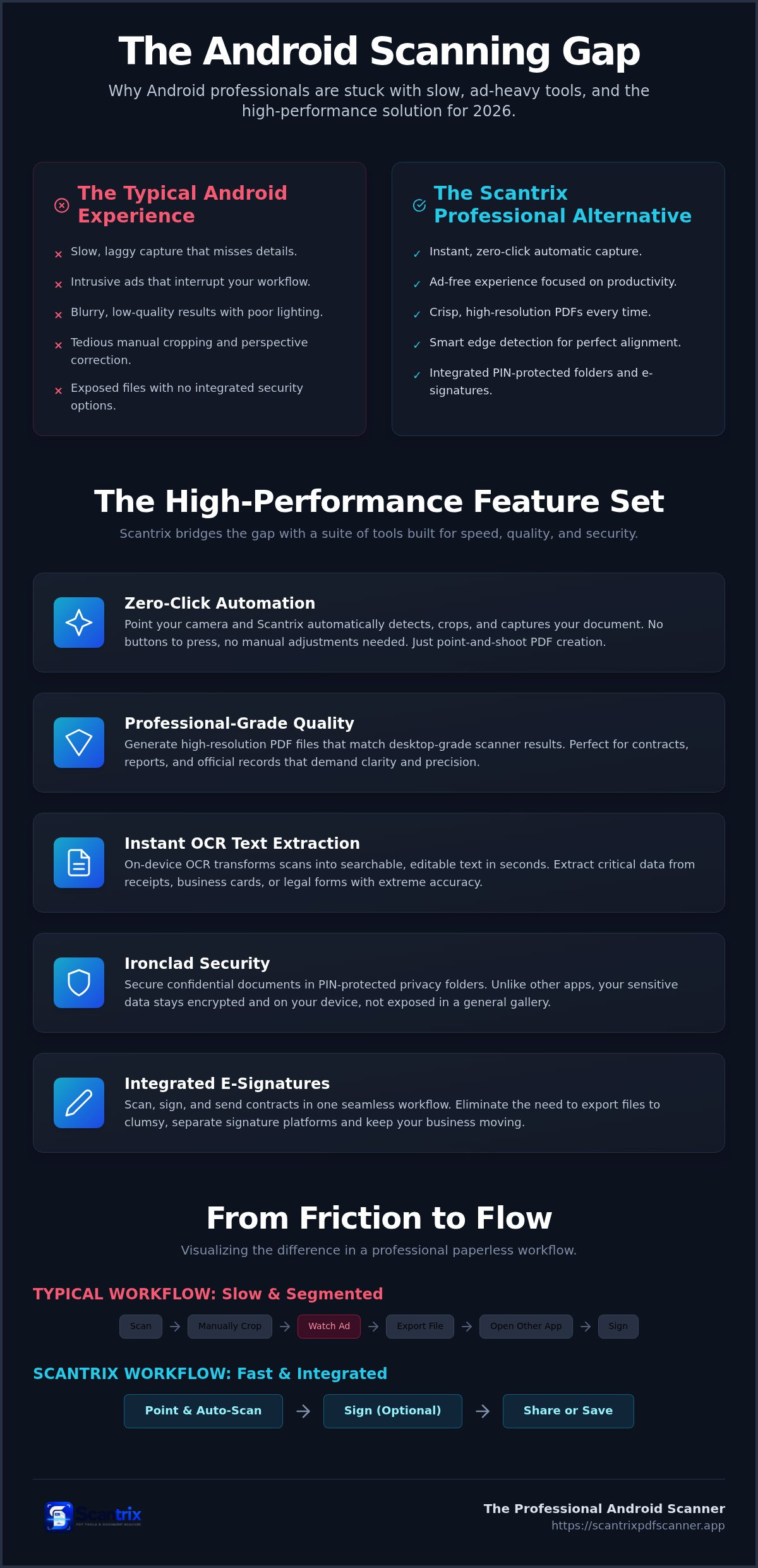
Generic camera apps fail because they lack intelligence. They don't understand document boundaries. They produce shadows and skewed perspectives. Scantrix replicates the Scannable workflow through a streamlined, utilitarian interface. It utilizes smart edge detection to ensure professional results every time. You get the same point-and-shoot speed found on iOS. No manual cropping. No blurry corners. Just crisp, high-resolution PDFs ready for distribution. It's the technical sophistication of an evernote scannable for android alternative built for the modern workforce.
Scantrix: The High-Performance Alternative for 2026
Scantrix delivers immediate results. Point. Capture. Convert. This streamlined workflow eliminates the friction associated with generic cloud storage scanners. It functions as the definitive evernote scannable for android alternative by prioritizing speed. Automatic edge detection identifies document boundaries instantly. You don't need to crop manually or adjust corners. It's a hands-free experience designed for high-stakes environments. The software handles the alignment. You focus on the content.
Professional output requires technical precision. Scantrix generates high-resolution PDF files that match desktop-grade hardware results. It handles complex textures and low-light environments with ease. Multi-page scanning allows you to digitize long reports or complex contracts in a single, continuous session. By adhering to mobile application security best practices, the app ensures your sensitive data remains encrypted and protected. It's the logical choice for business users who value both speed and integrity.
Advanced OCR and Text Extraction
Physical paper becomes digital data through integrated OCR technology. This feature transforms static images into editable text strings instantly. Extract critical data from receipts, business cards, or legal forms with extreme accuracy. OCR acts as the bridge between physical paper and searchable digital databases. It's a core component of a modern evernote scannable for android alternative. If you have questions about specific integrations, reach out to our technical team for support.
Beyond Scanning: Security and Signatures on Android
Security isn't an afterthought. It's a core requirement. Most scanning apps leave your sensitive data exposed in the general gallery. Scantrix changes this. It integrates security directly into the scan-to-save workflow. Capture confidential documents with absolute confidence. Use PIN-protected privacy folders to lock down your most important files. This integrated approach makes Scantrix a superior evernote scannable for android alternative. It eliminates the need for clumsy third-party PDF lockers. Your data stays on your device, under your control. It's professional-grade protection for the modern mobile workforce.
Speed meets legality with our integrated tools. You can add professional electronic signatures to scanned contracts instantly. Don't waste time exporting files to separate signature platforms. Scan the document. Apply your signature. Send the final PDF. It's a seamless cycle that keeps your business moving. This all-in-one functionality defines the high-performance experience on Android. It turns your smartphone into a complete, secure mobile office. No friction. No delays. Just results.
The Professional Paperless Workflow
Organization drives long-term efficiency. You can transform your mobile device into a digital filing cabinet for rapid document retrieval. Sync your organized scans to preferred cloud storage providers for cross-device accessibility. This ensures your files are available wherever you work. Ready to optimize your productivity? Download Scantrix PDF Scanner to start your paperless journey today. Experience the speed, security, and simplicity of the ultimate evernote scannable for android alternative. Digital transformation starts here.
Elevate Your Android Productivity Today
Stop waiting for an iOS-exclusive tool to bridge the gap. You need a solution that works on your hardware right now. Scantrix delivers the speed and technical intelligence you've been missing. It functions as the premier evernote scannable for android alternative by combining technical precision with a minimalist, ad-free design. You get Automatic Edge Detection for perfect document alignment. You gain Secure PIN Protection for sensitive files. You utilize Professional OCR Extraction to turn physical paper into actionable digital data instantly.
These tools aren't just features; they're your new standard for professional efficiency. Transition from physical to digital states with absolute confidence. No more blurry scans. No more security gaps. Just high-performance results that respect your time and your data. Download Scantrix PDF Scanner for Android to transform your mobile office. Your paperless future is ready. Capture it now.
Frequently Asked Questions
Is there an official Evernote Scannable app for Android?
No official standalone Evernote Scannable app exists for the Android platform. Evernote maintains this specific tool as an iOS exclusive. While the primary Evernote Android application includes a basic camera scanner, it lacks the specialized speed and automation of the standalone version. Professionals searching for a dedicated evernote scannable for android alternative should utilize Scantrix to achieve an equivalent high-speed experience.
What is the best free alternative to Scannable on the Play Store?
Scantrix is the premier free alternative available on the Google Play Store. It replicates the minimalist, high-speed workflow that defines the Scannable experience. The app provides essential professional tools like smart edge detection and high-resolution PDF output for free. It's a utilitarian tool that prioritizes user time and document clarity, making it the most efficient evernote scannable for android alternative for mobile workers.
Can Scantrix extract text from scanned documents like Scannable?
Yes. Scantrix features integrated OCR text extraction to transform physical images into editable digital data. This on-device technology processes documents locally to ensure maximum speed and privacy. You can extract text from receipts, contracts, or business cards in seconds. This capability allows you to copy, edit, or share document content directly from your smartphone without needing separate desktop software or manual transcription.
Is scanning documents on Android secure for legal files?
Security depends on the specific application's architecture. Scantrix ensures legal-grade security through PIN-protected privacy folders and local on-device processing. Your sensitive documents aren't stored in the public photo gallery where other apps can access them. By integrating encryption and access controls directly into the scanning workflow, Scantrix provides a reliable environment for managing confidential contracts, tax records, and sensitive legal paperwork safely.


