

Your smartphone isn't just a phone. It's a high-performance document architect waiting for the right command. Most professionals still struggle with blurry edges, file size limits, and the constant threat of data breaches. You need more than a basic camera tool. You need a dedicated scan to email android app that handles the heavy lifting for your professional workflow. We know the frustration of unprofessional results and the risks involved in sending sensitive data over open networks. This guide reveals how to transform your Android device into a high-speed document hub. You'll learn to capture clean, cropped PDFs and secure them with PIN-protected privacy. We will break down the essential 2026 document delivery loop: capture, edit, protect, and deliver. Expect immediate action. Expect professional-grade output. Your mobile office starts here.
Key Takeaways
- Replace amateur photos with professional PDFs. Streamline your workflow by eliminating multi-step gallery-to-email friction.
- Evaluate critical features like OCR accuracy and multi-page support. Select the right scan to email android app for searchable, high-resolution document delivery.
- Deploy smart edge detection for perfect captures. Secure sensitive data instantly using PIN-protected privacy and integrated e-signature tools.
- Execute a complete 30-second document cycle. Move from physical capture to professional email delivery without leaving a single interface.
Why Your Business Needs a Dedicated Scan to Email Android App
Standard smartphone photos look amateur. They lack authority and precision. A dedicated scan to email android app signals technical competence to your clients. It transforms raw pixels into structured, professional data. You stop sending images with shadows and skewed corners. You start sending clean, high-resolution PDFs. This transition moves your workflow from casual capture to professional delivery instantly.
Efficiency defines your daily output. Direct email integration eliminates unnecessary friction. The traditional "Gallery-to-Email" multi-step loop is slow and disorganized. It forces you to toggle between apps, search for files, and manage attachments manually. A high-performance scan to email android app like Scantrix streamlines this entire sequence. Capture the document. Finalize the file. Send the email. You complete the task in one interface without leaving the application. Speed wins.
Compliance is a critical 2026 requirement. The global mobile scanner app market reached $1.05 billion this year because data security is paramount. Secure capture ensures sensitive information stays within a controlled app environment. Files don't linger in public photo streams or unprotected folders. Use PIN-protected privacy to lock down your digital assets. Review our guide on how to store sensitive documents on your phone to maintain strict document hygiene.
Moving Beyond Basic Smartphone Photos
Perspective correction and smart cropping are non-negotiable for modern business. Traditional cameras capture light; professional software reconstructs data. Understanding how image scanners work reveals the difference between a simple photo and a digital document. Automatic edge detection creates clean, uniform borders by identifying the document perimeter against any background. It removes distractions and flattens the output for a desktop-quality finish.
- Correct Perspective: Fixes angles for a flat, readable view.
- Smart Cropping: Removes messy desk backgrounds automatically.
- Auto-Enhancement: Sharpens text for maximum OCR accuracy.
This systematic approach ensures every delivery meets professional standards. It's fast. It's reliable. It works every time.
Critical Features to Evaluate in a Mobile Scanner
Functionality dictates results. Selecting the right scan to email android app requires strict technical benchmarks. OCR accuracy is the baseline. AI-driven Optical Character Recognition improved accuracy by 45% in 2026. This ensures PDF attachments are searchable and text-extractable. Don't settle for static images. Transform physical ink into digital intelligence instantly.
Efficiency demands multi-page support. Scanning long contracts one page at a time kills productivity. Your utility must merge multiple captures into one organized file. Security is the final pillar. Privacy concerns impact 41% of users today. Local protection is mandatory. Use PIN-protected privacy to lock files before delivery. Adhering to mobile app security best practices keeps sensitive data safe from unauthorized access. If you need custom security configurations, contact our support specialists for assistance.
The Professional Requirement: No Watermarks
Watermarks destroy brand credibility. In legal and financial sectors, "Scanned with Free App" labels look amateur. They signal a lack of professional investment. Scantrix provides clean, high-resolution exports with no intrusive branding. This maintains a polished image for every delivery. Beyond visual clarity, prioritize data integrity. You should encrypt documents on smartphone as a standard business practice. Clean files. Secure delivery. Zero friction.
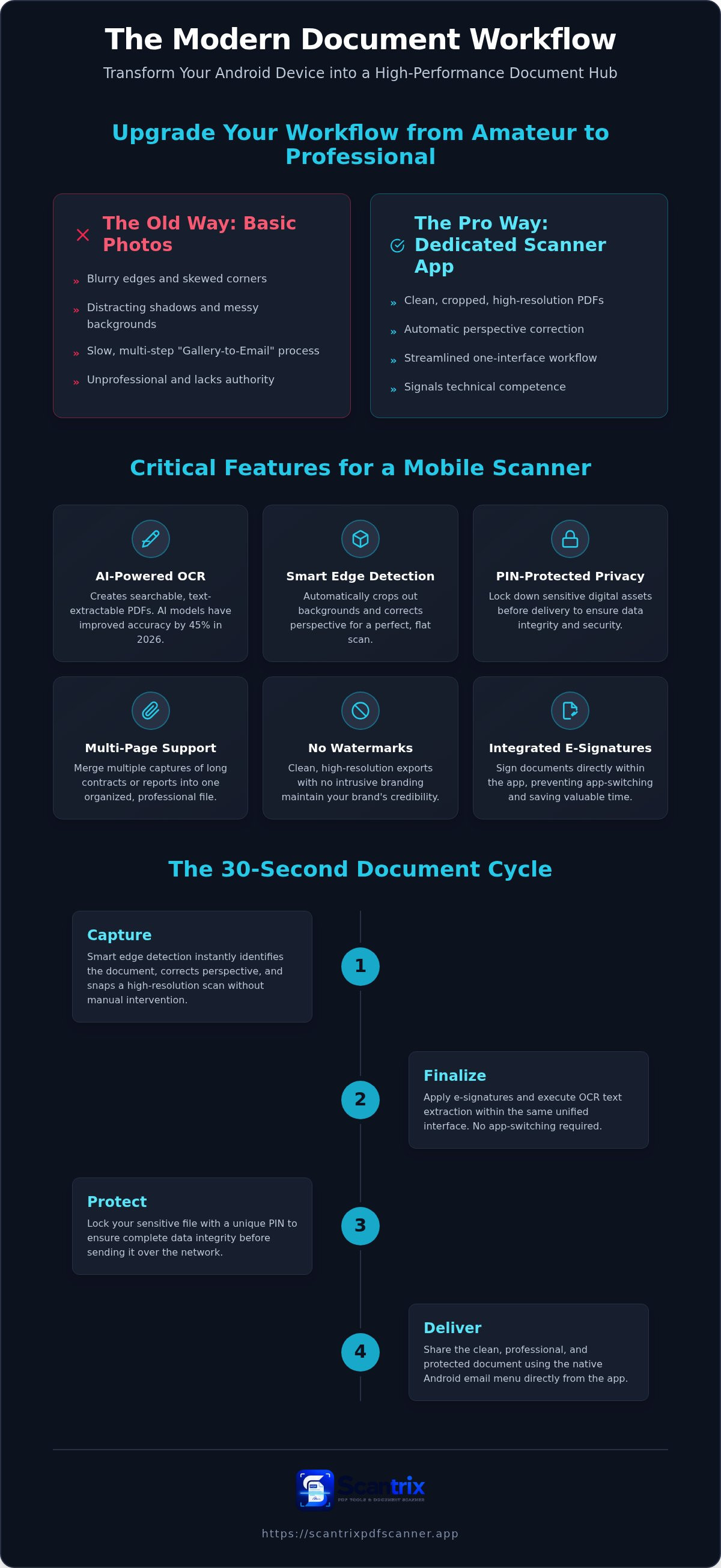
The Scantrix Workflow: Capture to Email in 30 Seconds
Speed defines the modern professional. A high-performance scan to email android app must deliver results in seconds. The Scantrix workflow optimizes every stage of document delivery. It moves from physical paper to a secure digital inbox with surgical precision. No wasted motion. No technical friction.
The process begins with capture. Position your document. Smart edge detection identifies the perimeter instantly. It corrects the perspective and snaps a high-resolution image without manual intervention. Next, finalize the file. Apply e-signatures and execute OCR text extraction within the same interface. This unified approach prevents app-switching and preserves your focus.
Secure and send. Most guides stop at the scan. We focus on the delivery phase. Lock your sensitive file with a PIN to ensure data integrity. Share the document using the native Android email menu. Using a dedicated scan to email android app ensures your file arrives clean, professional, and protected. It's a complete end-to-end solution for a mobile-first world.
Maximizing Efficiency with E-Signatures and OCR
Integration drives productivity. You can sign PDF documents on phone before hitting send. This eliminates the need for printers or desktop software. Use OCR to extract text for quick copy-pasting into your email body. This provides immediate context for the recipient without requiring them to open the attachment first. It's efficient. It's smart.
Scale your operations today. For specialized requirements or fleet deployments, contact our team for enterprise-grade mobile scanning needs. We provide the tools you need for high-speed document delivery.
Master Your Digital Document Delivery
Professional document handling is a baseline requirement for 2026 business operations. You've seen how smart automatic edge detection eliminates amateur results. Integrated e-signature tools shorten approval cycles. Local PIN-protected privacy ensures data integrity during transit. Selecting a high-performance scan to email android app isn't just about convenience. It's about building a secure, high-speed document hub that works as hard as you do. Stop struggling with fragmented tools and blurry images. Move to a systematic workflow that delivers clean, professional PDFs in seconds. Your mobile office is ready for an upgrade. You can achieve technical excellence starting today. Secure your mobile workflow; Contact Scantrix today to take full control of your digital output. Efficiency starts now. Professional results await.
Frequently Asked Questions
How do I scan a document and email it as a PDF on Android?
Open a professional scanner utility like Scantrix. Position your document under the camera. Smart edge detection identifies the perimeter and snaps the image automatically. The app converts the capture into a high-resolution PDF. Tap the share icon. Select your native email client. This scan to email android app method eliminates manual cropping and gallery clutter. It ensures professional delivery in one unified interface.
Is there a free scan to email app without watermarks?
Yes, you can find professional utilities that deliver clean exports without intrusive branding. Most basic apps apply watermarks that damage your credibility in legal or financial sectors. Scantrix provides a professional, ad-free experience. It delivers high-resolution PDFs without amateur labels. Maintain technical competence. Deliver polished files. This scan to email android app is the preferred choice for professionals who prioritize high-performance results.
Can I password protect a PDF before emailing it from my phone?
Yes, you can secure sensitive files before delivery using local security features. Scantrix offers PIN-protected privacy to lock documents before they leave your device. Select the file. Apply the security layer. This ensures data integrity during transit. It is a critical step for 2026 data compliance and general document hygiene. Protect your digital assets before hitting send. It is fast and reliable.
What is the best way to scan multiple pages into one email?
The most efficient method is using the multi-page support feature within your scanner utility. Capture the first page. Continue snapping subsequent pages in sequence. The software automatically merges these captures into a single, organized PDF file. This prevents sending multiple, fragmented attachments. It is the best way to handle long contracts or receipt reports. One file. One email. Total organization.


