

A high-resolution camera doesn't guarantee a professional document. Most mobile scans fail due to poor processing, not hardware. If you need to know how to get clear scans on android, you must look beyond the lens. You've likely faced blurry text, warped corners, and manual cropping fatigue. It's frustrating. You need digital assets, not messy snapshots.
This 2026 guide reveals the streamlined workflow for desk-quality results. We'll show you how to transform distorted photos into crystal-clear, searchable PDFs. Using Scantrix PDF Scanner, you can automate precision. We'll cover environment optimization, automatic edge detection, and integrated OCR technology. Stop settling for illegible files. Master the transition from physical paper to secure, high-performance digital organization now.
Key Takeaways
- Optimize scanning environments with high-contrast surfaces and natural light to eliminate blurry text and distortion.
- Master how to get clear scans on android by using Scantrix PDF Scanner for automated edge detection and precision cropping.
- Convert static images into searchable data with OCR technology for efficient document retrieval and organization.
- Secure confidential files with PIN-protected privacy and execute professional contracts instantly using integrated e-signature tools.
Mastering the Lens: Tactics for High-Resolution Document Capture
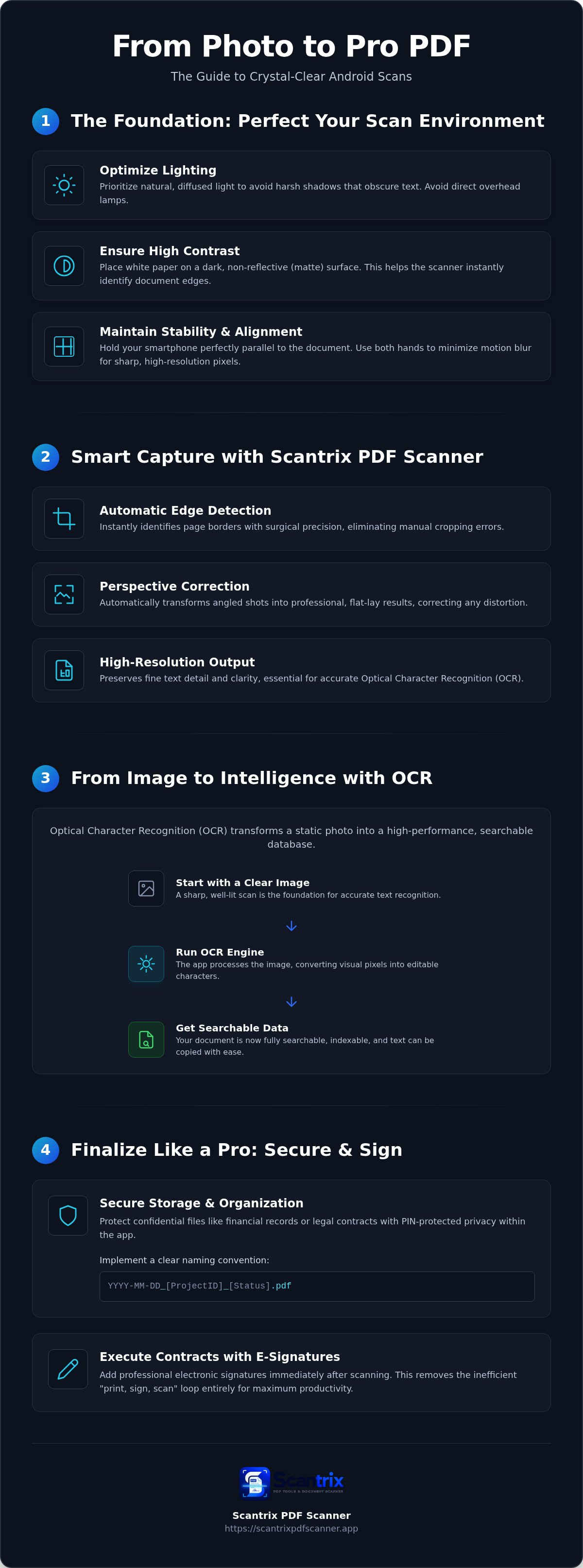
Professional document capture starts with environment control. High-quality hardware is useless in poor conditions. Lighting is your primary variable. Prioritize natural, diffused light whenever possible. Avoid direct overhead lamps. These create harsh shadows that obscure text layers. If you are learning how to get clear scans on android, start with your desk setup. Place white paper on a dark, matte surface. This high-contrast pairing ensures the scanner identifies the document edges immediately. It prevents the software from confusing the page with the background.
Stability determines final legibility. Hold your smartphone parallel to the document. Do not tilt the device. Even slight angles cause perspective distortion. This makes text appear warped or compressed. Keep your hands steady. Use both hands if necessary to minimize motion blur. A still camera produces sharp, high-resolution pixels. These pixels are the foundation for professional-grade digital assets. You are building a reliable digital archive, not just taking a picture.
Leveraging Automatic Edge Detection for Sharp Results
Software intelligence bridges the gap between a photo and a document. Enable automatic edge detection within Scantrix PDF Scanner. This feature removes manual cropping errors instantly. It identifies page borders with surgical precision. Use high-resolution output settings to preserve fine text detail. This is essential for accurate Optical Character Recognition (OCR) later in the workflow. The app handles perspective correction automatically. It transforms angled shots into professional, flat-lay results. You achieve desk-quality output with a single tap. It's a fast, efficient path to clarity.
Beyond the Image: Using OCR for Searchable Clarity
Capturing a sharp image is only the beginning. A static photo lacks utility. It's unsearchable. It's locked. You need interactive data. Execute OCR to unlock text layers. This process transforms visual pixels into editable characters. It's the standard for professional document management. If you want to master how to get clear scans on android, you must prioritize text legibility. Sharp images lead to perfect extraction. Clear files ensure every word is indexed correctly.
Refine your document layouts post-capture. Use the mobile editor. Adjust brightness. Boost contrast. These small tweaks sharpen letterforms for the OCR engine. Verify text accuracy immediately. High-contrast files ensure searchable indexing for your digital filing cabinet. You save time. You eliminate manual sorting. Your archive becomes a high-performance database. It's about transition. Physical clutter becomes organized digital intelligence.
Extracting Text with Professional Precision
Manual data entry is inefficient. It's prone to error. Speed up your workflow. Learn how to copy text from a scanned document on Android to bypass tedious typing. Export OCR results to text or PDF formats. Share them across professional platforms instantly. Scantrix PDF Scanner ensures high-fidelity extraction. It handles complex layouts with ease. Tables remain intact. Columns stay aligned. This technical sophistication defines professional-grade output. It values your time. For specific workflow questions, reach out to our support team for expert guidance. We help you maintain a seamless digital state.
Finalizing the Workflow: Secure Storage and E-Signatures
Clarity is useless without security. Your workflow must protect sensitive data. Implement PIN-protected privacy to lock confidential folders within the app. This is critical for financial records or legal contracts. Establish a clear naming convention immediately for instant retrieval across all synced devices. A systematic approach includes:
- Standardized date formats (YYYY-MM-DD)
- Specific project or client identifiers
- Status markers like "Final" or "Draft"
This organization completes the transformation from physical clutter to digital intelligence. You've learned how to get clear scans on android using smart lighting and alignment. Now you must manage that output with professional-grade discipline. Your digital vault should be as organized as a physical filing cabinet.
Finalizing Contracts with Integrated E-Signatures
Mobile efficiency requires immediate action. Execute contracts on the spot. Add professional electronic signatures immediately after scanning. This removes the "print, sign, scan" loop entirely. Follow our guide to sign PDF documents on your phone for instant approvals. This tool integrates directly with your captured documents. It maintains the high-resolution quality established in previous steps. It's a unified edit-to-scan workflow designed for maximum productivity.
Secure your archive with technical sophistication. Basic cloud storage often lacks on-device encryption. Use an app to lock PDF files on Android to prevent unauthorized access to sensitive folders. Scantrix PDF Scanner provides these high-performance security features natively. It acts as a silent, reliable assistant for your professional document management. Your documents remain private. Your digital vault stays organized. The result is a seamless, secure transition from paper to PDF.
Master Your Digital Document Transition
Professional-grade scanning is a systematic process. It starts with environment control and ends with secure organization. You have learned how to get clear scans on android by prioritizing high-contrast backgrounds and stable, parallel alignment. These simple tactics eliminate blurry text and perspective distortion. Transition from static photos to interactive data with OCR technology. This converts physical clutter into a high-performance digital archive. It's about speed and precision. Every scan counts.
Efficiency requires the right tools. Scantrix PDF Scanner provides a unified workflow. It features automatic edge detection, unlimited OCR extraction, and a PIN-protected document vault. These capabilities ensure your files remain sharp, searchable, and secure. Stop settling for illegible mobile snapshots. Contact our team for professional scanning solutions to upgrade your productivity. Your paperless office is ready for implementation. Begin your transformation now.
Frequently Asked Questions
How can I get a clear scan on Android without a physical scanner?
Use a dedicated utility like Scantrix PDF Scanner to replace traditional hardware. Position your document on a high-contrast surface under bright, indirect light. Hold the smartphone steady and parallel to the page. The app utilizes smart edge detection to identify borders and correct perspectives instantly. This workflow transforms a standard mobile photo into a desk-quality digital document.
Why are my phone scans blurry and how do I fix them?
Blurry scans usually stem from insufficient lighting or accidental movement. To fix this, stabilize your device with both hands and clean your camera lens. Dirty glass distorts pixels. If you need to know how to get clear scans on android, prioritize high-resolution settings and avoid using digital zoom. These steps ensure every pixel remains sharp for professional document management.
Is there a free Android scanner app that offers OCR and no watermarks?
Most basic apps limit functionality or add branding to your files. Scantrix PDF Scanner offers a professional, watermark-free experience designed for high-performance users. It provides integrated OCR technology and PIN-protected privacy features. While native tools like Google Drive handle simple tasks, they often lack the technical sophistication needed for complex layouts and secure, professional-grade document storage and management.
How do I convert a paper document to a searchable PDF on my phone?
Capture the paper document using an app equipped with OCR text extraction. Scantrix PDF Scanner unlocks the text layer during the scanning process automatically. Save the final file as a PDF to ensure it is fully indexed. This allows you to search for specific terms within the document later. It's a critical step for maintaining a streamlined and organized digital archive.


